Unlock a world of possibilities! Login now and discover the exclusive benefits awaiting you.

- Qlik Community
- :
- All Forums
- :
- QlikView
- :
- Compare two files
- Subscribe to RSS Feed
- Mark Topic as New
- Mark Topic as Read
- Float this Topic for Current User
- Bookmark
- Subscribe
- Mute
- Printer Friendly Page

 spividori
- Mark as New
- Bookmark
- Subscribe
- Mute
- Subscribe to RSS Feed
- Permalink
- Report Inappropriate Content
Compare two files
Hi.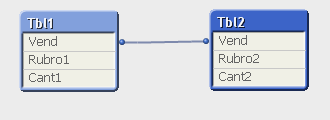
I have this model and I need to compare the amounts of object 1 vs Rubro2 when they are equal.
This is a small example of my model, I could establish a link between Vend and heading, but in my original model more complex and need to do it this way.
Regards.

 alexandros17
- Mark as New
- Bookmark
- Subscribe
- Mute
- Subscribe to RSS Feed
- Permalink
- Report Inappropriate Content
Ecco il miol esempio, guarda "MY TABLE"

 its_anandrjs
- Mark as New
- Bookmark
- Subscribe
- Mute
- Subscribe to RSS Feed
- Permalink
- Report Inappropriate Content
Is there any problem if you take this table in single table like with join of left join for comparing the fields.
 jonathandienst
- Mark as New
- Bookmark
- Subscribe
- Mute
- Subscribe to RSS Feed
- Permalink
- Report Inappropriate Content
Hi
When I need to do this type of comparison, I concatenate the sets into a single fact table with a source field to indicate the original data source. It is then very easy to compare. So the load would be like:
Data:
LOAD *,
'Tbl1' As Source
FROM Tbl1;
Concatenate
LOAD *,
'Tbl2' As Source
FROM Tbl2;
Then to compare, create a straight or pivot table with Vend as the dimension and for the expressions (to compare field Rubro):
Tbl1 =Sum({<Source = {'Tbl1'}>} Rubro)
Tbl2 =Sum({<Source = {'Tbl2'}>} Rubro)
Diff =Column(1) - Column(2)
HTH
Jonathan
spividori
- Mark as New
- Bookmark
- Subscribe
- Mute
- Subscribe to RSS Feed
- Permalink
- Report Inappropriate Content
Thanks for responding, but would not it be done with Set Analysis directly?
Regards.
