Unlock a world of possibilities! Login now and discover the exclusive benefits awaiting you.

- Qlik Community
- :
- All Forums
- :
- QlikView
- :
- Comparing two column values
- Subscribe to RSS Feed
- Mark Topic as New
- Mark Topic as Read
- Float this Topic for Current User
- Bookmark
- Subscribe
- Mute
- Printer Friendly Page

- Mark as New
- Bookmark
- Subscribe
- Mute
- Subscribe to RSS Feed
- Permalink
- Report Inappropriate Content
Comparing two column values
Hi All,
I have to compare the values present in two columns. But the columns are located in different tables. e.g. I have to compare values of Column A with the values of Column B. Column A is present in Table A whereas Column B is present in table B. How do I compare them in the script?
- Tags:
- qlikview_scripting

 robert_mika
- Mark as New
- Bookmark
- Subscribe
- Mute
- Subscribe to RSS Feed
- Permalink
- Report Inappropriate Content
Do you have only one field per table?
Do they have any common column?
What's is expected result?
Yes/NO or values that exist in one column only?
- Mark as New
- Bookmark
- Subscribe
- Mute
- Subscribe to RSS Feed
- Permalink
- Report Inappropriate Content
Both the tables have multiple columns.
They have a common column.
The expected output should be Yes/No based on the match found.
- Mark as New
- Bookmark
- Subscribe
- Mute
- Subscribe to RSS Feed
- Permalink
- Report Inappropriate Content
I think you should use exists() function if you want to do this in the script.
robert_mika
- Mark as New
- Bookmark
- Subscribe
- Mute
- Subscribe to RSS Feed
- Permalink
- Report Inappropriate Content
Could you post sample of data?

 Gabriel
- Mark as New
- Bookmark
- Subscribe
- Mute
- Subscribe to RSS Feed
- Permalink
- Report Inappropriate Content
Hi,
I think you can bring both field into a temp table, from there you can then use IF statement to check field value and create a YES/NO field. Finally left join or ApplyMap the new field back to any of the tables.
robert_mika
- Mark as New
- Bookmark
- Subscribe
- Mute
- Subscribe to RSS Feed
- Permalink
- Report Inappropriate Content
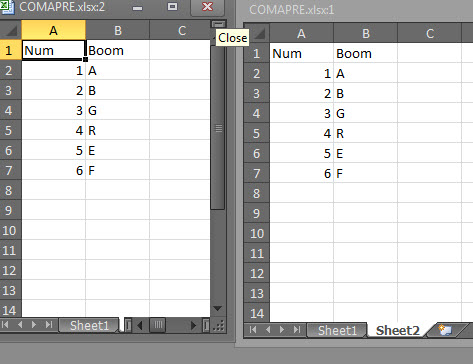
T1:
LOAD Num AS Num,
Boom as Boom1
FROM
COMAPRE.xlsx
(ooxml, embedded labels, table is Sheet1);
temp:
LOAD Num as Num,
lookup('Boom1','Num',Num,'T1') as Boom1,
Boom as Boom2
FROM
COMAPRE.xlsx
(ooxml, embedded labels, table is Sheet2);
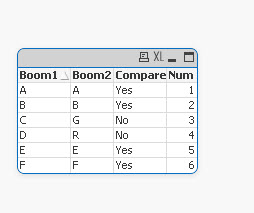
final:
load Num,
Boom1,
Boom2,
If(Boom1=Boom2,'Yes','No') as Compare
Resident temp;
drop table T1,temp

 beck_bakytbek
- Mark as New
- Bookmark
- Subscribe
- Mute
- Subscribe to RSS Feed
- Permalink
- Report Inappropriate Content
Cool Stuff, very useful and powerful
Thanks a lot
Beck