Unlock a world of possibilities! Login now and discover the exclusive benefits awaiting you.

- Qlik Community
- :
- All Forums
- :
- QlikView
- :
- Re: Consolidate multiple fields into one
- Subscribe to RSS Feed
- Mark Topic as New
- Mark Topic as Read
- Float this Topic for Current User
- Bookmark
- Subscribe
- Mute
- Printer Friendly Page

- Mark as New
- Bookmark
- Subscribe
- Mute
- Subscribe to RSS Feed
- Permalink
- Report Inappropriate Content
Consolidate multiple fields into one
I have this issue and any help is much appreciated! I am trying to manipulate a access database to be able to show results and production by hour on one chart. Right now I have it on seperate tabs by hour and the totals are just calculated.
I have a table that looks like this from Access, this goes on for 10 hours.
| Line | Shift | Date | Hr1 | Hr1_Goal | Hr1_ Prod | Hr2 | Hr_2Goal | etc | etc | etc | etc |
|---|---|---|---|---|---|---|---|---|---|---|---|
I am trying to manipulate this in qlikview so that the data pull in this format, where each hour is marked as a 1-10, which means each hour would have its own line.
| Line | Shift | Date | Hour | Prod | Goal |
|---|---|---|---|---|---|
How can I achieve this?

 MarcoWedel
- Mark as New
- Bookmark
- Subscribe
- Mute
- Subscribe to RSS Feed
- Permalink
- Report Inappropriate Content
Hi,
you could use a crosstable load to achieve this.
Can you provide some test data to demonstrate?
thanks
regards
Marco
- Mark as New
- Bookmark
- Subscribe
- Mute
- Subscribe to RSS Feed
- Permalink
- Report Inappropriate Content
Of course, Marco!
The attachment has the format by which I am pulling the data. I also attached the excel sheet with the way the data looks.
MarcoWedel
- Mark as New
- Bookmark
- Subscribe
- Mute
- Subscribe to RSS Feed
- Permalink
- Report Inappropriate Content
Hi,
one solution could be:
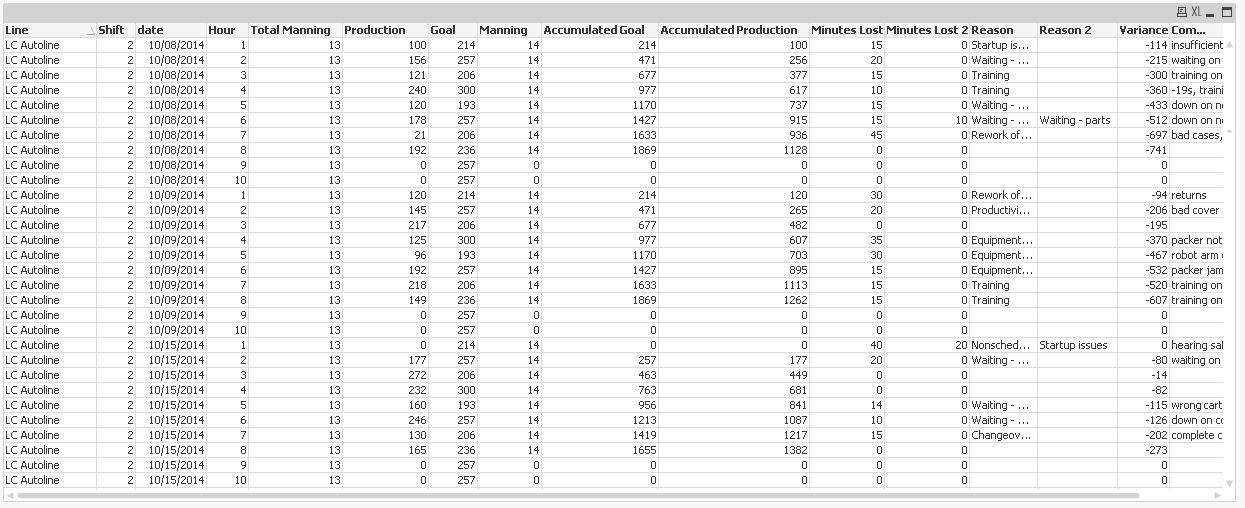
tabInput:
CrossTable (FieldName, FieldValue, 5)
LOAD RecNo() as %ID,
    *
FROM [TAble sample.xlsx] (ooxml, embedded labels, table is Sheet1);

Left Join (tabInput)
LOAD Distinct
  FieldName,
  If(SubStringCount(FieldName,' ')>1,Mid(FieldName,Index(FieldName,' ',2)+1),SubField(FieldName,' ',1)) as FieldNameNew,
  SubField(FieldName, ' ', 2) as Hour
Resident tabInput;

Left Join (tabInput)
LOAD Distinct
  Date,
  Date(Date) as date
Resident tabInput;

tabOutput:
LOAD Distinct
  %ID,
  Line,
  Shift,
  date,
  Manning as [Total Manning]
Resident tabInput;

Generic LOAD
  %ID,
  Hour,
  FieldNameNew,
  FieldValue
Resident tabInput
Where FieldNameNew <> 'Hour';

DROP Table tabInput;
hope this helps
regards
Marco
MarcoWedel
- Mark as New
- Bookmark
- Subscribe
- Mute
- Subscribe to RSS Feed
- Permalink
- Report Inappropriate Content
Just in case you're getting different results when loading your xls, there's been a typo in your column header
"Hour 4 Production" 
regards
Marco
- Mark as New
- Bookmark
- Subscribe
- Mute
- Subscribe to RSS Feed
- Permalink
- Report Inappropriate Content
Hi Marco,
That did not appear to work. I think it is because the excel is slightly different. I have attached the query I used and the results.

 bansefi01
- Mark as New
- Bookmark
- Subscribe
- Mute
- Subscribe to RSS Feed
- Permalink
- Report Inappropriate Content
Thank you Marco, is it possible to perform this action in QlikSense ? could you share it pleas ?
thanks again
Fernando
MarcoWedel
- Mark as New
- Bookmark
- Subscribe
- Mute
- Subscribe to RSS Feed
- Permalink
- Report Inappropriate Content
Hi,
an implementation in Sense might use the same script as the previous Qlik solution besides changing the source:
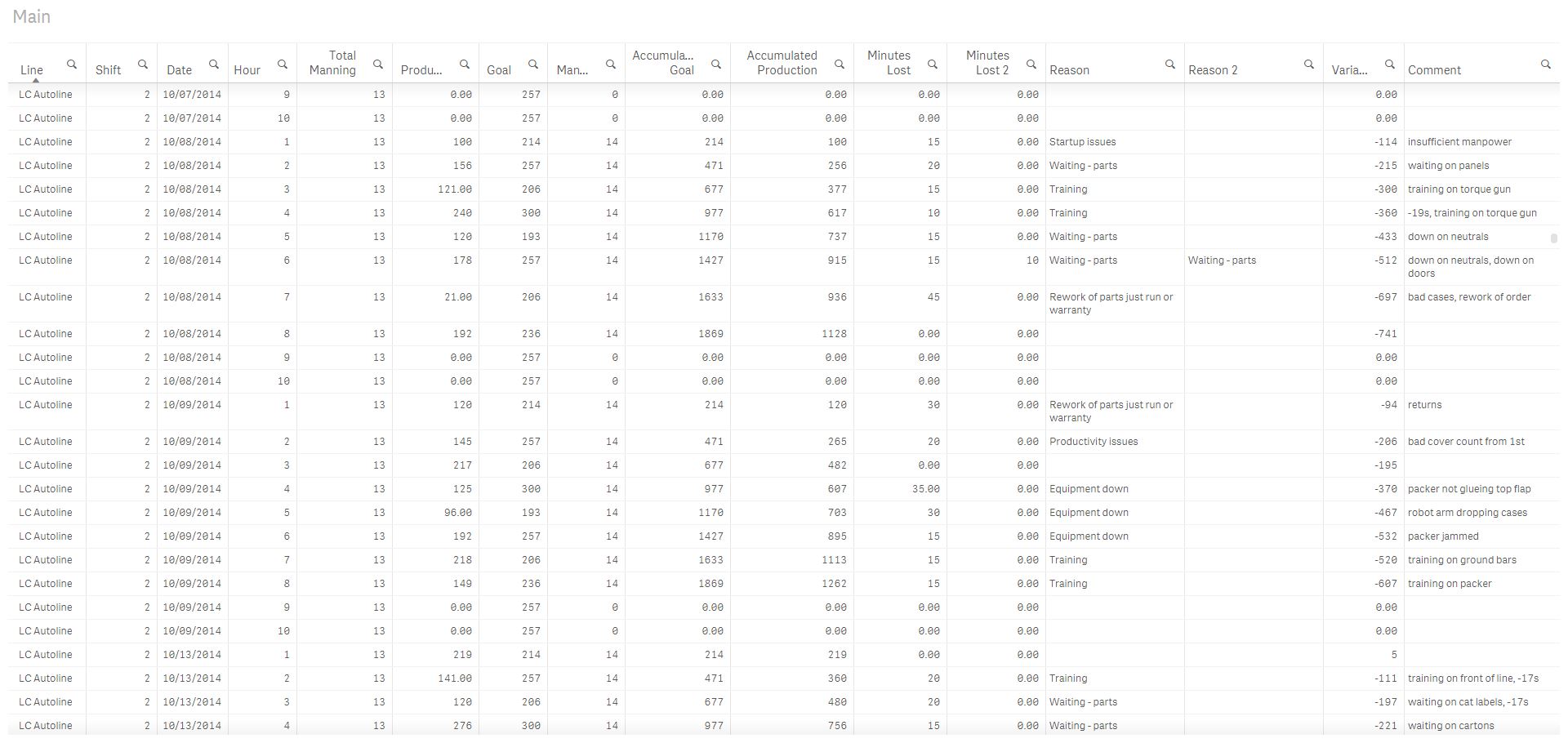
tabInput:
CrossTable (FieldName, FieldValue, 5)
Load RecNo() as %ID, *
From [lib://TableSample] (ooxml, embedded labels, table is Sheet1);

table1:
Load Distinct
%ID,
Line,
Shift,
Date,
Manning as [Total Manning]
Resident tabInput;

table2:
Generic
Load * Where FieldNameNew <> 'Hour';
Load %ID,
SubField(FieldName, ' ', 2) as Hour,
If(SubStringCount(FieldName,' ')>1,Mid(FieldName,Index(FieldName,' ',2)+1),SubField(FieldName,' ',1)) as FieldNameNew,
FieldValue
Resident tabInput;

FOR i = NoOfTables()-1 to 0 STEP -1
  LET vTable=TableName($(i));
  IF WildMatch('$(vTable)', 'table2.*') THEN
   JOIN (table1) LOAD * RESIDENT [$(vTable)];
  DROP TABLE [$(vTable)];
  ENDIF
NEXT i

DROP Table tabInput;
(some script changes not related to Sense implementation)
hope this helps
regards
Marco