Unlock a world of possibilities! Login now and discover the exclusive benefits awaiting you.

- Qlik Community
- :
- All Forums
- :
- QlikView
- :
- Controls' position/sizes changes on AccessPoint
- Subscribe to RSS Feed
- Mark Topic as New
- Mark Topic as Read
- Float this Topic for Current User
- Bookmark
- Subscribe
- Mute
- Printer Friendly Page

 vlad_komarov
- Mark as New
- Bookmark
- Subscribe
- Mute
- Subscribe to RSS Feed
- Permalink
- Report Inappropriate Content
Controls' position/sizes changes on AccessPoint
Noticed an issue with list boxes positions'/sizes' shifting on AccessPoint (AJAX).
I have multiple List boxes on a page and they are perfectly aligned on Dev Environment:
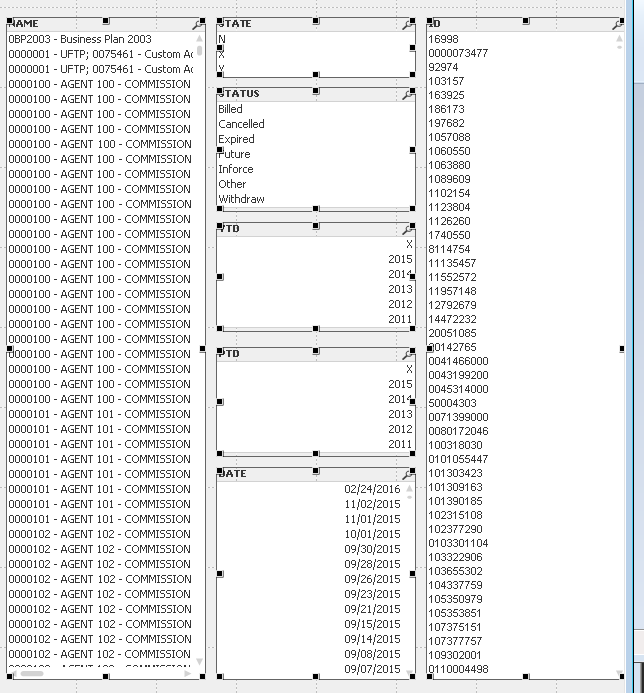
Published document looks slightly different:
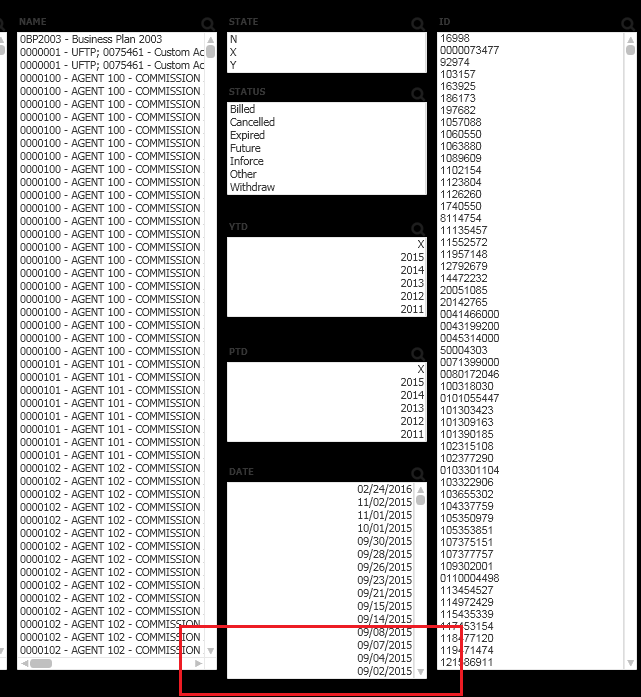
It only happens with multiple (3+) list boxes in a "column". With 1-2 list boxes in a "column" all controls seems to be perfectly aligned.
I understand that there is some difference in individual controls' displaying between desktop and AccessPoint. And it's probably accumulated with 3+ controls in the "column". But is there any solution for that?
Anything I can do except adjusting items in each "column" individually and hoping it will work fine on any current and future versions on AJAX and supported browsers...
I will really appreciate some suggestions.
Happy Friday!
Regards,
Vladimir

 marcus_sommer
- Mark as New
- Bookmark
- Subscribe
- Mute
- Subscribe to RSS Feed
- Permalink
- Report Inappropriate Content
The rendering between desktop and access point is in general different and I think you would need a lot of efforts to manipulate the html/css from access point or using from document extensions. I believe a solution would be only possible if you could choose your preferred rendering-engine within the qv webview-mode to reach WYSIWYG.
My solution is to change the view within the fat-client worse but that it fitted within the access point.
- Marcus
vlad_komarov
- Mark as New
- Bookmark
- Subscribe
- Mute
- Subscribe to RSS Feed
- Permalink
- Report Inappropriate Content
Thank you, Markus.
Looks like I have to live with this limitation.
Regards,
Vladimir
