Unlock a world of possibilities! Login now and discover the exclusive benefits awaiting you.

- Qlik Community
- :
- All Forums
- :
- QlikView
- :
- Convert seconds into hh:mm:ss format
- Subscribe to RSS Feed
- Mark Topic as New
- Mark Topic as Read
- Float this Topic for Current User
- Bookmark
- Subscribe
- Mute
- Printer Friendly Page

 bindu_apte
- Mark as New
- Bookmark
- Subscribe
- Mute
- Subscribe to RSS Feed
- Permalink
- Report Inappropriate Content
Convert seconds into hh:mm:ss format
hi All,
I have a requirement where in i should display time in hh:mm:ss format and the field is in seconds, when i try using the below expression
Time(Time#(fieldname,'ss'),'hh:mm:ss'), am not getting correct value.
In precise, if the value is more than 24hours, it is not considering. It is subtracting from 24hours and rest is displayed i believe.
Ex:120720s it should give (33:32:00) instead it is giving 9:32:00
Please come up with the correct expression and explaination.
Thanka in advance,
Bindu
Accepted Solutions

 ashfaq_haseeb
- Mark as New
- Bookmark
- Subscribe
- Mute
- Subscribe to RSS Feed
- Permalink
- Report Inappropriate Content
Hi,
try the below code.
=interval(timestamp#(120720, 's'), 'hh:mm:ss')
Regards
ASHFAQ

 amit_saini
- Mark as New
- Bookmark
- Subscribe
- Mute
- Subscribe to RSS Feed
- Permalink
- Report Inappropriate Content
Hi Bindu,
Please try this:
Go to chart properties-:> Number-> select Time option and here you can change the format.
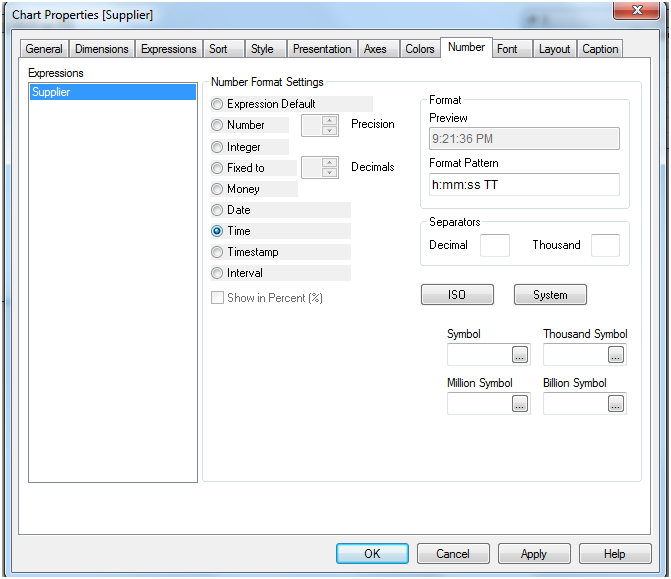
Thanks,
AS
ashfaq_haseeb
- Mark as New
- Bookmark
- Subscribe
- Mute
- Subscribe to RSS Feed
- Permalink
- Report Inappropriate Content
Hi,
try the below code.
=interval(timestamp#(120720, 's'), 'hh:mm:ss')
Regards
ASHFAQ
bindu_apte
- Mark as New
- Bookmark
- Subscribe
- Mute
- Subscribe to RSS Feed
- Permalink
- Report Inappropriate Content
Hi,
Thanks for your reply.
In our dashboard we are using the field as a dimension not in expression.
If we are using in expression and changing the format under number we are getting wrong value.
Thanks
bindu_apte
- Mark as New
- Bookmark
- Subscribe
- Mute
- Subscribe to RSS Feed
- Permalink
- Report Inappropriate Content
Thanks Ashfaq,
Its working 🙂

- Mark as New
- Bookmark
- Subscribe
- Mute
- Subscribe to RSS Feed
- Permalink
- Report Inappropriate Content
Having this exact issue and happy to find the correct answer here  Thanks Ashfaq!