Unlock a world of possibilities! Login now and discover the exclusive benefits awaiting you.

- Qlik Community
- :
- All Forums
- :
- QlikView
- :
- Converting DOB to Age Range
- Subscribe to RSS Feed
- Mark Topic as New
- Mark Topic as Read
- Float this Topic for Current User
- Bookmark
- Subscribe
- Mute
- Printer Friendly Page

- Mark as New
- Bookmark
- Subscribe
- Mute
- Subscribe to RSS Feed
- Permalink
- Report Inappropriate Content
Converting DOB to Age Range
I have Date of Birth as dd mmm yyyy format in Excel. Appreciate if you could let me know how to convert the DOB to different Age Ranges like;
Age (20 - 30)
Age (31- 40)
Age (41 - 50)
Age (51 - 60)
Age (61 - 70)
Age (71 - 80)
Thanks
- Tags:
- qlikview

 sushil353
- Mark as New
- Bookmark
- Subscribe
- Mute
- Subscribe to RSS Feed
- Permalink
- Report Inappropriate Content
Hi,
this is how you can do:
agegroup:
LOAD * Inline
[
Agemin,Agemax,group
0,5,0-5
5,10,5-10
10,18,10-18
];
age:
LOAD (now()-DOB)/365 as Age,* Inline
[
DOB,Name
12/28/2013,Pranya
09/05/2000, Ram
];
IntervalMatch (Age) LOAD Agemin, Agemax Resident agegroup;
HTH
sushil

 MarcoWedel
- Mark as New
- Bookmark
- Subscribe
- Mute
- Subscribe to RSS Feed
- Permalink
- Report Inappropriate Content
Class(Age(today(), DOB),10)
MarcoWedel
- Mark as New
- Bookmark
- Subscribe
- Mute
- Subscribe to RSS Feed
- Permalink
- Report Inappropriate Content
Dual('Age ('&Replace(Class(Age(today(), DOB),10),'<= x <','-')&')',Class(Age(today(), DOB),10))
MarcoWedel
- Mark as New
- Bookmark
- Subscribe
- Mute
- Subscribe to RSS Feed
- Permalink
- Report Inappropriate Content
LOAD *,
    Age(today(), DOB) as Age,
    Dual('Age ('&Replace(Class(Age(today(), DOB),10),'<= x <','-')&')',Class(Age(today(), DOB),10)) as AgeRange;
LOAD Date(Today()-Ceil(Rand()*35000)) as DOB
AutoGenerate 300;
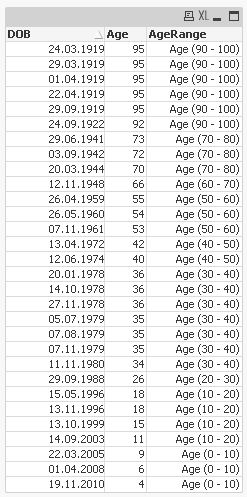
hope this helps
regards
Marco
- Mark as New
- Bookmark
- Subscribe
- Mute
- Subscribe to RSS Feed
- Permalink
- Report Inappropriate Content
by using class function.
- Mark as New
- Bookmark
- Subscribe
- Mute
- Subscribe to RSS Feed
- Permalink
- Report Inappropriate Content
Hi
Thanks for that. Appreciate if you could explain ,
- LOAD *,
- Age(today(), DOB) as Age,
- Dual('Age ('&Replace(Class(Age(today(), DOB),10),'<= x <','-')&')',Class(Age(today(), DOB),10)) as AgeRange;
- LOAD Date(Today()-Ceil(Rand()*35000)) as DOB
- AutoGenerate 300;
what these do, as I am new to Qlikview.
I also tried to edit my script using the above, but did not work. There is an error in the script. In fact I want to get a Chart "No. of Incidents By Age Range". I also attached the QVW. Appreciate your help.
Thanks for your help