Unlock a world of possibilities! Login now and discover the exclusive benefits awaiting you.

- Qlik Community
- :
- All Forums
- :
- QlikView
- :
- Converting Data Format
- Subscribe to RSS Feed
- Mark Topic as New
- Mark Topic as Read
- Float this Topic for Current User
- Bookmark
- Subscribe
- Mute
- Printer Friendly Page

 brunolelli87
- Mark as New
- Bookmark
- Subscribe
- Mute
- Subscribe to RSS Feed
- Permalink
- Report Inappropriate Content
Converting Data Format
Dears,
I have a database with a Dates column, named DATE_STOCK, but the dates are formatted as string, for example: "01 de abr de 2020"; so it's not well-formatted as a date.
How can I convert it to 01/04/2020 (DD/MM/YYYY)?
Check some more examples:
04 de fev de 2019 > 04/02/2019
05 de dez de 2020 > 05/12/2020
Thanks for your help
Bruno Lelli
Accepted Solutions

 Taoufiq_Zarra
- Mark as New
- Bookmark
- Subscribe
- Mute
- Subscribe to RSS Feed
- Permalink
- Report Inappropriate Content
if you're worried that 'de ' will be interpreted differently you can use
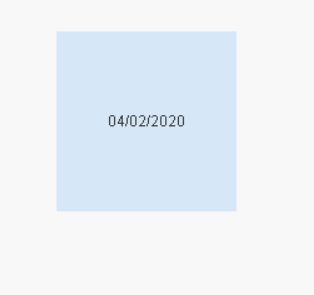
=Date(Date#(replace(YOURFIELD,' de ','/'),'DD/MMMM/YYYY'))
example :
=Date(Date#(replace('04 de févr. de 2020',' de ','/'),'DD/MMMM/YYYY')) =>
Taoufiq ZARRA
"Please LIKE posts and "Accept as Solution" if the provided solution is helpful "
(you can mark up to 3 "solutions") 😉

 Lisa_P
- Mark as New
- Bookmark
- Subscribe
- Mute
- Subscribe to RSS Feed
- Permalink
- Report Inappropriate Content
Use the Date#() function to tell the format of the data being loaded. Take a look at help:
For date formatting:
Taoufiq_Zarra
- Mark as New
- Bookmark
- Subscribe
- Mute
- Subscribe to RSS Feed
- Permalink
- Report Inappropriate Content
if you're worried that 'de ' will be interpreted differently you can use
=Date(Date#(replace(YOURFIELD,' de ','/'),'DD/MMMM/YYYY'))
example :
=Date(Date#(replace('04 de févr. de 2020',' de ','/'),'DD/MMMM/YYYY')) =>
Taoufiq ZARRA
"Please LIKE posts and "Accept as Solution" if the provided solution is helpful "
(you can mark up to 3 "solutions") 😉
brunolelli87
- Mark as New
- Bookmark
- Subscribe
- Mute
- Subscribe to RSS Feed
- Permalink
- Report Inappropriate Content
Thanks,
But I'm just wondering why MMMM instead of just MM?
Thank you so much
Taoufiq_Zarra
- Mark as New
- Bookmark
- Subscribe
- Mute
- Subscribe to RSS Feed
- Permalink
- Report Inappropriate Content
the correct formula :
=Date(Date#(replace(YOURFIELD,' de ','/'),'DD/MMM/YYYY'))
why .?
for example :
MMM->Apr
MMMM->April
MM->04
Taoufiq ZARRA
"Please LIKE posts and "Accept as Solution" if the provided solution is helpful "
(you can mark up to 3 "solutions") 😉
brunolelli87
- Mark as New
- Bookmark
- Subscribe
- Mute
- Subscribe to RSS Feed
- Permalink
- Report Inappropriate Content
Nice, I got it!
Thanks a lot
Another question...
I have some data on spreadsheets classified by quarters, like 1Q2019, 2Q2019, 3Q2019... and the column name is Quarter.
In another spreadsheet I have some information classified by dates, like 01/02/2019, 01/10/2019, 04/09/2019... and the column's name is Days
So, how can I connect everything? I mean, if the user selects one date the system should automatically select the corresponding quarter and vice verse.
Example:
Selecting: 03/05/2019 (DD/MM/YYYY)
The system should automatically select 02Q2019
Selecting 22/11/2019 (DD/MM/YYYY)
The system should automatically select 4Q2019
How can I do it?
Thanks again
Taoufiq_Zarra
- Mark as New
- Bookmark
- Subscribe
- Mute
- Subscribe to RSS Feed
- Permalink
- Report Inappropriate Content
for this you'll need:
and
Taoufiq ZARRA
"Please LIKE posts and "Accept as Solution" if the provided solution is helpful "
(you can mark up to 3 "solutions") 😉
