Unlock a world of possibilities! Login now and discover the exclusive benefits awaiting you.

- Qlik Community
- :
- All Forums
- :
- QlikView
- :
- Copy Chart from Accesspoint to Power Point slide
- Subscribe to RSS Feed
- Mark Topic as New
- Mark Topic as Read
- Float this Topic for Current User
- Bookmark
- Subscribe
- Mute
- Printer Friendly Page

 prachisangewar
- Mark as New
- Bookmark
- Subscribe
- Mute
- Subscribe to RSS Feed
- Permalink
- Report Inappropriate Content
Copy Chart from Accesspoint to Power Point slide
Hi,
I am unable to copy charts from Qlikview Accesspoint to ppt/excel/word doc.
Copy to Clipboard is enabled for all charts,but still its not getting pasted.
I've even tried ctrl+shift -> right click -> Copy Image; by this method I can only copy the chart on paint but if I try the same with ppt or excel,I get a pop-up window asking for Qlikview credentials.After keying in the Credentials there is no action.
Please suggest if any solution for this.
Thanks!

 beck_bakytbek
- Mark as New
- Bookmark
- Subscribe
- Mute
- Subscribe to RSS Feed
- Permalink
- Report Inappropriate Content
Hi Prachi, you can do this,
but you can use macro to Export your Images into PowerPoint
if you need this macros. let me know
beck
beck_bakytbek
- Mark as New
- Bookmark
- Subscribe
- Mute
- Subscribe to RSS Feed
- Permalink
- Report Inappropriate Content
Hi prachi, try this macro, i use myself this macro whithin Access Point into PowerPoint, and it does work well
Sub ExportPPT
Set objPPT = CreateObject("PowerPoint.Application")
objPPT.Visible = True
Set objPresentation = objPPT.Presentations.Add
Set PPSlide = objPresentation.Slides.Add(1,11)
set up = ActiveDocument.GetApplication.GetUserPreferences
up.ChartUseCapNBorder = True
ActiveDocument.GetApplication.SetUserPreferences up
with objPresentation.Slides(1).Shapes(1)
.TextFrame.TextRange = "to powerpoint from access_point"
.Left = 100
.top = 15
.width=600
.height=20
end with
ActiveDocument.Sheets("YourIDofSheet").Activate
ActiveDocument.GetSheetObject("YourIDofObject").CopyBitmapToClipboard
with objPresentation.Slides(1).Shapes.PasteSpecial(PasteHTML)
.Left = 100
.top = 45
.width=100
.height=150
end with
Set PPSlide = Nothing
Set PPPres = Nothing
End sub
i hope. that can contribute to solve / to improve your issue
beck

- Mark as New
- Bookmark
- Subscribe
- Mute
- Subscribe to RSS Feed
- Permalink
- Report Inappropriate Content
Hello Prachi,
Did you try simply adding "Copy Image to Clipboard" option to caption bar?
Chart Properties -> Caption -> Copy Image to Clipboard:
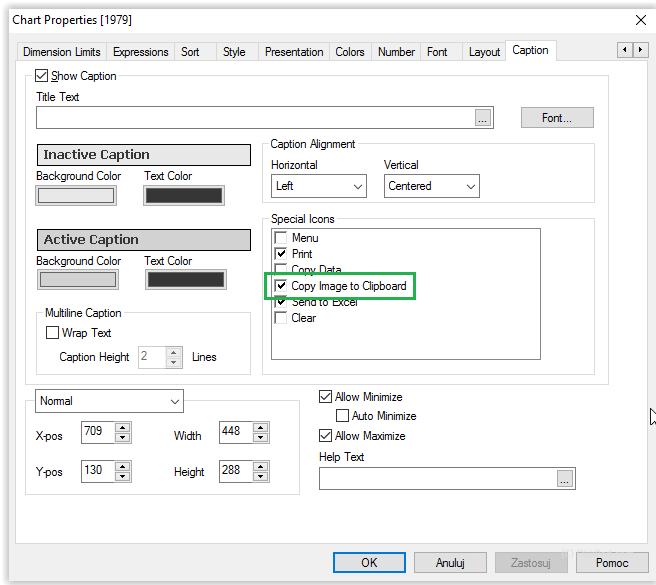
It will add new button, which after clicking automatically copies chart image to your clipboard:

BR,
Kuba
prachisangewar
- Mark as New
- Bookmark
- Subscribe
- Mute
- Subscribe to RSS Feed
- Permalink
- Report Inappropriate Content
Hi Kuba,
I had enabled "copy to clipboard " option.But it is not enables on accesspoint.
prachisangewar
- Mark as New
- Bookmark
- Subscribe
- Mute
- Subscribe to RSS Feed
- Permalink
- Report Inappropriate Content
Hi Beck,
Many Thanks for the Macro.But I think it will not work with ajax.
Any other work around for this?
Thanks!
beck_bakytbek
- Mark as New
- Bookmark
- Subscribe
- Mute
- Subscribe to RSS Feed
- Permalink
- Report Inappropriate Content
Hi prachi.
did you test this macro with Ajax?
beck
prachisangewar
- Mark as New
- Bookmark
- Subscribe
- Mute
- Subscribe to RSS Feed
- Permalink
- Report Inappropriate Content
Hi Beck,
The Macro is not working with Ajax
Please suggest.
Thanks!!
beck_bakytbek
- Mark as New
- Bookmark
- Subscribe
- Mute
- Subscribe to RSS Feed
- Permalink
- Report Inappropriate Content
- Mark as New
- Bookmark
- Subscribe
- Mute
- Subscribe to RSS Feed
- Permalink
- Report Inappropriate Content
Hello,
How about:
- enabling Print option, and simply saving image generated this way
- Clicking Ctrl+Shift+Right mouse button on image area, then choosing save image as
- Using Sniping tool 
BR,
Kuba;