Unlock a world of possibilities! Login now and discover the exclusive benefits awaiting you.

- Qlik Community
- :
- All Forums
- :
- QlikView
- :
- Re: Could ListBox backgroud be set as transparent?
- Subscribe to RSS Feed
- Mark Topic as New
- Mark Topic as Read
- Float this Topic for Current User
- Bookmark
- Subscribe
- Mute
- Printer Friendly Page

- Mark as New
- Bookmark
- Subscribe
- Mute
- Subscribe to RSS Feed
- Permalink
- Report Inappropriate Content
Could ListBox backgroud be set as transparent?
Hi guys,
As question above, could the listbox backgroud be set as transparent? and where to set it?
Thanks!
- « Previous Replies
-
- 1
- 2
- Next Replies »

 ashfaq_haseeb
- Mark as New
- Bookmark
- Subscribe
- Mute
- Subscribe to RSS Feed
- Permalink
- Report Inappropriate Content
HI,
I think you cannot apply the same to multiplex.
Regards
ASHFAQ

 manideep78
- Mark as New
- Bookmark
- Subscribe
- Mute
- Subscribe to RSS Feed
- Permalink
- Report Inappropriate Content
Hi Jack,
First Set full transparency in the Document properties --> General tab
and then
Open Multi box Properties --> Presentation tab --> Click on Background button --> Set Transparency to 100%
If you forgot to set transparency in any one of the cases, it will not work. So you need to put transparency in both cases to get it work for a list box or multibox.
Regards,
Manideep

 aveeeeeee7en
- Mark as New
- Bookmark
- Subscribe
- Mute
- Subscribe to RSS Feed
- Permalink
- Report Inappropriate Content
First Select the 'Qlikview Classic' in 'Style'
than move the Scroll Bar from Left to right(Full Transparency).
After this select 'LED' option.
Than go to List Box> Right Click on it > Properties > Presentation> Extreme Bottom Left > Background > Click on it > Color Transparency Scrollbar > Move the Scroll Bar from Left to right(Full Transparency).
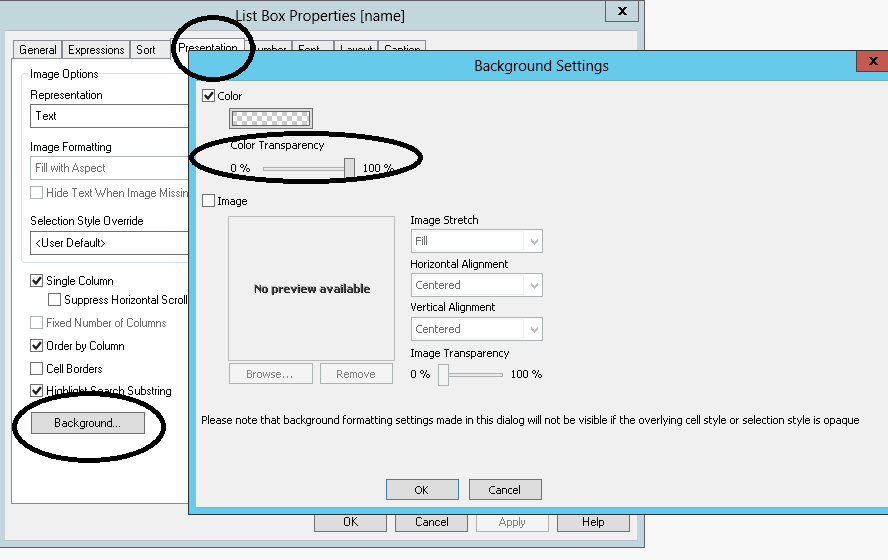
This will work for you and also create the List Box Transparent.
Regards
Aviral Nag
- « Previous Replies
-
- 1
- 2
- Next Replies »