Unlock a world of possibilities! Login now and discover the exclusive benefits awaiting you.

- Qlik Community
- :
- All Forums
- :
- QlikView
- :
- Count Activities Where ActivityDate > ResponseDate
- Subscribe to RSS Feed
- Mark Topic as New
- Mark Topic as Read
- Float this Topic for Current User
- Bookmark
- Subscribe
- Mute
- Printer Friendly Page

- Mark as New
- Bookmark
- Subscribe
- Mute
- Subscribe to RSS Feed
- Permalink
- Report Inappropriate Content
Count Activities Where ActivityDate > ResponseDate
I have a data that looks like in CAMPAIGN RESPONSE TABLE:
Id    Name        CreateDate
001  Tom Cruise   2018-08-29
002  Tom Hanks    2018-09-02
003  Bill Nye     2018-06-25
004  Johnny Cash  2018-06-27
I also have a data that looks like in ACTIVITY TABLE:
Id   PersonId  Name        ActivityDate
117  001       Tom Cruise  2018-08-30
118  001       Tom Cruise  2018-09-31
211  003       Bill Nye   2018-06-26
212  003       Bill Nye   2018-06-27
I want to create a STRAIGHT TABLE that shows ALL CAMPAIGN RESPONSES and if they have had an ACTIVITY since the CreateDate. Something like:
 Id   Name       CreateDate ActivitesAfterResponse
001  Tom Cruise  2018-08-29   2
002  Tom Hanks   2018-09-02   0
003  Bill Nye    2018-06-25   2
004  Johnny Cash 2018-06-27   0
Currently, I have set analysis like below but it is not working:
=count({<ActivityDate={">CreateDate"}>}distinct(ActivityId))
Any help is appreciated! Thank you!!

 felipedl
- Mark as New
- Bookmark
- Subscribe
- Mute
- Subscribe to RSS Feed
- Permalink
- Report Inappropriate Content
Hi Dave,
That will not work with set analysis when it's a variable date.
Set analysis will only calculate once, and so, its best to make the validation throught the script, rather than the graphs.
First, do a simple transformation like bellow:
Created:
load * Inline
[
Id,Name,CreateDate
001,Tom Cruise, 2018-08-29
002,Tom Hanks,2018-09-02
003,Bill Nye, 2018-06-25
004,Johnny Cash,2018-06-27
];


Activity:
Load * Inline
[
Id,PersonId,Name,ActivityDate
117,001, Tom Cruise,2018-08-30
118,001, Tom Cruise,2018-09-31
211,003, Bill Nye, 2018-06-26
212,003, Bill Nye, 2018-06-27
];


left join (Created)
Load
Name,
ActivityDate
Resident Activity;


drop table Activity;


FinalData:
Load
Id,
Name,
CreateDate,
ActivityDate,
if (ActivityDate>CreateDate,1,0) as [Flag]
Resident Created;


drop table Created;
And as epxression, use the flag as your aggregation field.
sum(Flag)
That will get you:
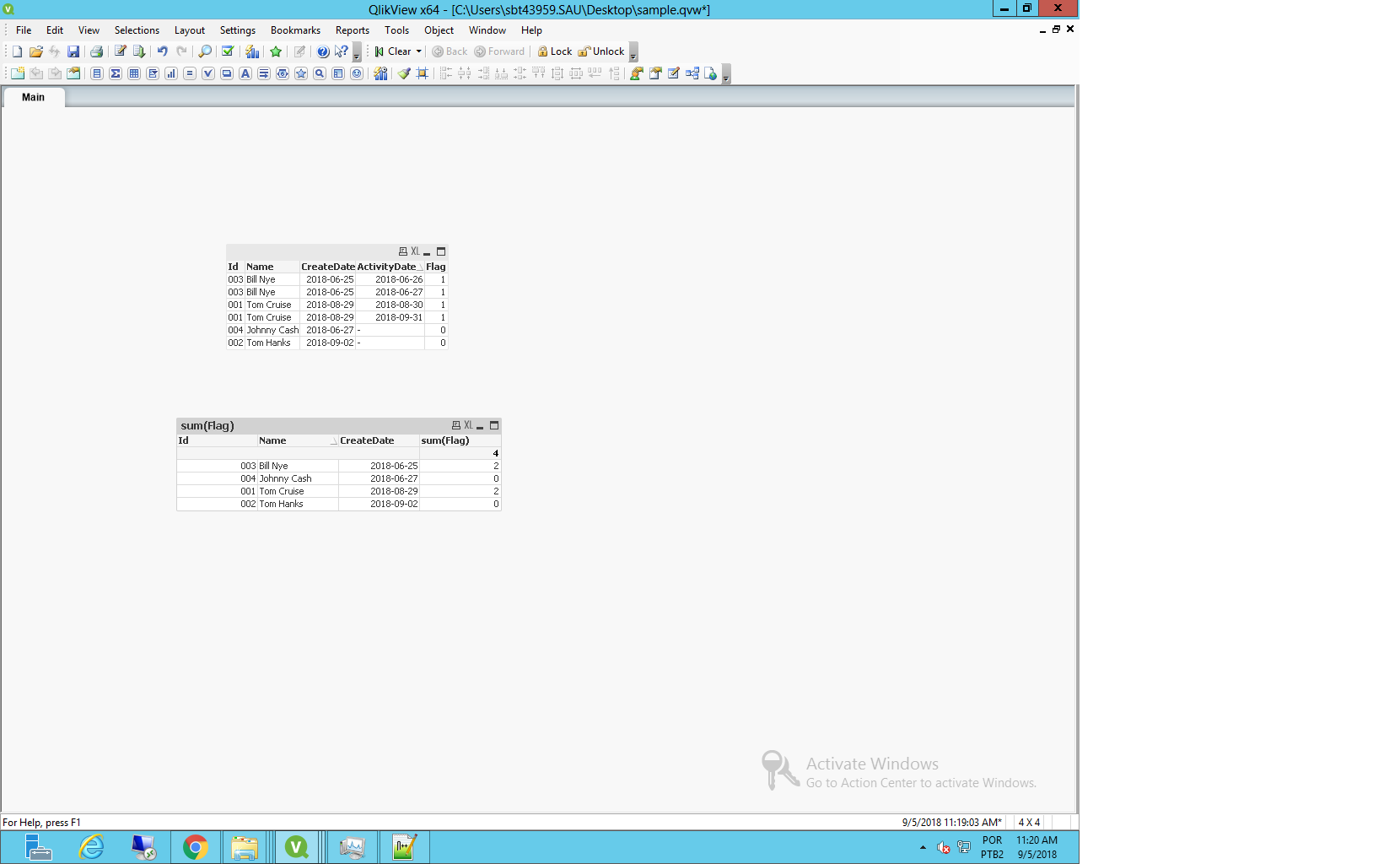
Attached the QVW i used.

 andrey_krylov
- Mark as New
- Bookmark
- Subscribe
- Mute
- Subscribe to RSS Feed
- Permalink
- Report Inappropriate Content
Hi, Dave. Felip is right, set analysis is not appropriate to this challenge. But you can try to solve it by expression as well
Sum(Aggr(If(ActivityDate > Max(TOTAL <Name> CreateDate), 1), Name, Id))