Unlock a world of possibilities! Login now and discover the exclusive benefits awaiting you.

- Qlik Community
- :
- All Forums
- :
- QlikView
- :
- Count Results from Survey
- Subscribe to RSS Feed
- Mark Topic as New
- Mark Topic as Read
- Float this Topic for Current User
- Bookmark
- Subscribe
- Mute
- Printer Friendly Page

 suthashiniv
- Mark as New
- Bookmark
- Subscribe
- Mute
- Subscribe to RSS Feed
- Permalink
- Report Inappropriate Content
Count Results from Survey
Hi, I have conducted a survey and require to show the data in the dashboard.
I have questions with the below options. I have given a RatingID for each of the options to identify them easily.
- Not at all - RatingID 1
- Not well- RatingID 2
- Somewhat- RatingID 3
- Well - RatingID 4
- Very well- RatingID 5
- Unable to Assess- RatingID 6
I want to calculate the no. of participants who choose the respective options.
This is the raw data that is exported into the dashboard.
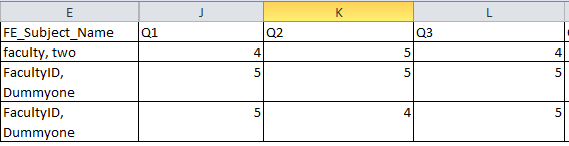
Below is the code I used:
=if (Data=RatingID, COUNT(Participants),0)
And these are the results:

You can see that the results for faculty two is correct for Q1 where only 1 person said "Well". And the results for FacultyID, Dummyone Q1 is correct as 2 participants said "Very well". However, if you look at Q2 for FacultyID, Dummyone, no values are found. The correct values should be 1 for Agree and 1 for Strongly Agree. How can the code be changed to identify the correct number of participants who chose the respective options? Please help.
Thank you.
