Unlock a world of possibilities! Login now and discover the exclusive benefits awaiting you.

- Qlik Community
- :
- All Forums
- :
- QlikView
- :
- Count by Month - set analysis
- Subscribe to RSS Feed
- Mark Topic as New
- Mark Topic as Read
- Float this Topic for Current User
- Bookmark
- Subscribe
- Mute
- Printer Friendly Page

 bellesol
- Mark as New
- Bookmark
- Subscribe
- Mute
- Subscribe to RSS Feed
- Permalink
- Report Inappropriate Content
Count by Month - set analysis
Hi,
I have been asked to build a table by month and year that shows the number of open items in a storage.
I want to build a table that would not be affected by the user's selections, the table will display by month and year the amount of items in the storage , for example in February , the relevant data will be all the items that the enter date is less than 28.02.2020, i.e., all the items that enter in January and February 2020.
a table with a dummy data:
*I also attached the excel file*
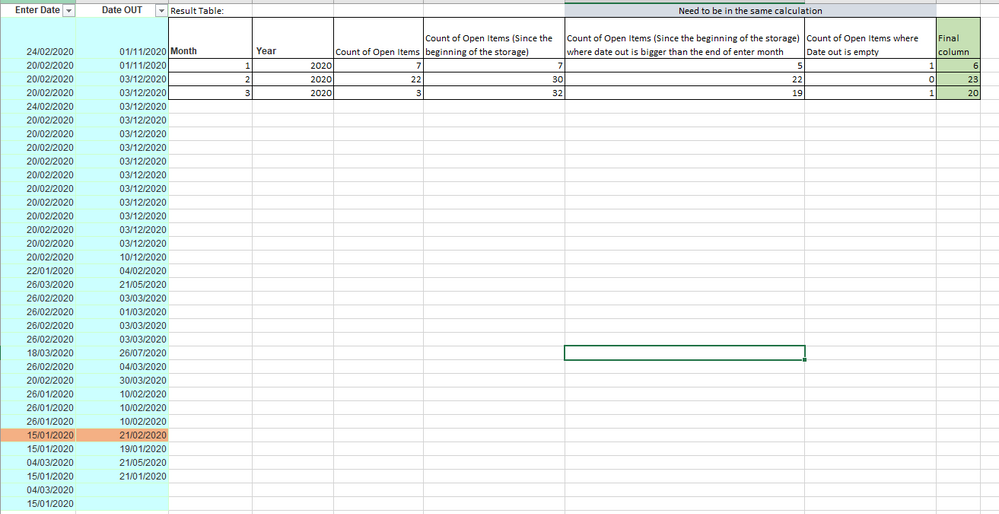
For example:
Item that has entered on 15.1.2020 and was out on 21.02.2020, In the "Final column" I need to count this item only one time in the January month row ,this item will not be calculate on February because the date out is less the 28.2.2020 .
How can I Build the expression in the "Final column"?
I tried something like this expression:
=count({<[Enter Date]={"=Monthend([Enter Date],0)<=[Date OUT]"}>} [MRB])
- Tags:
- new_to_qlikview
bellesol
- Mark as New
- Bookmark
- Subscribe
- Mute
- Subscribe to RSS Feed
- Permalink
- Report Inappropriate Content
Hi,
Can someone help?

 sunsun566
- Mark as New
- Bookmark
- Subscribe
- Mute
- Subscribe to RSS Feed
- Permalink
- Report Inappropriate Content
Hi
I think you can expand each Item to every day, the formula coding will be much easier.
Hope it helps you:)

 agigliotti
- Mark as New
- Bookmark
- Subscribe
- Mute
- Subscribe to RSS Feed
- Permalink
- Report Inappropriate Content
Hi @bellesol ,
Could you post a sample app with mock data to look at?
Follow me on my LinkedIn | Know Gamma Informatica at gammainformatica.it
