Unlock a world of possibilities! Login now and discover the exclusive benefits awaiting you.

- Qlik Community
- :
- All Forums
- :
- QlikView
- :
- Count in script
- Subscribe to RSS Feed
- Mark Topic as New
- Mark Topic as Read
- Float this Topic for Current User
- Bookmark
- Subscribe
- Mute
- Printer Friendly Page

 kushalthakral
- Mark as New
- Bookmark
- Subscribe
- Mute
- Subscribe to RSS Feed
- Permalink
- Report Inappropriate Content
Count in script
Hi All
i have a file having data like
| Model | Sales Date |
|---|---|
| a | 01/01/2013 |
| a | 01/02/2013 |
| a | 01/05/2013 |
| b | 01/07/2013 |
| b | 03/05/2013 |
| b | 07/05/2013 |
| b | 01/01/2013 |
| c | 01/01/2013 |
| c | 01/03/2013 |
| c | 03/03/2013 |
| c | 01/02/2013 |
| a | 05/05/2013 |
Now Actually i want to calculate the count of each model in a script and then find the ratio of each model with respect to total sales
in a script
Thanks
Kushal Thakral
- Tags:
- new_to_qlikview
- « Previous Replies
-
- 1
- 2
- Next Replies »
Accepted Solutions

 its_anandrjs
- Mark as New
- Bookmark
- Subscribe
- Mute
- Subscribe to RSS Feed
- Permalink
- Report Inappropriate Content
Load your table like below
Table:
LOAD * INLINE [
Model,Sales Date
a, 01/01/2013
a, 01/02/2013
a, 01/05/2013
b, 01/07/2013
b, 03/05/2013
b, 07/05/2013
b, 01/01/2013
c, 01/01/2013
c, 01/03/2013
c, 03/03/2013
c, 01/02/2013
a, 05/05/2013];
Left Join
LOAD
Model,
Count([Sales Date]) as ModelCount
Resident Table
Group By Model;
Left join
LOAD
Count([Sales Date]) as CntTotal
Resident Table;
Left Join
LOAD
Model,
Num((sum(ModelCount) / sum(CntTotal)),'#.#0%') as Ratio
Resident Table
Group By Model;
 SunilChauhan
- Mark as New
- Bookmark
- Subscribe
- Mute
- Subscribe to RSS Feed
- Permalink
- Report Inappropriate Content
Load Count(Model) as Modelcount,
[Source Date]
from path
group by [Source Date]
hope this helps

 maxgro
- Mark as New
- Bookmark
- Subscribe
- Mute
- Subscribe to RSS Feed
- Permalink
- Report Inappropriate Content
where are sales?
kushalthakral
- Mark as New
- Bookmark
- Subscribe
- Mute
- Subscribe to RSS Feed
- Permalink
- Report Inappropriate Content
Total sales means count of all dates together
Assume each as quantity 1 and add all models together as Sales

- Mark as New
- Bookmark
- Subscribe
- Mute
- Subscribe to RSS Feed
- Permalink
- Report Inappropriate Content
Hi,
Lets suppose your table name is "Sales". you can load another table from this table lets say ModelCount
NocConcatenate
ModelCount:
Load Count(Model) as ModelCount,
Model
Resident Sales
Group by Model;
then in your scrip you can write expression to get ratio like =Sum (Sales) / Sum (ModelCount)
 MK_QSL
- Mark as New
- Bookmark
- Subscribe
- Mute
- Subscribe to RSS Feed
- Permalink
- Report Inappropriate Content
Use something like below
Count of Sales
COUNT(Model) or COUNT([Sales Date])
% Contribution
COUNT(Model)/Count(TOTAL Model)
maxgro
- Mark as New
- Bookmark
- Subscribe
- Mute
- Subscribe to RSS Feed
- Permalink
- Report Inappropriate Content
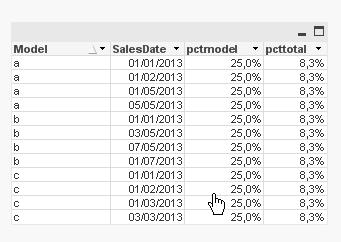
source:
load * inline [
Model, SalesDate
a, 01/01/2013
a, 01/02/2013
a, 01/05/2013
b, 01/07/2013
b, 03/05/2013
b, 07/05/2013
b, 01/01/2013
c, 01/01/2013
c, 01/03/2013
c, 03/03/2013
c, 01/02/2013
a, 05/05/2013
];

left join (source)
LOAD
Model, count(SalesDate) as cnt
Resident source
group by Model;

left join (source)
LOAD
count(SalesDate) as cnttotal
Resident source
;

table:
NoConcatenate load
Model, SalesDate,
1 / cnt as pct,
1 / cnttotal as pcttotal
Resident
source;

DROP Table source;

 Gysbert_Wassena
- Mark as New
- Bookmark
- Subscribe
- Mute
- Subscribe to RSS Feed
- Permalink
- Report Inappropriate Content
See attached example.
talk is cheap, supply exceeds demand
SunilChauhan
- Mark as New
- Bookmark
- Subscribe
- Mute
- Subscribe to RSS Feed
- Permalink
- Report Inappropriate Content
in myscript use [Source Date] in count and model outside
load
count([Source Date]) as Totalcount,
Model
from path
group by Model;
its_anandrjs
- Mark as New
- Bookmark
- Subscribe
- Mute
- Subscribe to RSS Feed
- Permalink
- Report Inappropriate Content
Load your table like below
Table:
LOAD * INLINE [
Model,Sales Date
a, 01/01/2013
a, 01/02/2013
a, 01/05/2013
b, 01/07/2013
b, 03/05/2013
b, 07/05/2013
b, 01/01/2013
c, 01/01/2013
c, 01/03/2013
c, 03/03/2013
c, 01/02/2013
a, 05/05/2013];
Left Join
LOAD
Model,
Count([Sales Date]) as ModelCount
Resident Table
Group By Model;
Left join
LOAD
Count([Sales Date]) as CntTotal
Resident Table;
Left Join
LOAD
Model,
Num((sum(ModelCount) / sum(CntTotal)),'#.#0%') as Ratio
Resident Table
Group By Model;
- « Previous Replies
-
- 1
- 2
- Next Replies »