Unlock a world of possibilities! Login now and discover the exclusive benefits awaiting you.

Announcements
ALERT: QlikView server communication interruptions following Microsoft Windows Domain Controller security updates
- Qlik Community
- :
- All Forums
- :
- QlikView
- :
- Counting date and empty cells to create pie or bar...
Options
- Subscribe to RSS Feed
- Mark Topic as New
- Mark Topic as Read
- Float this Topic for Current User
- Bookmark
- Subscribe
- Mute
- Printer Friendly Page
Turn on suggestions
Auto-suggest helps you quickly narrow down your search results by suggesting possible matches as you type.
Showing results for

Not applicable
2015-02-09
12:33 PM
- Mark as New
- Bookmark
- Subscribe
- Mute
- Subscribe to RSS Feed
- Permalink
- Report Inappropriate Content
Counting date and empty cells to create pie or bar chart
Please help,
I will like to create a bar chart or pie chart that will count cells with "date" values, cells with "NA" values and "empty" cells.
Please refer to the image to help out here.
Thanks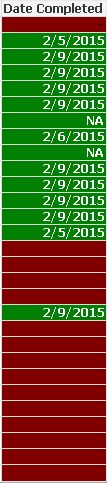
789 Views
1 Solution
Accepted Solutions

 rwunderlich
Partner Ambassador/MVP
2015-02-09
12:46 PM
- Mark as New
- Bookmark
- Subscribe
- Mute
- Subscribe to RSS Feed
- Permalink
- Report Inappropriate Content
You could use a Calculated Dimension like:
=if(trim(DateCompleted)='', 'Empty'
,if(DateCompleted='NA', 'NA'
,'Date'
))
and an Expression
=sum(1)
-Rob
669 Views
2 Replies
rwunderlich
Partner Ambassador/MVP
2015-02-09
12:46 PM
- Mark as New
- Bookmark
- Subscribe
- Mute
- Subscribe to RSS Feed
- Permalink
- Report Inappropriate Content
You could use a Calculated Dimension like:
=if(trim(DateCompleted)='', 'Empty'
,if(DateCompleted='NA', 'NA'
,'Date'
))
and an Expression
=sum(1)
-Rob
670 Views
Not applicable
2015-02-09
03:44 PM
Author
- Mark as New
- Bookmark
- Subscribe
- Mute
- Subscribe to RSS Feed
- Permalink
- Report Inappropriate Content
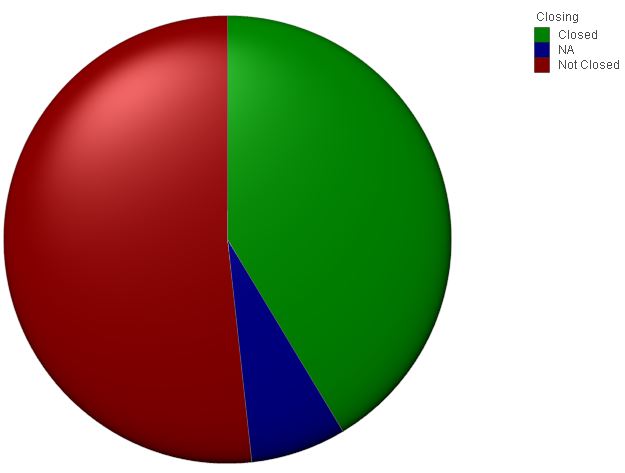
Thanks Rob! You saved the day!
Works perfectly!
- Not Closed is my 'Empty'
- NA is 'NA'
- Closed is 'Date'
And I changed the 'Background Color' in the 'Expression' tab.
669 Views