Unlock a world of possibilities! Login now and discover the exclusive benefits awaiting you.

- Qlik Community
- :
- All Forums
- :
- QlikView
- :
- Create a Dimension with indents
- Subscribe to RSS Feed
- Mark Topic as New
- Mark Topic as Read
- Float this Topic for Current User
- Bookmark
- Subscribe
- Mute
- Printer Friendly Page

- Mark as New
- Bookmark
- Subscribe
- Mute
- Subscribe to RSS Feed
- Permalink
- Report Inappropriate Content
Create a Dimension with indents
Hi All,
I got a request to create a dimension in below format. I know about the Tree view in List box but that is not what I am looking for. I want to use the output dimension as a Dimension in a Straight table with similar view.
Input Data: (Region - EU, Territory - Benelux/Central Europe, Country - Belgium/Netherlands/Germany etc)
Region-Territory-Country
EU |
EU-Benelux |
EU-Benelux-Belgium |
EU-Benelux-Netherlands |
EU-Central Europe |
EU-Central Europe-Germany |
EU-Central Europe-Poland |
Output required:
Region-Territory-Country
EU |
Benelux |
Belgium |
Netherlands |
Central Europe |
Germany |
Poland |
Thanks
Karthik
- « Previous Replies
-
- 1
- 2
- Next Replies »
Accepted Solutions

 sudeepkm
- Mark as New
- Bookmark
- Subscribe
- Mute
- Subscribe to RSS Feed
- Permalink
- Report Inappropriate Content
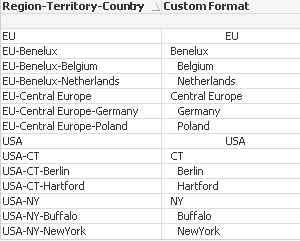
sure. This can be done in few ways. One way is given below.
Please follow these steps.
Create a variable as below.
vlen
=Max(aggr(len([Region-Territory-Country]),[Region-Territory-Country]))
Then change the Dimension as
=if(SubStringCount([Region-Territory-Country], '-')=0,
Repeat(' ',Round(vlen/4))&[Region-Territory-Country],
Repeat(' ', SubStringCount([Region-Territory-Country], '-')) & SubField([Region-Territory-Country],'-',SubStringCount([Region-Territory-Country], '-')+1))

 Frank_Hartmann
- Mark as New
- Bookmark
- Subscribe
- Mute
- Subscribe to RSS Feed
- Permalink
- Report Inappropriate Content
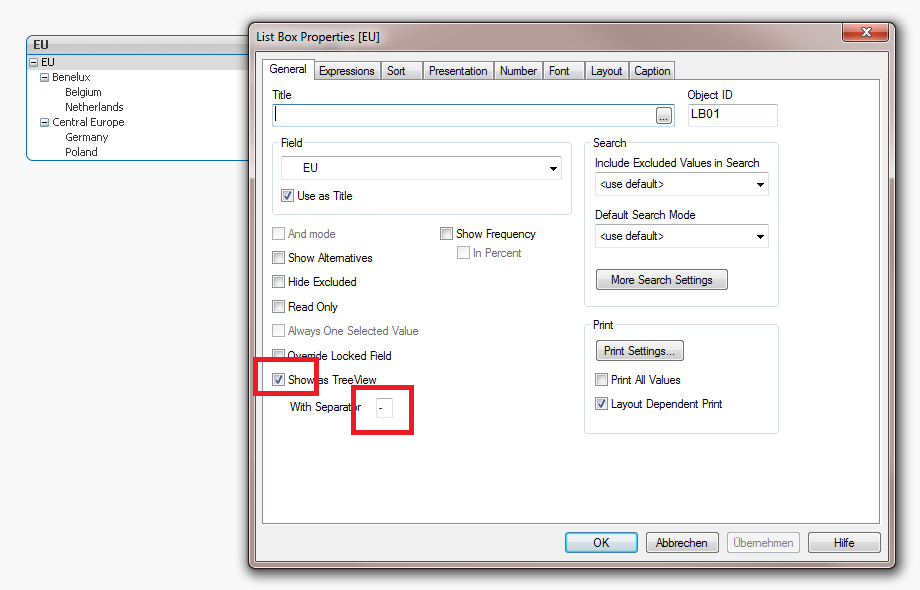
like this?

 jonathandienst
- Mark as New
- Bookmark
- Subscribe
- Mute
- Subscribe to RSS Feed
- Permalink
- Report Inappropriate Content
You can get this type of view in a pivot table using Style | Indent Mode. This assumes that he data models has associations between the header levels. If you have a single field, you will some load logic to split into 3 fields.
Or you can prefix the name with spaces in a straight table. But you will not able expand or collapse like in a pivot. For example a calculated dimension like:
=Repeat(' ', SubStringCount([Region-Territory-Country], '-') & [Region-Territory-Country]
jonathandienst
- Mark as New
- Bookmark
- Subscribe
- Mute
- Subscribe to RSS Feed
- Permalink
- Report Inappropriate Content
Or
=Repeat(' ', SubStringCount([Region-Territory-Country], '-')) &
SubString([Region-Territory-Country], '-', SubStringCount([Region-Territory-Country], '-')
- Mark as New
- Bookmark
- Subscribe
- Mute
- Subscribe to RSS Feed
- Permalink
- Report Inappropriate Content
Not exactly.
I know this Tree view option. Let me try the solution given by Jonathan
sudeepkm
- Mark as New
- Bookmark
- Subscribe
- Mute
- Subscribe to RSS Feed
- Permalink
- Report Inappropriate Content
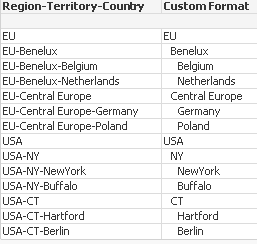
slight modification to Jonathan's expression.
=Repeat(' ', SubStringCount([Region-Territory-Country], '-')) & SubField([Region-Territory-Country],'-',SubStringCount([Region-Territory-Country], '-')+1)
For below data:
Region-Territory-Country
EU
EU-Benelux
EU-Benelux-Belgium
EU-Benelux-Netherlands
EU-Central Europe
EU-Central Europe-Germany
EU-Central Europe-Poland
USA
USA-NY
USA-NY-NewYork
USA-NY-Buffalo
USA-CT
USA-CT-Hartford
USA-CT-Berlin
output:
- Mark as New
- Bookmark
- Subscribe
- Mute
- Subscribe to RSS Feed
- Permalink
- Report Inappropriate Content
Yes, it worked. Almost there
Can we show EU in the middle and Benelux without indent and Beglium with Indent.
Like below:
EU |
Benelux |
Belgium |
Netherlands |
sudeepkm
- Mark as New
- Bookmark
- Subscribe
- Mute
- Subscribe to RSS Feed
- Permalink
- Report Inappropriate Content
sure. This can be done in few ways. One way is given below.
Please follow these steps.
Create a variable as below.
vlen
=Max(aggr(len([Region-Territory-Country]),[Region-Territory-Country]))
Then change the Dimension as
=if(SubStringCount([Region-Territory-Country], '-')=0,
Repeat(' ',Round(vlen/4))&[Region-Territory-Country],
Repeat(' ', SubStringCount([Region-Territory-Country], '-')) & SubField([Region-Territory-Country],'-',SubStringCount([Region-Territory-Country], '-')+1))
sudeepkm
- Mark as New
- Bookmark
- Subscribe
- Mute
- Subscribe to RSS Feed
- Permalink
- Report Inappropriate Content
also instead of ' ' in Repeat function it is better to use chr(32) for space.
- Mark as New
- Bookmark
- Subscribe
- Mute
- Subscribe to RSS Feed
- Permalink
- Report Inappropriate Content
Countries are randomly segregated into different Territories in my file.
Am I missing any sorting
- « Previous Replies
-
- 1
- 2
- Next Replies »