Unlock a world of possibilities! Login now and discover the exclusive benefits awaiting you.

- Qlik Community
- :
- All Forums
- :
- QlikView
- :
- Create dates in a range for future cash-flows
- Subscribe to RSS Feed
- Mark Topic as New
- Mark Topic as Read
- Float this Topic for Current User
- Bookmark
- Subscribe
- Mute
- Printer Friendly Page

- Mark as New
- Bookmark
- Subscribe
- Mute
- Subscribe to RSS Feed
- Permalink
- Report Inappropriate Content
Create dates in a range for future cash-flows
Dear all - I am trying to solve a problem which I believe is related to looping through records to generate additional entries in the calendar. My data-set consists of table number 1 below, with one record per product and two date fields that effectively represent start and end dates for the new data shown in table 2.
What I am trying to accomplish in table 2 is for each product to create extra date rows that relate to the 'next coupon' date at a frequency determined by the coupon frequency column (number of payments in a year) up to a maximum of the maturity date.
Example Data
| Security | Next Coupon | Coupon Frequency | Coupon Rate | Maturity Date | Nominal Amount |
|---|---|---|---|---|---|
| US61747YCJ29 | 23/09/2018 | 2 | 5.0% | 23/09/2019 | 250,000 |
| XS0471074582 | 02/12/2018 | 1 | 2.5% | 02/12/2019 | 300,000 |
The table below shows the results I think I need to be able to create a summary chart of the coupon dates.
Anticipated Result Table
| Security | Coupon Date |
|---|---|
| US61747YCJ29 | 23/09/2018 |
| US61747YCJ29 | 24/03/2019 |
| US61747YCJ29 | 23/09/2019 |
| XS0471074582 | 02/12/2018 |
| XS0471074582 | 02/12/2019 |
So far I have been able to create a master calendar to link together the maturity date and the next coupon but I think now I need to loop to add the extra rows. I have read a few of the example of this on this site but I cannot see clearly how to apply to this situation. I have attached my working file as far as I got.
Many thanks for any help or pointers anyone is able to give.
Ben
Accepted Solutions

 sunny_talwar
- Mark as New
- Bookmark
- Subscribe
- Mute
- Subscribe to RSS Feed
- Permalink
- Report Inappropriate Content
Try with While clause
BONDS:
LOAD *,
Date(AddMonths([Next Coupon], (12/[Coupon Frequency]) * (IterNo()-1))) as [Coupon Date]
While AddMonths([Next Coupon], (12/[Coupon Frequency]) * (IterNo()-1)) <= [Maturity Date];
LOAD * INLINE [
Security, Next Coupon, Coupon Frequency, Coupon Rate, Maturity Date, Nominal Amount
US61747YCJ29, 23/09/2018, 2, 5.0%, 23/09/2019, "250,000"
XS0471074582, 02/12/2018, 1, 2.5%, 02/12/2019, "300,000"
];
sunny_talwar
- Mark as New
- Bookmark
- Subscribe
- Mute
- Subscribe to RSS Feed
- Permalink
- Report Inappropriate Content
Try with While clause
BONDS:
LOAD *,
Date(AddMonths([Next Coupon], (12/[Coupon Frequency]) * (IterNo()-1))) as [Coupon Date]
While AddMonths([Next Coupon], (12/[Coupon Frequency]) * (IterNo()-1)) <= [Maturity Date];
LOAD * INLINE [
Security, Next Coupon, Coupon Frequency, Coupon Rate, Maturity Date, Nominal Amount
US61747YCJ29, 23/09/2018, 2, 5.0%, 23/09/2019, "250,000"
XS0471074582, 02/12/2018, 1, 2.5%, 02/12/2019, "300,000"
];
 MarcoWedel
- Mark as New
- Bookmark
- Subscribe
- Mute
- Subscribe to RSS Feed
- Permalink
- Report Inappropriate Content
Hi,
one solution might be:
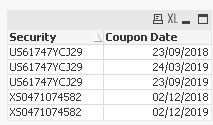
table1:
LOAD * FROM [https://community.qlik.com/thread/304503] (html, codepage is 1252, embedded labels, table is @1);

table2:
LOAD Security,
    DayName([Next Coupon]+365.2425/[Coupon Frequency]*(IterNo()-1)) as [Coupon Date]
Resident table1
While DayName([Next Coupon]+365.2425/[Coupon Frequency]*(IterNo()-1)) <= [Maturity Date];
hope this helps
regards
Marco
- Mark as New
- Bookmark
- Subscribe
- Mute
- Subscribe to RSS Feed
- Permalink
- Report Inappropriate Content
Thanks once again Sunny - correct answer as always!
That did solve my initial need, I now have one follow up if I may. I used your instructions above to add dates to my master calendar so I have all dates that either principal or coupon are paid on across a list of bonds.
//This is the list of maturity dates
DateLink:
LOAD
     ISIN,
     MATURITY as Date,
     'PRINCIPAL' as DateType
RESIDENT BONDS;

//This is the list of coupon payment dates
LOAD
     ISIN,
     Date(AddMonths(NEXT_CPN, (12/CPN_FREQ_CD) * (IterNo()-1))) as Date,
     'COUPON' as DateType
RESIDENT BONDS
While AddMonths(NEXT_CPN, (12/CPN_FREQ_CD) * (IterNo()-1)) <= MATURITY;
;

//Call Calendar Generator for field 'date'
CALL CalendarFromField('Date','CommonCalendar', '');
When I now create a table or a chart for the results, I used the 'DateType' to define principal or coupon and sum the relevant amount (notional or coupon) to get the cash-flows. However, on non-coupon or principal dates there is no value and the chart/pivot provides no result.
I have unticked 'supress zero values' but this does not make a difference.
Do I need to create a 'dummy' value in the table for non-coupon or principal dates to force it to recognise those dates?
sunny_talwar
- Mark as New
- Bookmark
- Subscribe
- Mute
- Subscribe to RSS Feed
- Permalink
- Report Inappropriate Content
What expression are you using to calculate principal or coupon in your chart? May be try to add this to your chart and see if this works
YourExpression + Sum({1} 0)
- Mark as New
- Bookmark
- Subscribe
- Mute
- Subscribe to RSS Feed
- Permalink
- Report Inappropriate Content
Thanks - that is a neat little trick and does force the extra dates, although if I then drill down into the results (e.g. select a particular year) then the results table will isolate that year and keep the rest of the records (which are then blank but not of interest, especially if I have 50+ years of dates.
The results pivot I am using is Year and Month (from the common calendar) and two expressions, one sum of principal, one sum of coupons.
sunny_talwar
- Mark as New
- Bookmark
- Subscribe
- Mute
- Subscribe to RSS Feed
- Permalink
- Report Inappropriate Content
How about if you just do this... assuming you have set analysis or if statement in YourExpression
YourExpression + Sum(0)
- Mark as New
- Bookmark
- Subscribe
- Mute
- Subscribe to RSS Feed
- Permalink
- Report Inappropriate Content
Excellent - thanks Sunny

 qliksus
- Mark as New
- Bookmark
- Subscribe
- Mute
- Subscribe to RSS Feed
- Permalink
- Report Inappropriate Content
Maybe this one too
load
Security,
date( date(NextCoupon) + ( (IterNo()-1)* ((date(MaturityDate)-date(NextCoupon))/CouponFrequency ) )) as test,
from a
While IterNo()-1<=CouponFrequency ;