Unlock a world of possibilities! Login now and discover the exclusive benefits awaiting you.

- Qlik Community
- :
- All Forums
- :
- QlikView
- :
- Creating a balance sheet hierarchy based on an exc...
- Subscribe to RSS Feed
- Mark Topic as New
- Mark Topic as Read
- Float this Topic for Current User
- Bookmark
- Subscribe
- Mute
- Printer Friendly Page

- Mark as New
- Bookmark
- Subscribe
- Mute
- Subscribe to RSS Feed
- Permalink
- Report Inappropriate Content
Creating a balance sheet hierarchy based on an excel file
Hello everyone,
I am currently analyzing SAP data where I have to recreate the
structure of a balance sheet in QlikView.
I basically have to tell QlikView to add up multiple smaller (sub)
accounts which are part of a hierachy.
Here is an example:
The account ,brand names' (1010) is a sub account of
,other tangible assets' (1000).
The account ,brand names' (1010) has the sub accounts
,brand names / definite life' (1011) and ,brand names / indefinite life' (1012).
The data in excel is structured like this:
1000
1010
1011
1012
1020
2011
2012
As you can see, every level of the hierarchy has its own column in excel.
Is there a way to let QlikView automatically add up all of the sub accounts per level so that I
can recreate the balance sheet and still be able to drill down to the sub accounts?
Thanks in advance for any input or thoughts you may have.
Best regards,
Mats
Accepted Solutions

 MarcoWedel
- Mark as New
- Bookmark
- Subscribe
- Mute
- Subscribe to RSS Feed
- Permalink
- Report Inappropriate Content
Hi,
maybe one solution might be:
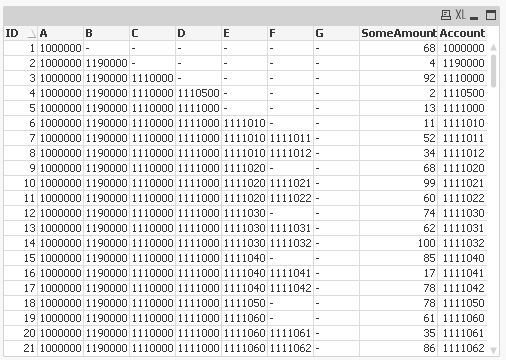
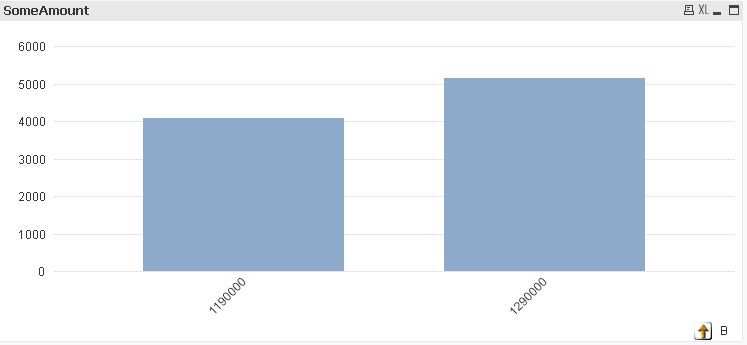
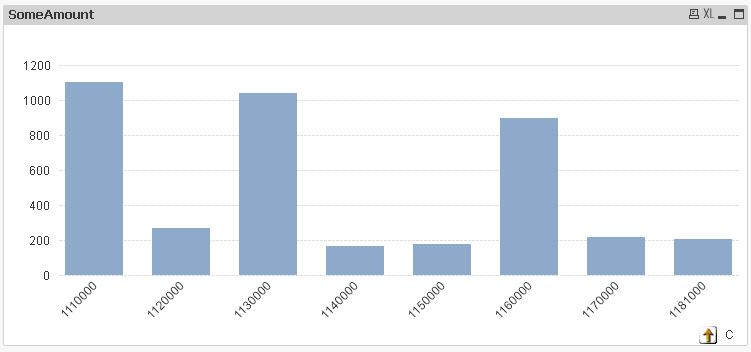
tabAccounts:
LOAD RecNo() as ID,
                          Alt(A,Peek(A))  as A,
    If(Len(A)=0  ,        Alt(B,Peek(B))) as B,
    If(Len(A&B)=0,        Alt(C,Peek(C))) as C,
    If(Len(A&B&C)=0,      Alt(D,Peek(D))) as D,
    If(Len(A&B&C&D)=0,    Alt(E,Peek(E))) as E,
    If(Len(A&B&C&D&E)=0,  Alt(F,Peek(F))) as F,
    If(Len(A&B&C&D&E&F)=0,Alt(G,Peek(G))) as G,
    Alt(G,F,E,D,C,B,A) as Account,
    Ceil(Rand()*100) as SomeAmount
FROM  (ooxml, no labels, table is Sheet1);
using the sample data you provided in your thread: Bilanz-/GuV-Struktur/Konzernhierarchie in QlikView
hope this helps
regards
Marco

 girirajsinh
- Mark as New
- Bookmark
- Subscribe
- Mute
- Subscribe to RSS Feed
- Permalink
- Report Inappropriate Content
You can achieve that using Hierarchy Load.
Please share sample data or application , it would be easier .
Find more on Hierarchy here
- Mark as New
- Bookmark
- Subscribe
- Mute
- Subscribe to RSS Feed
- Permalink
- Report Inappropriate Content
Hey Girirajsinh Vaghela,
thank you for your quick response.
I'll take a look at the provided content.
I've also attached a sample with the mentioned data structure.
Thanks again.
MarcoWedel
- Mark as New
- Bookmark
- Subscribe
- Mute
- Subscribe to RSS Feed
- Permalink
- Report Inappropriate Content
Hi,
maybe one solution might be:
tabAccounts:
LOAD RecNo() as ID,
                          Alt(A,Peek(A))  as A,
    If(Len(A)=0  ,        Alt(B,Peek(B))) as B,
    If(Len(A&B)=0,        Alt(C,Peek(C))) as C,
    If(Len(A&B&C)=0,      Alt(D,Peek(D))) as D,
    If(Len(A&B&C&D)=0,    Alt(E,Peek(E))) as E,
    If(Len(A&B&C&D&E)=0,  Alt(F,Peek(F))) as F,
    If(Len(A&B&C&D&E&F)=0,Alt(G,Peek(G))) as G,
    Alt(G,F,E,D,C,B,A) as Account,
    Ceil(Rand()*100) as SomeAmount
FROM  (ooxml, no labels, table is Sheet1);
using the sample data you provided in your thread: Bilanz-/GuV-Struktur/Konzernhierarchie in QlikView
hope this helps
regards
Marco
MarcoWedel
- Mark as New
- Bookmark
- Subscribe
- Mute
- Subscribe to RSS Feed
- Permalink
- Report Inappropriate Content
maybe also helpful:
Qlik Sense - Comparing field values by "Parsing" the digits composing this values
regards
Marco