Unlock a world of possibilities! Login now and discover the exclusive benefits awaiting you.

- Qlik Community
- :
- All Forums
- :
- QlikView
- :
- Creating calculated values as Dimension
- Subscribe to RSS Feed
- Mark Topic as New
- Mark Topic as Read
- Float this Topic for Current User
- Bookmark
- Subscribe
- Mute
- Printer Friendly Page

- Mark as New
- Bookmark
- Subscribe
- Mute
- Subscribe to RSS Feed
- Permalink
- Report Inappropriate Content
Creating calculated values as Dimension
Hello everybody, I am totally confused about my QlikView Application.
I'll try to calculated values for a Report. Therefore I have different sources, joined them and now I calculate the values in a PivotTable.
I want to count the number of Names listed for one ID.
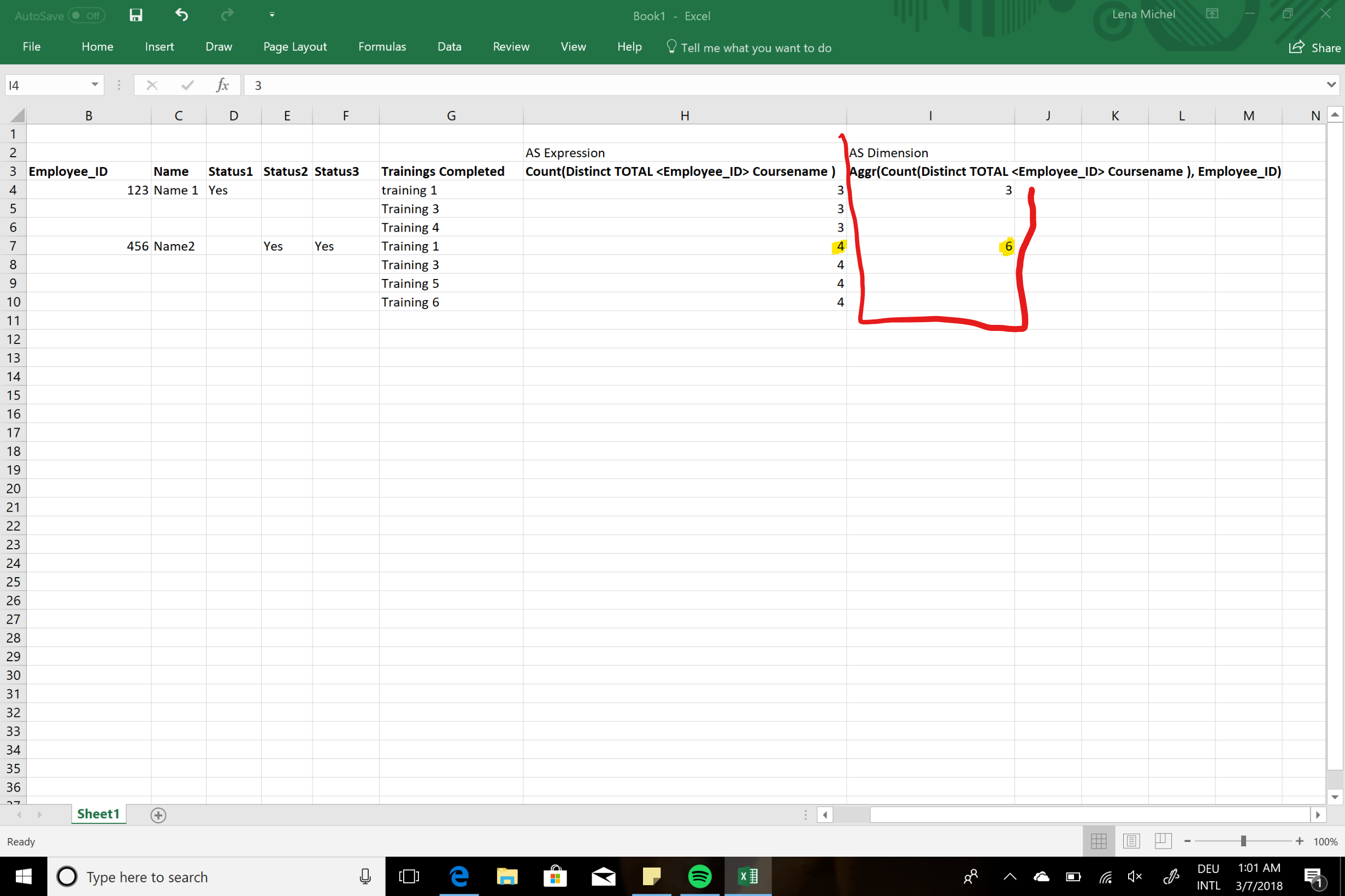
Therefore I made an Expression Field Count(Distinct TOTAL <Employee_ID> Coursename). The results are right. But I get all the results as often as the name exists.
So I tried to calculate a dimension with Aggr(Count(Distinct TOTAL <Employee_ID> Coursename), Employee_ID). Around 90% of the values are correct, but some of them aren't. I dont know why and tried nearly everything since three days.

 isingh30
- Mark as New
- Bookmark
- Subscribe
- Mute
- Subscribe to RSS Feed
- Permalink
- Report Inappropriate Content
Please share your data or app.
Thank you!

 Digvijay_Singh
- Mark as New
- Bookmark
- Subscribe
- Mute
- Subscribe to RSS Feed
- Permalink
- Report Inappropriate Content
What do you get from this -
Aggr(Count(Distinct Coursename), Employee_ID)
Didn't understand this below?
But I get all the results as often as the name exists.
- Mark as New
- Bookmark
- Subscribe
- Mute
- Subscribe to RSS Feed
- Permalink
- Report Inappropriate Content
I tried to explain that issue in the Picture below. I want to count the number of trainings completed for each ID. As Expression the values are right. When I try to use a Dimension with Aggr I get nearly the right values, but around 10% of the values are incorrect.