Unlock a world of possibilities! Login now and discover the exclusive benefits awaiting you.

- Qlik Community
- :
- All Forums
- :
- QlikView
- :
- CrossTable load on a resident table
- Subscribe to RSS Feed
- Mark Topic as New
- Mark Topic as Read
- Float this Topic for Current User
- Bookmark
- Subscribe
- Mute
- Printer Friendly Page

 ashish_2511
- Mark as New
- Bookmark
- Subscribe
- Mute
- Subscribe to RSS Feed
- Permalink
- Report Inappropriate Content
CrossTable load on a resident table
Dear Community -
Here are my input and output tables, Please suggest the best way to achieve this by using resident load and not crosstable load, I/p table is already loaded into qlikview
I/p Table -
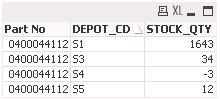
O/p Table -
| Part No | S1Stock | S2Stock | S3Stock | S4Stock |
| 400044112 | 1643 | 34 | -3 | 12 |
Thanks in advance
-Sneh
- « Previous Replies
-
- 1
- 2
- Next Replies »

 karthiksrqv
- Mark as New
- Bookmark
- Subscribe
- Mute
- Subscribe to RSS Feed
- Permalink
- Report Inappropriate Content
Hi,
If you want the display format to same as O/P, then create a pivot table. After you create, drag the expressions to make it display horizontally.


- Mark as New
- Bookmark
- Subscribe
- Mute
- Subscribe to RSS Feed
- Permalink
- Report Inappropriate Content
May be this?
Generic LOAD Part*1 as [Part No], Dept & '' & 'Stock' as Dept, Stock Inline [
Part, Dept, Stock
0400044112, S1, 1643
0400044112, S2, 34
0400044112, S3, -3
0400044112, S4, 12
];

 stabben23
- Mark as New
- Bookmark
- Subscribe
- Mute
- Subscribe to RSS Feed
- Permalink
- Report Inappropriate Content
Hi,
the easiest way is to create a pivot and drag and drop the DEPOT_CD Dimension a "top" Dimension.
ashish_2511
- Mark as New
- Bookmark
- Subscribe
- Mute
- Subscribe to RSS Feed
- Permalink
- Report Inappropriate Content
Hi. Thanks!
I'm not looking for a Pivot table as I finally want it to be displayed in a table box along with 15 other fields.
Please suggest a way to achieve this as a standalone table in load script.
ashish_2511
- Mark as New
- Bookmark
- Subscribe
- Mute
- Subscribe to RSS Feed
- Permalink
- Report Inappropriate Content
Hi. Thanks!
I'm not looking for a Pivot table as I finally want it to be displayed in a table box along with 15 other fields.
Please suggest a way to achieve this as a standalone table in load script.
ashish_2511
- Mark as New
- Bookmark
- Subscribe
- Mute
- Subscribe to RSS Feed
- Permalink
- Report Inappropriate Content
Hi Anil.
This is not Working
- Mark as New
- Bookmark
- Subscribe
- Mute
- Subscribe to RSS Feed
- Permalink
- Report Inappropriate Content
When you say, This is not working you should mention the reason. And then I've tested with your data and i did and it showing as you expected in that image
ashish_2511
- Mark as New
- Bookmark
- Subscribe
- Mute
- Subscribe to RSS Feed
- Permalink
- Report Inappropriate Content
Hi Anil
Sorry for not mentioning the reason. This is fine but since this creates 4 separate tables in Data model, How do I join this with some other table? or how'd I store this to a qvd?
Thanks!

- Mark as New
- Bookmark
- Subscribe
- Mute
- Subscribe to RSS Feed
- Permalink
- Report Inappropriate Content
Hi
check out the revers cross table option:
http://community.qlik.com/message/78337#78337
kr, Norbert
- « Previous Replies
-
- 1
- 2
- Next Replies »