Unlock a world of possibilities! Login now and discover the exclusive benefits awaiting you.

- Qlik Community
- :
- All Forums
- :
- QlikView
- :
- Cummulating in Scrip with one Month value missing
- Subscribe to RSS Feed
- Mark Topic as New
- Mark Topic as Read
- Float this Topic for Current User
- Bookmark
- Subscribe
- Mute
- Printer Friendly Page

 manish_kumar
- Mark as New
- Bookmark
- Subscribe
- Mute
- Subscribe to RSS Feed
- Permalink
- Report Inappropriate Content
Cummulating in Scrip with one Month value missing
Hi
I have a data with some valued on monthly basis. But for one month value is not there.
Thus when I cummulate the data in script it omits the row for the month which is not having the data. I need the cummulative value for that month also which is not having the value itself.
Original data
| Month | Values |
| 01-04-2015 | 80615 |
| 01-05-2015 | 74193 |
| 01-06-2015 | 74193 |
| 01-07-2015 | 74193 |
| 01-08-2015 | 74193 |
| 01-09-2015 | 74193 |
| 01-10-2015 | 78336 |
| 01-11-2015 | 74193 |
| 01-12-2015 | 74193 |
| 01-01-2016 | 74893 |
| 01-03-2016 | 8357 |
Desired result
| Month | Cummuative Values |
| 01-04-2015 | 80615 |
| 01-05-2015 | 154808 |
| 01-06-2015 | 229001 |
| 01-07-2015 | 303194 |
| 01-08-2015 | 377387 |
| 01-09-2015 | 451580 |
| 01-10-2015 | 529916 |
| 01-11-2015 | 604109 |
| 01-12-2015 | 678302 |
| 01-01-2016 | 753195 |
| 01-02-2016 | 753195 |
| 01-03-2016 | 761552 |

- Mark as New
- Bookmark
- Subscribe
- Mute
- Subscribe to RSS Feed
- Permalink
- Report Inappropriate Content
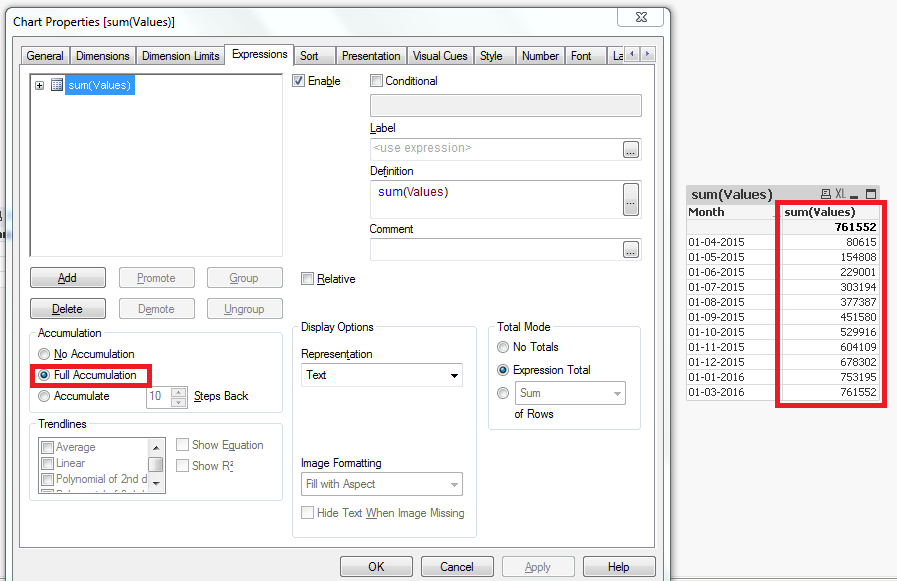
May be using, Full accumulation for Sum(Values) in expression Tab of Straight table, For ref please follow the image
Or May be expression
Rangesum(Below(Sum(Values),0),Above(Values,1,1000))
manish_kumar
- Mark as New
- Bookmark
- Subscribe
- Mute
- Subscribe to RSS Feed
- Permalink
- Report Inappropriate Content
Thanks for the reply.
I need this work to be done in Back end only. Because I have to apply further logics on Cummulative values. 

 rubenmarin
- Mark as New
- Bookmark
- Subscribe
- Mute
- Subscribe to RSS Feed
- Permalink
- Report Inappropriate Content
Hi Manish, having a calendar can help generating the missing months:
Data:
LOAD Date#(Month, 'DD-MM-YYYY') as Month, Values Inline [
Month, Values
01-04-2015, 80615
01-05-2015, 74193
01-06-2015, 74193
01-07-2015, 74193
01-08-2015, 74193
01-09-2015, 74193
01-10-2015, 78336
01-11-2015, 74193
01-12-2015, 74193
01-01-2016, 74893
01-03-2016, 8357
];
Calendar:
Load Date(AddMonths(MinMonth, IterNo())) as Month While MaxMonth >= AddMonths(MinMonth, IterNo());
LOAD Min(Month) as MinMonth,
Max(Month) as MaxMonth
Resident Data;
Maybe you need to uncheck the 'Supress zero values' option in presentation tab.
To know more about missing data: Generating Missing Data In QlikView
And about calendars: How to use - Master-Calendar and Date-Values
 ahaahaaha
- Mark as New
- Bookmark
- Subscribe
- Mute
- Subscribe to RSS Feed
- Permalink
- Report Inappropriate Content
Hi
It uses the principle of creating a Master-Calendar.
Month: //Generate the first day of the month date
LOAD
AddMonths(Date('01.04.2015'), RecNo() - 1) as Month
autogenerate 12;
Left Join //Left connection load the raw data
LOAD*Inline
[
Month, Values
01.04.2015, 80615
01.05.2015, 74193
01.06.2015, 74193
01.07.2015, 74193
01.08.2015, 74193
01.09.2015, 74193
01.10.2015, 78336
01.11.2015, 74193
01.12.2015, 74193
01.01.2016, 74893
01.03.2016, 8357
];
Table1: //Form a table with a cumulative sum
NoConcatenate
LOAD*,
Rangesum(Values, peek('CummuativeValues')) as CummuativeValues
Resident Month;
DROP Table Month;
The result is a table
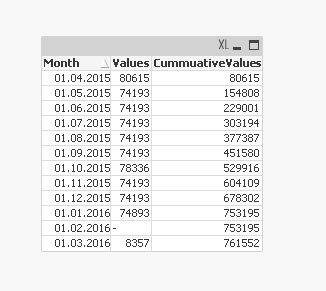
If the raw data is loaded from an external source (for example, file xls), the end result can be formed at once by making a left connection with the accumulation the sum.
Regards
Andrey
