Unlock a world of possibilities! Login now and discover the exclusive benefits awaiting you.

- Qlik Community
- :
- All Forums
- :
- QlikView
- :
- Re: Cumulative Formula Previous Month
- Subscribe to RSS Feed
- Mark Topic as New
- Mark Topic as Read
- Float this Topic for Current User
- Bookmark
- Subscribe
- Mute
- Printer Friendly Page

 Chloe19
- Mark as New
- Bookmark
- Subscribe
- Mute
- Subscribe to RSS Feed
- Permalink
- Report Inappropriate Content
Cumulative Formula Previous Month
Hi
I have the below formula to give me the cumulative.
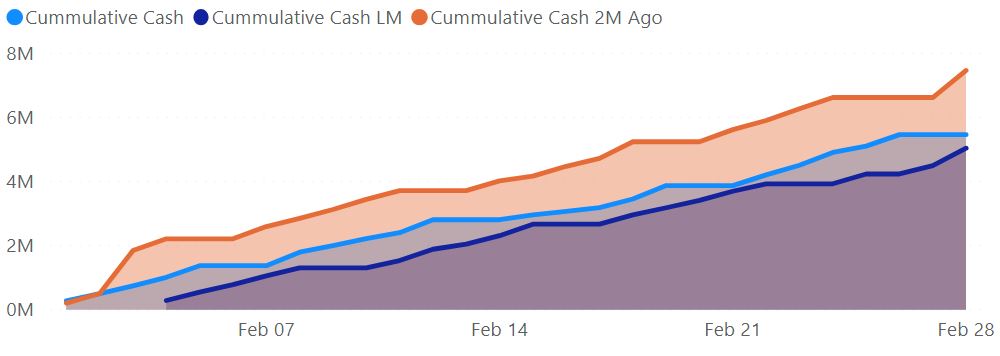
However, how would I amend it to give me the cumulative for the previous month or 2 months ago.
So regardless is I select to filter on MAY it would give me APRIL or if I filter JUN it would give me MAY
$(accum)Sum(TOTAL_CASH)$(/accum)
Thank you
(see attached what I achieved in POWER BI but I am struggling replicating in QLIK (below is the POWER BI formula)
Cummulative Cash = CALCULATE([Total Cash],FILTER(ALLSELECTED('Date'),'Date'[Date] <= MAX('Date'[Date])))
- Subscribe by Topic:
-
Application Development
-
Creating Analytics
-
Layout & Visualizations
-
QlikView App Dev
-
Scripting

 stevejoyce
- Mark as New
- Bookmark
- Subscribe
- Mute
- Subscribe to RSS Feed
- Permalink
- Report Inappropriate Content
If the date/time dimension is used in your chart, you can use rangesum(above()) which you can pass through your expression, start (t-1, t-2, etc) and end row (current row value).
Chloe19
- Mark as New
- Bookmark
- Subscribe
- Mute
- Subscribe to RSS Feed
- Permalink
- Report Inappropriate Content
Hi
Thanks for the response I tried the below, doesn't work, no result, any suggestions?
[Cash Date] is my date dimension
aggr(RANGESUM(ABOVE($(accum)Sum(TOTAL_CASH)$(/accum), 0, ROWNO()) ), [Cash Date], (-1))
