Unlock a world of possibilities! Login now and discover the exclusive benefits awaiting you.

- Qlik Community
- :
- All Forums
- :
- QlikView
- :
- Customer sorting
- Subscribe to RSS Feed
- Mark Topic as New
- Mark Topic as Read
- Float this Topic for Current User
- Bookmark
- Subscribe
- Mute
- Printer Friendly Page

 nevilledhamsiri
- Mark as New
- Bookmark
- Subscribe
- Mute
- Subscribe to RSS Feed
- Permalink
- Report Inappropriate Content
Customer sorting
Hi members,
I need the branches to be sorted as like below.
1 RA
2 EH
3 K7
4 K9
5 EM
6 AS
7 TA
8 MY
I need this to be done in the form of an expression but not in the front end.
Thanks
Neville
Accepted Solutions

 JGMDataAnalysis
- Mark as New
- Bookmark
- Subscribe
- Mute
- Subscribe to RSS Feed
- Permalink
- Report Inappropriate Content
SortingMap:
MAPPING LOAD *
INLINE [
txt, num
RA, 1
EH, 2
K7, 3
K9, 4
EM, 5
AS, 6
TA, 7
MY, 8
];
NOCONCATENATE
LOAD
BRANCH,
PREMIUM,
Dual(BRANCH, ApplyMap('SortingMap', BRANCH, 100000)) AS BranchTemp
FROM [D:\CUSTOMER SORTING.xlsx] (ooxml, embedded labels, table is Sheet1);
DROP FIELD BRANCH; RENAME FIELD BranchTemp TO BRANCH;
JGMDataAnalysis
- Mark as New
- Bookmark
- Subscribe
- Mute
- Subscribe to RSS Feed
- Permalink
- Report Inappropriate Content
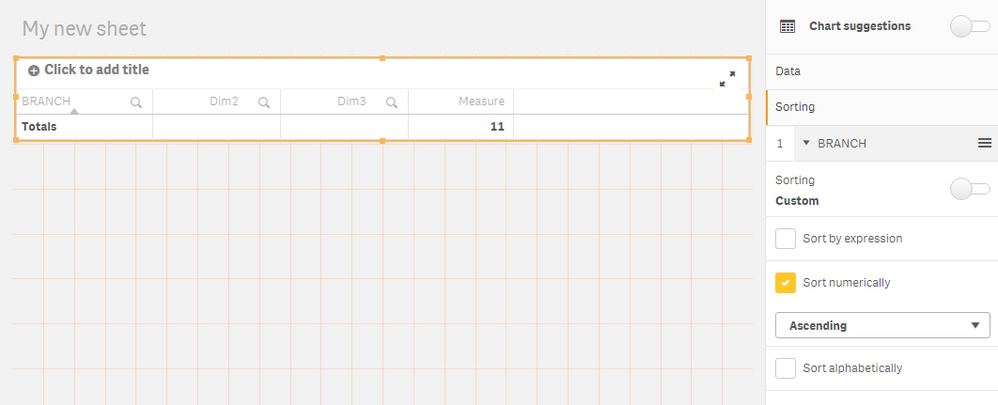
You just have to add the BRANCH field as a dimension in a chart and make sure it is numerically ordered.

 sunny_talwar
- Mark as New
- Bookmark
- Subscribe
- Mute
- Subscribe to RSS Feed
- Permalink
- Report Inappropriate Content
As an expression, but not on front end? what do you mean? Not sure I completely understand
nevilledhamsiri
- Mark as New
- Bookmark
- Subscribe
- Mute
- Subscribe to RSS Feed
- Permalink
- Report Inappropriate Content
Yes,
It likes, I need this to be achieved not in the script level. May be as a calculated dimension etc
JGMDataAnalysis
- Mark as New
- Bookmark
- Subscribe
- Mute
- Subscribe to RSS Feed
- Permalink
- Report Inappropriate Content
SortingMap:
MAPPING LOAD *
INLINE [
txt, num
RA, 1
EH, 2
K7, 3
K9, 4
EM, 5
AS, 6
TA, 7
MY, 8
];
NOCONCATENATE
LOAD
BRANCH,
PREMIUM,
Dual(BRANCH, ApplyMap('SortingMap', BRANCH, 100000)) AS BranchTemp
FROM [D:\CUSTOMER SORTING.xlsx] (ooxml, embedded labels, table is Sheet1);
DROP FIELD BRANCH; RENAME FIELD BranchTemp TO BRANCH;
nevilledhamsiri
- Mark as New
- Bookmark
- Subscribe
- Mute
- Subscribe to RSS Feed
- Permalink
- Report Inappropriate Content
Thanks JGMD
This is fine. If this is to be achieved in front end,how it will b done?
Thanks
Neville
JGMDataAnalysis
- Mark as New
- Bookmark
- Subscribe
- Mute
- Subscribe to RSS Feed
- Permalink
- Report Inappropriate Content
You just have to add the BRANCH field as a dimension in a chart and make sure it is numerically ordered.
