Unlock a world of possibilities! Login now and discover the exclusive benefits awaiting you.

- Qlik Community
- :
- All Forums
- :
- QlikView
- :
- Customers not spent
- Subscribe to RSS Feed
- Mark Topic as New
- Mark Topic as Read
- Float this Topic for Current User
- Bookmark
- Subscribe
- Mute
- Printer Friendly Page

- Mark as New
- Bookmark
- Subscribe
- Mute
- Subscribe to RSS Feed
- Permalink
- Report Inappropriate Content
Customers not spent
Hi guys,
I am trying to find customers who haven't spent in a particular period. I am trying to use an expression
=sum({<[invoice_value]={'0'}>} invoice_value)

This isn't returning any records. If I try this in SQL though by doing having sum(val) = 0 this works fine and shows me the customers. I am guessing this isn't possible in Qlikview or I am going about this wrong.
Can anyone help me here?
Thanks
- Tags:
- new_to_qlikview

 datanibbler
- Mark as New
- Bookmark
- Subscribe
- Mute
- Subscribe to RSS Feed
- Permalink
- Report Inappropriate Content
Hi Jamel,
that formula seems to be correct - but it would logically always return 0 as that's what you have specified in your set_expression. You want to know how many customers are there, no? Then you have to use COUNT()
HTH
Best regards,
DataNibbler
- Mark as New
- Bookmark
- Subscribe
- Mute
- Subscribe to RSS Feed
- Permalink
- Report Inappropriate Content
Hi there,
Thanks for your reply. I would like to return these customers as basically our sales team will want to call the customers who haven't spent so I need Qlikview to show them..
I was thinking of adding something into the dimension like
=if(sum(invoice_value = 0),invoice_CustNo)
But this didn't work either... Doh
datanibbler
- Mark as New
- Bookmark
- Subscribe
- Mute
- Subscribe to RSS Feed
- Permalink
- Report Inappropriate Content
Hi,
so you really need the individual records with the names of those customers, not just their number or some aggregated info.
Then you'll need to specify some binary field (1 or 0) in the script which you can use to display the names of those customers whose invoice_value=0 on the GUI - or even put them in variables and send them via email.
Best regards,
DataNibbler
- Mark as New
- Bookmark
- Subscribe
- Mute
- Subscribe to RSS Feed
- Permalink
- Report Inappropriate Content
If you want to count Customers:
=count(distinct if(aggr(sum(invoice_value),Customer)=0, Customer))
If you want to use Customer in calculated dimension:
=only(if(aggr(sum(invoice_value),Customer)=0, Customer))

 buzzy996
- Mark as New
- Bookmark
- Subscribe
- Mute
- Subscribe to RSS Feed
- Permalink
- Report Inappropriate Content
try this
1. add in ur script this statement Set NullInterpret = '';
2. add in ur expr =sum([invoice_value]=null())

 luciancotea
- Mark as New
- Bookmark
- Subscribe
- Mute
- Subscribe to RSS Feed
- Permalink
- Report Inappropriate Content
From a business perspective, you need to detail your requirements: you are not simply looking all the customers who didn't purchased anything in a period, that will return all historical customers. Also you want to exclude accidental/unique purchases (definition depends on industry).
I would define: from all the active customers in the last 6 months (over a certain value, we don't want to waste time on very small customers), return all the customers that didn't purchase anything in the last month.
Further more, you may want to return not only lost customers, but also the ones that suffered a drastic reduction of their purchases, lets say 30%.
Again, these numbers depends on the industry.
- Mark as New
- Bookmark
- Subscribe
- Mute
- Subscribe to RSS Feed
- Permalink
- Report Inappropriate Content
Hi guys,
I have tackled this from a different angle. I've basically added two states two my document so a user can pick dates within the two states. This then returns the values for either range
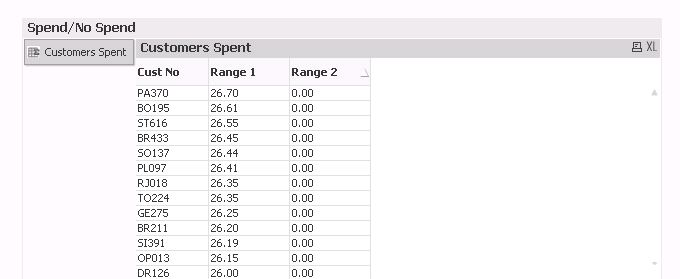
I have sorted this by "Range 2" so customers who haven't spent appear at the top. I am however seeing customers who have spent
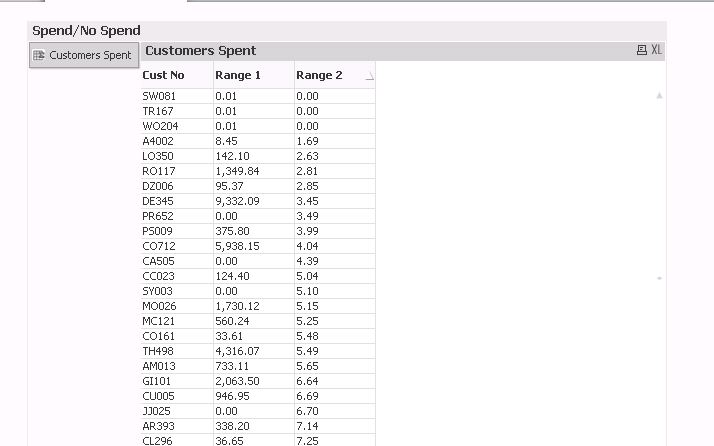
Is there a way to not show these in the table? I am getting close now !!
Thanks guys
buzzy996
- Mark as New
- Bookmark
- Subscribe
- Mute
- Subscribe to RSS Feed
- Permalink
- Report Inappropriate Content
u can create two variables
1 for range from 2nd for range to
tell them ur customer
they can pick from any value to any to value.
hopes helps!
- Mark as New
- Bookmark
- Subscribe
- Mute
- Subscribe to RSS Feed
- Permalink
- Report Inappropriate Content
Hi there,
I don't think that will work as I want to see only the customers when they haven't spent. I have created a new expression which will return "No Spend" if the customer hasn't spent in Range 2 and a dash "-" appears if they have spent..
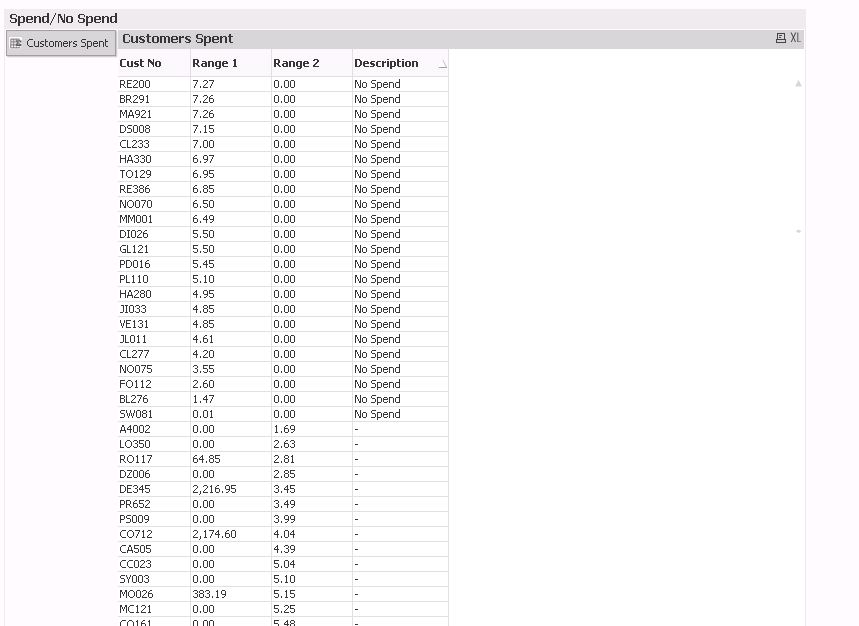
This is the expression I've used to get this
=if(Match(sum({[No Spend]<[invoice_value]={'>0'}>} invoice_value),'0'),'No Spend')
Is there a way to create a list box or something so they choose "No Spend" and this only chooses those customers?
Thanks for all your help so far 