Unlock a world of possibilities! Login now and discover the exclusive benefits awaiting you.

- Qlik Community
- :
- All Forums
- :
- QlikView
- :
- Customized Color in Bar Chart
- Subscribe to RSS Feed
- Mark Topic as New
- Mark Topic as Read
- Float this Topic for Current User
- Bookmark
- Subscribe
- Mute
- Printer Friendly Page

- Mark as New
- Bookmark
- Subscribe
- Mute
- Subscribe to RSS Feed
- Permalink
- Report Inappropriate Content
Customized Color in Bar Chart
Dear all,
I'm new in qlikview. I have a calculative dimension. Based on my calculative dimension my bar chart is generated. now my requirement is few bar will be red color and few bar will be green color. ( A1-3, A4-7, A8-10, A11-15, A16-21, A30+ will be Green Color and L1-3, L4-7 will be RED color). My calculative dimension is :
If (PO_Ex_Factory_Date-PO_DATE<=-30,Dual('A30+',7),
If (PO_Ex_Factory_Date-PO_DATE<=-22,Dual('A22-30',6),
If (PO_Ex_Factory_Date-PO_DATE<=-16,Dual('A16-21',5),
If (PO_Ex_Factory_Date-PO_DATE<=-11,Dual('A11-15',4),
If (PO_Ex_Factory_Date-PO_DATE<=-8,Dual('A8-10',3),
If (PO_Ex_Factory_Date-PO_DATE<=-4,Dual('A4-7',2),
If (PO_Ex_Factory_Date-PO_DATE<=-1,Dual('A1-3',1),
if(PO_Ex_Factory_Date-PO_DATE=0, Dual('Ontime',8),
If (PO_Ex_Factory_Date-PO_DATE <=3, Dual('L1-3',9),
If (PO_Ex_Factory_Date-PO_DATE<=7, Dual('L4-7',10),
If (PO_Ex_Factory_Date-PO_DATE<=10, Dual('L8-10',11),
If(PO_Ex_Factory_Date-PO_DATE<=15, Dual('L11-15,12)',
If (PO_Ex_Factory_Date-PO_DATE<=21, Dual('L16-21',13),
If (PO_Ex_Factory_Date-PO_DATE<=30, Dual('L22-30',14),
If (PO_Ex_Factory_Date-PO_DATE>=30, Dual('L30+',15)))))))))))))))))
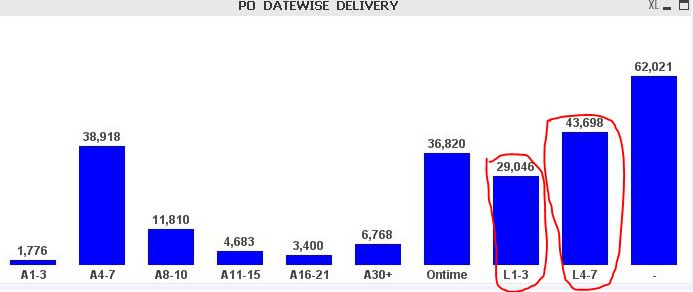
I have also write down below script in expression but now working..
=if(Match(Text(Floor(PO_Ex_Factory_Date-PO_DATE <=3)),'L1-3'),RGB(255, 0, 0)).
For your better undearstanding please find attachment..
Regards,
Masba
- Tags:
- new_to_qlikview
Accepted Solutions

 jonathandienst
- Mark as New
- Bookmark
- Subscribe
- Mute
- Subscribe to RSS Feed
- Permalink
- Report Inappropriate Content
Hi
Your dimension expression may be incorrect:
If (PO_Ex_Factory_Date - PO_DATE <= -30, Dual('A30+',7),
If (PO_Ex_Factory_Date - PO_DATE <= -22, Dual('A22-30',6),
I assume that you are trying to compare (PO_Ex_Factory_Date - PO_DATE) with -30, -20 etc. But you are comparing PO_DATE rather than the difference...
You probably need
If ( (PO_Ex_Factory_Date - PO_DATE) <= -30, Dual('A30+',7),
If ( (PO_Ex_Factory_Date - PO_DATE) <= -22, Dual('A22-30',6),
Your colour expression has the same mistake, and just getting the text() version of the comparison is not going to get the text value of the duals in the dimension.
I would create a derived dual field in my load script (named OnTime for example) using the same logic as your calculated dimension, and then use this field as a conventional dimension, and a conventional colour expression:
=If(OnTime = 'L1 - 3', , RGB(255, 0, 0))
HTH
Jonathan
jonathandienst
- Mark as New
- Bookmark
- Subscribe
- Mute
- Subscribe to RSS Feed
- Permalink
- Report Inappropriate Content
Hi
Your dimension expression may be incorrect:
If (PO_Ex_Factory_Date - PO_DATE <= -30, Dual('A30+',7),
If (PO_Ex_Factory_Date - PO_DATE <= -22, Dual('A22-30',6),
I assume that you are trying to compare (PO_Ex_Factory_Date - PO_DATE) with -30, -20 etc. But you are comparing PO_DATE rather than the difference...
You probably need
If ( (PO_Ex_Factory_Date - PO_DATE) <= -30, Dual('A30+',7),
If ( (PO_Ex_Factory_Date - PO_DATE) <= -22, Dual('A22-30',6),
Your colour expression has the same mistake, and just getting the text() version of the comparison is not going to get the text value of the duals in the dimension.
I would create a derived dual field in my load script (named OnTime for example) using the same logic as your calculated dimension, and then use this field as a conventional dimension, and a conventional colour expression:
=If(OnTime = 'L1 - 3', , RGB(255, 0, 0))
HTH
Jonathan