Unlock a world of possibilities! Login now and discover the exclusive benefits awaiting you.

- Qlik Community
- :
- All Forums
- :
- QlikView
- :
- Customized straight table.
- Subscribe to RSS Feed
- Mark Topic as New
- Mark Topic as Read
- Float this Topic for Current User
- Bookmark
- Subscribe
- Mute
- Printer Friendly Page

- Mark as New
- Bookmark
- Subscribe
- Mute
- Subscribe to RSS Feed
- Permalink
- Report Inappropriate Content
Customized straight table.
Hi Everyone,
I have a data table similar that is similar to
| ID | Year | Status | Tans Time | Wait Time | Cost |
|---|---|---|---|---|---|
| 1 | 2015 | Arrived | 123 | 545 | 1 |
| 2 | 2015 | Arrived | 125 | 123 | 1 |
| 3 | 2015 | Arrived | 324 | 231 | 2 |
| 4 | 2015 | Arrived | 435 | 133 | 4 |
| 1 | 2015 | Served | 234 | 255 | 5 |
| 3 | 2015 | Served | 524 | 122 | 3 |
I want a Table in output similar to
| Center | 2015 |
|---|---|
| Arrived | 4 |
| Served | 2 |
| % Served | 50% |
| Avg Tans Time | 254 |
| Avg wait Time | 300 |
| Cost per trans | 2.4 |
How can achieve this ?? do we have any object that can create customized rows like this??
- « Previous Replies
-
- 1
- 2
- Next Replies »
Accepted Solutions

 sunny_talwar
- Mark as New
- Bookmark
- Subscribe
- Mute
- Subscribe to RSS Feed
- Permalink
- Report Inappropriate Content
No dimension:
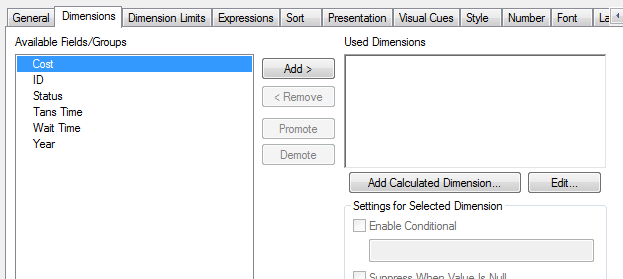
6 Expressions:
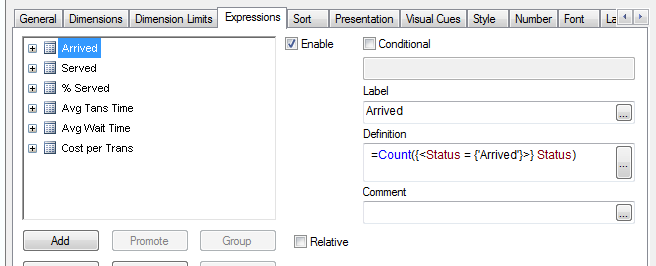
Exp1: =Count({<Status = {'Arrived'}>} Status)
Exp2: =Count({<Status = {'Served'}>} Status)
Exp3: =Served/Arrived
Exp4: =Avg([Tans Time])
Exp5: =Avg([Wait Time])
Exp6: =Avg(Cost)
Presentation tab -> Horizontal view checked:

sunny_talwar
- Mark as New
- Bookmark
- Subscribe
- Mute
- Subscribe to RSS Feed
- Permalink
- Report Inappropriate Content
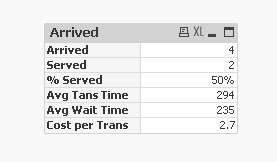
There are few ways to do this, one of this is using straight table and 6 expressions:
- Mark as New
- Bookmark
- Subscribe
- Mute
- Subscribe to RSS Feed
- Permalink
- Report Inappropriate Content
Hi Sunny,
Its Failing to open?
sunny_talwar
- Mark as New
- Bookmark
- Subscribe
- Mute
- Subscribe to RSS Feed
- Permalink
- Report Inappropriate Content
Do you have a personal edition of QlikView?
- Mark as New
- Bookmark
- Subscribe
- Mute
- Subscribe to RSS Feed
- Permalink
- Report Inappropriate Content
Yes, I have License but i think it has expired.
sunny_talwar
- Mark as New
- Bookmark
- Subscribe
- Mute
- Subscribe to RSS Feed
- Permalink
- Report Inappropriate Content
What is the error message that you are seeing?
- Mark as New
- Bookmark
- Subscribe
- Mute
- Subscribe to RSS Feed
- Permalink
- Report Inappropriate Content
Saying i have reached maximum number of recoveries done using this Personal Edition.
- Mark as New
- Bookmark
- Subscribe
- Mute
- Subscribe to RSS Feed
- Permalink
- Report Inappropriate Content
Can you Share a screenshot.??
sunny_talwar
- Mark as New
- Bookmark
- Subscribe
- Mute
- Subscribe to RSS Feed
- Permalink
- Report Inappropriate Content
No dimension:
6 Expressions:
Exp1: =Count({<Status = {'Arrived'}>} Status)
Exp2: =Count({<Status = {'Served'}>} Status)
Exp3: =Served/Arrived
Exp4: =Avg([Tans Time])
Exp5: =Avg([Wait Time])
Exp6: =Avg(Cost)
Presentation tab -> Horizontal view checked:
- Mark as New
- Bookmark
- Subscribe
- Mute
- Subscribe to RSS Feed
- Permalink
- Report Inappropriate Content
Thanks Sunny
- « Previous Replies
-
- 1
- 2
- Next Replies »