Unlock a world of possibilities! Login now and discover the exclusive benefits awaiting you.

- Qlik Community
- :
- All Forums
- :
- QlikView
- :
- DATE ISSUE
- Subscribe to RSS Feed
- Mark Topic as New
- Mark Topic as Read
- Float this Topic for Current User
- Bookmark
- Subscribe
- Mute
- Printer Friendly Page

 sagaraperera
- Mark as New
- Bookmark
- Subscribe
- Mute
- Subscribe to RSS Feed
- Permalink
- Report Inappropriate Content
DATE ISSUE
Dear all
how to make " 'MMM YYYY as TRANS_DATE," using the script given below
my Script
BCOD,
MONTH,
YEAR,
MONTH2,
CLA_CODE,
MONM,
GROSS_PREMIUM,
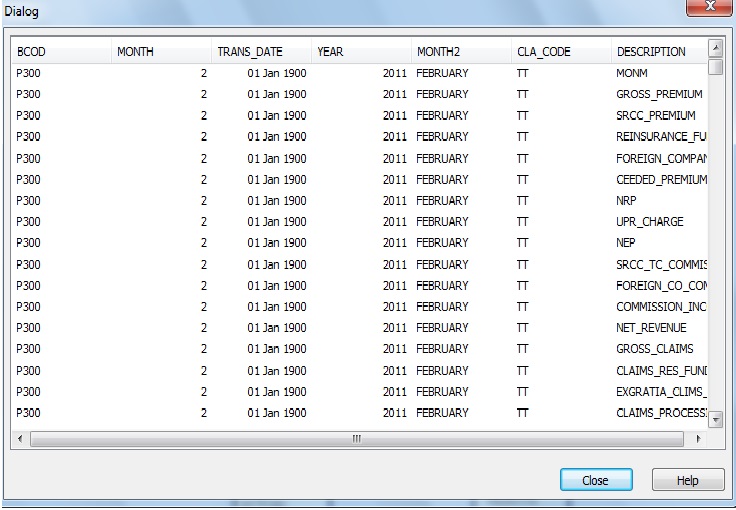
I previously used the script, Date(MONTH,'MMM YYYY') as TRANS_DATE.but the "TRANS_DATE" has not organized properly.
looking forward to a favorable reply.
SAGARA
- Tags:
- new_to_qlikview

 MK_QSL
- Mark as New
- Bookmark
- Subscribe
- Mute
- Subscribe to RSS Feed
- Permalink
- Report Inappropriate Content
Date (MonthStart (TRANS_DATE),'MMM YYYY') as TRANS_DATE

- Mark as New
- Bookmark
- Subscribe
- Mute
- Subscribe to RSS Feed
- Permalink
- Report Inappropriate Content
Try this one,
Text(Date(Today(),'MMM YYYY')) as Trans_date
 padmanabhan_ram
- Mark as New
- Bookmark
- Subscribe
- Mute
- Subscribe to RSS Feed
- Permalink
- Report Inappropriate Content
Hi Sagara,
Please try using the below code in the script while loading the dashboard.
Date#(FieldName,'MMM\YYYY') as FieldName
or
Date(FieldName,'MMM\YYYY') as FieldName
or
Date#(Date(FieldName,'MMM\YYYY'),'MMM\YYYY') as FieldName
Try the above codes one by one, check which one works for your format.
Regards,
Padmanabhan

 jagan
jagan
- Mark as New
- Bookmark
- Subscribe
- Mute
- Subscribe to RSS Feed
- Permalink
- Report Inappropriate Content
Hi,
Try like this
LOAD
*,
MakeDate(YEAR, MONTH) AS TRANS_DATE
FROM DataSource;
Regards,
Jagan.

 gautik92
- Mark as New
- Bookmark
- Subscribe
- Mute
- Subscribe to RSS Feed
- Permalink
- Report Inappropriate Content
Try this in Dimension Tab
=Date(TransactionDate,'MMM-YYYY')
 Kushal_Chawda
- Mark as New
- Bookmark
- Subscribe
- Mute
- Subscribe to RSS Feed
- Permalink
- Report Inappropriate Content
Use monthname(FiledName) as TRANS_DATE