Unlock a world of possibilities! Login now and discover the exclusive benefits awaiting you.

- Qlik Community
- :
- All Forums
- :
- QlikView
- :
- Re: Dashboard on Monitor Won't Stay Logged In
- Subscribe to RSS Feed
- Mark Topic as New
- Mark Topic as Read
- Float this Topic for Current User
- Bookmark
- Subscribe
- Mute
- Printer Friendly Page

 MeganStarkey
- Mark as New
- Bookmark
- Subscribe
- Mute
- Subscribe to RSS Feed
- Permalink
- Report Inappropriate Content
Dashboard on Monitor Won't Stay Logged In
Hi everyone -
I have a dashboard that is connected/displayed on several monitors managed via Splashtop.
It's got critical information that needs to be viewed realtime; it logs itself out about once or twice a day, and I have to go in manually and log back in each time so that it does not disrupt the department's productivity.
I've tried updating active session times, document timeout, all of those type settings (system wide and document wide) and it still is kicked out at least once a day. I need to be able to have it be logged in 24/7.
Any suggestions?
- « Previous Replies
-
- 1
- 2
- Next Replies »

 Chip_Matejowsky
- Mark as New
- Bookmark
- Subscribe
- Mute
- Subscribe to RSS Feed
- Permalink
- Report Inappropriate Content
Okay, "Socket closed by client' means that the webserver closed the connection or user clicked the "X" button and closed the session - "Exit Reason" in QlikView Server Session Log. So in your case, most likely that the webserver closed the connection. I've run into this issue previously and a browser extension that refreshes the session every minute or so typically prevents the session from being closed. Are you using the QlikView Web Server or IIS? If IIS, there may be a setting there you need to configure to prevent the session from closing.
Best Regards
Help users find answers! Don't forget to mark a solution that worked for you!
MeganStarkey
- Mark as New
- Bookmark
- Subscribe
- Mute
- Subscribe to RSS Feed
- Permalink
- Report Inappropriate Content
I'm not sure which we are using, but I'm seeing in another forum that if "Qlikview Web Server" is not listed in the Services in QMC, that it's likely that IIS is being used? I do not see "Qlikview Web Server" listed, so I would assume IIS.
Here's the browser extension that refreshes the page; I guess this extension has been on our dashboard for a while, according to more tenured folks on my team:

Do you know what the setting is for IIS that would need to be configure?
Thank you so much!
Chip_Matejowsky
- Mark as New
- Bookmark
- Subscribe
- Mute
- Subscribe to RSS Feed
- Permalink
- Report Inappropriate Content
You can tell which is being used by reviewing the QMC > System > About information and checking under the QVWS section. If the Product name is QlikView Web Server Service, then you're using QVWS. If the Product name is QlikView Web Server Settings Service, then you're using IIS.
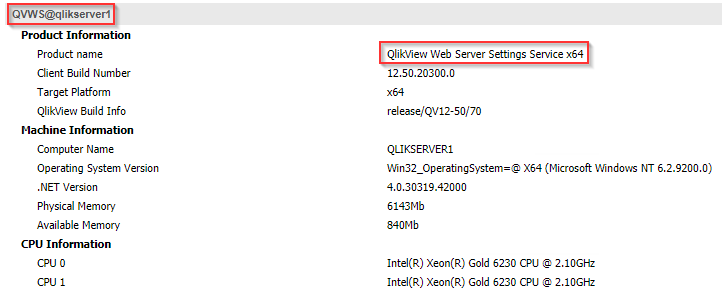
Sorry, but I don't know the setting in IIS that would govern this. You should be able to ask your internal Server team for assistance.
Best Regards
Help users find answers! Don't forget to mark a solution that worked for you!
MeganStarkey
- Mark as New
- Bookmark
- Subscribe
- Mute
- Subscribe to RSS Feed
- Permalink
- Report Inappropriate Content
Chip,
Thank you very much! Looks like we are indeed using IIS. Will investigate those settings further.
Appreciate all of the help.

- « Previous Replies
-
- 1
- 2
- Next Replies »