Unlock a world of possibilities! Login now and discover the exclusive benefits awaiting you.

- Qlik Community
- :
- All Forums
- :
- QlikView
- :
- Data model issue
- Subscribe to RSS Feed
- Mark Topic as New
- Mark Topic as Read
- Float this Topic for Current User
- Bookmark
- Subscribe
- Mute
- Printer Friendly Page

- Mark as New
- Bookmark
- Subscribe
- Mute
- Subscribe to RSS Feed
- Permalink
- Report Inappropriate Content
Data model issue
Hi everyone,
I need some help for the conception of my data model, I'm a bit lost. I just took over a project, and I have to finalize it.
But the conception is not goot enough to make the right things.
So here's the deal :
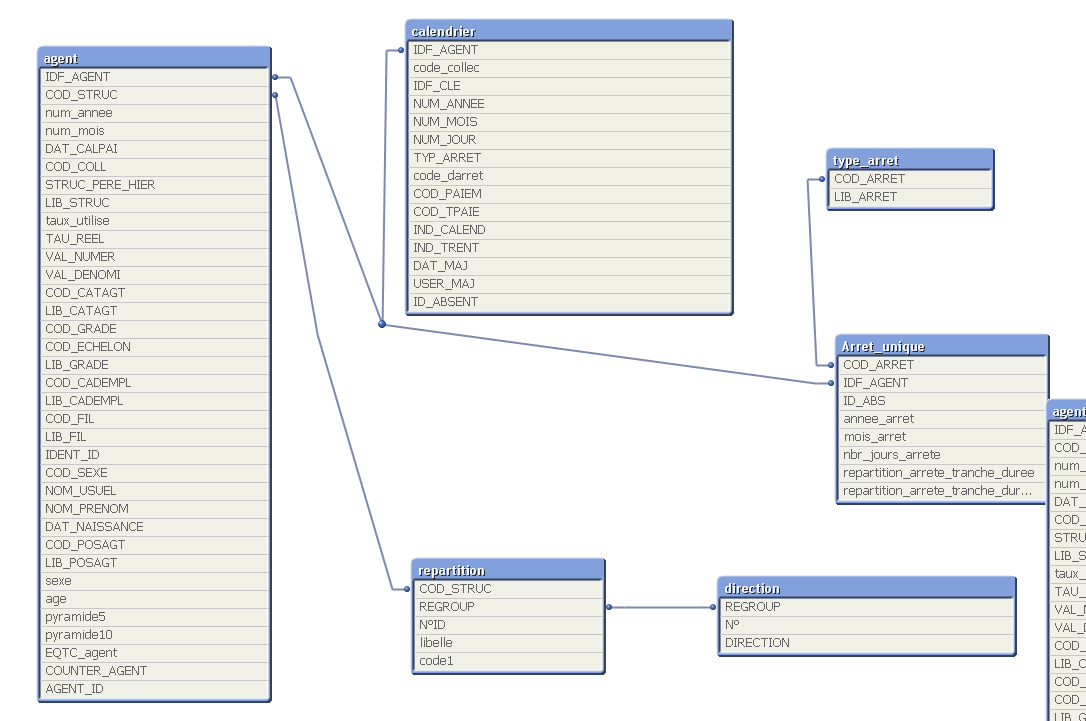
The important tables are Agent and Calendrier.
I have to calculate the percantage of absenteeism, by choosing between several years, and build an histogram with that.
So I have to count the number of days missed by all the employees at a year Y (or Y and Y+1 to see how it changed) and divide it by the number of employees the same year(s)
The table agent is build this way :
| IDF_AGENT | num_mois | num_annee |
|---|---|---|
12 | 1 | 2013 |
| 12 | 2 | 2013 |
| 15 | 5 | 2012 |
So the Agent #12 was employed in january and february 2013, and the #15 only on May 2012.
And the Calendrier
| IDF_AGENT | NUM_JOUR | NUM_MOIS | NUM_ANNEE |
|---|---|---|---|
| 12 | 2 | 2 | 2013 |
| 12 | 3 | 2 | 2013 |
| 12 | 4 | 2 | 2013 |
| 15 | 12 | 5 | 2012 |
The #12 missed 3 days in february and #15 only one day in may.
But when I want to make an histogram, there is an issue,because I can't link num_annee.agent and NUM_ANNEE.calendrier.
So I don't find a solution to solve it. Can I create a 3rd table which combine all the years ? But I don't know how to make it.
Rebuild a date model ? I don't see how to build it to make it better. Can someone help me ? I attached my qvw.
Thx a lot.
Accepted Solutions
- Mark as New
- Bookmark
- Subscribe
- Mute
- Subscribe to RSS Feed
- Permalink
- Report Inappropriate Content
Salut,
Je suppose au vu de ton appli que tu parle français 🙂
Alors une solution à ton problème, si je l'ai bien compris, pourrait être de rajouter le nombre de jour d'absence par IDF_AGENT dans ta table agent. Il faut pour cela créer une table temporaire qui va compter le nombre de jour d'absence par IDF_AGENT, par mois et par année et ensuite joindre cette table à la table agent.
En voici le code:
tmp:
LOAD
IDF_AGENT,
NUM_ANNEE as num_annee,
NUM_MOIS as num_mois,
count(NUM_JOUR) as NbJourAbsence
RESIDENT
calendrier
GROUP BY
IDF_AGENT,NUM_ANNEE,NUM_MOIS
;
JOIN
(agent)
LOAD
IDF_AGENT,
num_annee,
num_mois,
NbJourAbsence
RESIDENT
tmp
;
DROP TABLE tmp;
Maintenant que tu as le nombre de jour d'absence de chaque agent par mois et par année, tu peux faire ton graphe avec en dimension num_annee et/ou num_mois.
- Mark as New
- Bookmark
- Subscribe
- Mute
- Subscribe to RSS Feed
- Permalink
- Report Inappropriate Content
BTW, the histogram is in the Synthèse tab.
- Mark as New
- Bookmark
- Subscribe
- Mute
- Subscribe to RSS Feed
- Permalink
- Report Inappropriate Content
Salut,
Je suppose au vu de ton appli que tu parle français 🙂
Alors une solution à ton problème, si je l'ai bien compris, pourrait être de rajouter le nombre de jour d'absence par IDF_AGENT dans ta table agent. Il faut pour cela créer une table temporaire qui va compter le nombre de jour d'absence par IDF_AGENT, par mois et par année et ensuite joindre cette table à la table agent.
En voici le code:
tmp:
LOAD
IDF_AGENT,
NUM_ANNEE as num_annee,
NUM_MOIS as num_mois,
count(NUM_JOUR) as NbJourAbsence
RESIDENT
calendrier
GROUP BY
IDF_AGENT,NUM_ANNEE,NUM_MOIS
;
JOIN
(agent)
LOAD
IDF_AGENT,
num_annee,
num_mois,
NbJourAbsence
RESIDENT
tmp
;
DROP TABLE tmp;
Maintenant que tu as le nombre de jour d'absence de chaque agent par mois et par année, tu peux faire ton graphe avec en dimension num_annee et/ou num_mois.

 DavidFoster1
- Mark as New
- Bookmark
- Subscribe
- Mute
- Subscribe to RSS Feed
- Permalink
- Report Inappropriate Content
Hi Antonin.
The link between agent and calendar is confusing. The agent table looks like a set of employment records (this person, on this day). If that is correct, then the link to the calendar should be on a date value not the agent value.
Could you explain the purpose of both the tables?
- Mark as New
- Bookmark
- Subscribe
- Mute
- Subscribe to RSS Feed
- Permalink
- Report Inappropriate Content
Thanks for trying to help me David !
Et merci beaucoup sg_bobbyraj, c'était quand même assez simple, j'y avais pensé, mais je pensais qu'il y aurait une difficulté. M'enfin, tu me retires une grosse épine du pied !