Unlock a world of possibilities! Login now and discover the exclusive benefits awaiting you.

- Qlik Community
- :
- All Forums
- :
- QlikView
- :
- Date Expression
Options
- Subscribe to RSS Feed
- Mark Topic as New
- Mark Topic as Read
- Float this Topic for Current User
- Bookmark
- Subscribe
- Mute
- Printer Friendly Page
Turn on suggestions
Auto-suggest helps you quickly narrow down your search results by suggesting possible matches as you type.
Showing results for

Not applicable
2016-06-07
03:59 AM
- Mark as New
- Bookmark
- Subscribe
- Mute
- Subscribe to RSS Feed
- Permalink
- Report Inappropriate Content
Date Expression
Expression:
=if(Resolved > [Due Date],date([Due Date]),0)
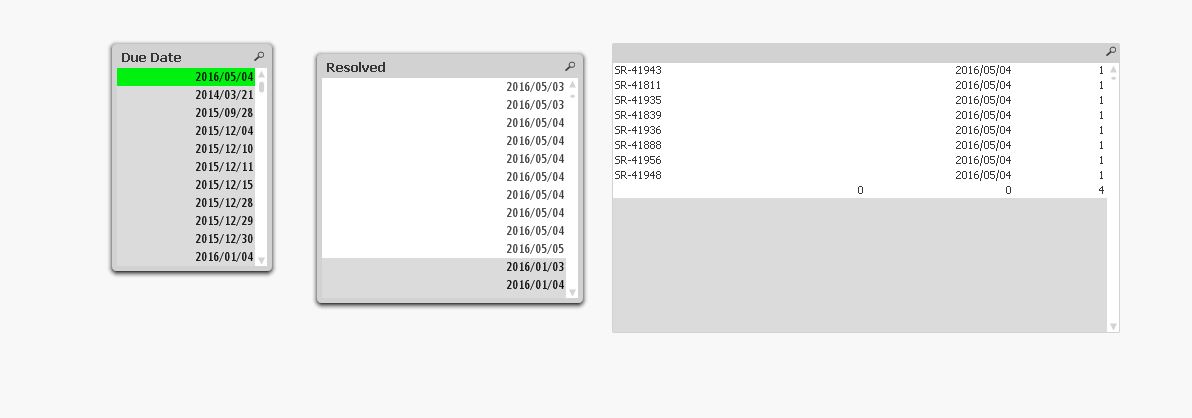
can any one check whats the Problem in this Expression.
using this Expression i am getting the same dates also of the two fields. but i want only bigger dates.
INFO: I have converted the time-stamp [Due Date] into Date
618 Views
2 Replies

 swuehl
Champion III
2016-06-07
04:43 AM
- Mark as New
- Bookmark
- Subscribe
- Mute
- Subscribe to RSS Feed
- Permalink
- Report Inappropriate Content
i assume you haven't transformed the timestamp to a date, you just formatted it using date() function.
In your script, use
Date(Floor(TIMESTAMPFIELD)) as DATEFIELD
 tresB
tresB
Champion III
2016-06-07
04:47 AM
- Mark as New
- Bookmark
- Subscribe
- Mute
- Subscribe to RSS Feed
- Permalink
- Report Inappropriate Content
While creating date field in the script, try using floor() like:
Date(floor(Resolved)) as Resolved
Then you would get single date in the list box for each date unlike you are having now.
529 Views