Unlock a world of possibilities! Login now and discover the exclusive benefits awaiting you.

Announcements
Want to see what's currently in public preview? We've pulled it all together in one place. Check it out here
- Qlik Community
- :
- All Forums
- :
- QlikView
- :
- Date Format issue
Options
- Subscribe to RSS Feed
- Mark Topic as New
- Mark Topic as Read
- Float this Topic for Current User
- Bookmark
- Subscribe
- Mute
- Printer Friendly Page
Turn on suggestions
Auto-suggest helps you quickly narrow down your search results by suggesting possible matches as you type.
Showing results for

Anonymous
Not applicable
2017-04-25
12:22 AM
- Mark as New
- Bookmark
- Subscribe
- Mute
- Subscribe to RSS Feed
- Permalink
- Report Inappropriate Content
Date Format issue
Hi All,
i am getting Date format iisue!
DB:
2017-04-12 21:51:51
QV:
1/9/0000 21:51:51
Regards,
2,867 Views
- « Previous Replies
-
- 1
- 2
- Next Replies »
15 Replies


2017-04-25
12:25 AM
- Mark as New
- Bookmark
- Subscribe
- Mute
- Subscribe to RSS Feed
- Permalink
- Report Inappropriate Content
May be use this?
=Timestamp('2017-04-12 21:51:51')
Best Anil, When applicable please mark the correct/appropriate replies as "solution" (you can mark up to 3 "solutions". Please LIKE threads if the provided solution is helpful
1,647 Views
Anonymous
Not applicable
2017-04-25
12:28 AM
Author
- Mark as New
- Bookmark
- Subscribe
- Mute
- Subscribe to RSS Feed
- Permalink
- Report Inappropriate Content
Nope already tried this
1,647 Views
2017-04-25
12:30 AM
- Mark as New
- Bookmark
- Subscribe
- Mute
- Subscribe to RSS Feed
- Permalink
- Report Inappropriate Content
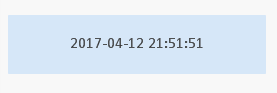
Where are you tried this? For me it is working
=Date(Timestamp('2017-04-12 21:51:51'),'YYYY-MM-DD hh:mm:ss')
Best Anil, When applicable please mark the correct/appropriate replies as "solution" (you can mark up to 3 "solutions". Please LIKE threads if the provided solution is helpful
1,647 Views

 prma7799
Master III
2017-04-25
12:37 AM
- Mark as New
- Bookmark
- Subscribe
- Mute
- Subscribe to RSS Feed
- Permalink
- Report Inappropriate Content
Try like below
=Timestamp# ('2017-04-12 21:51:51 ' )
or
=Timestamp#(Date#('2017-04-12 21:51:51 ' , 'YYYY-MM-DD'))
1,647 Views
Anonymous
Not applicable
2017-04-25
12:39 AM
Author
- Mark as New
- Bookmark
- Subscribe
- Mute
- Subscribe to RSS Feed
- Permalink
- Report Inappropriate Content
In Bar chart taking date column as dimension
1,647 Views
Anonymous
Not applicable
2017-04-25
12:41 AM
Author
- Mark as New
- Bookmark
- Subscribe
- Mute
- Subscribe to RSS Feed
- Permalink
- Report Inappropriate Content
still it is showing 1/9/000 as date in qlikview
1,647 Views
2017-04-25
12:41 AM
- Mark as New
- Bookmark
- Subscribe
- Mute
- Subscribe to RSS Feed
- Permalink
- Report Inappropriate Content
You can use Calculated Dimension the same if you want
Best Anil, When applicable please mark the correct/appropriate replies as "solution" (you can mark up to 3 "solutions". Please LIKE threads if the provided solution is helpful
1,647 Views
2017-04-25
12:41 AM
- Mark as New
- Bookmark
- Subscribe
- Mute
- Subscribe to RSS Feed
- Permalink
- Report Inappropriate Content
Can you provide sample to work on it
Best Anil, When applicable please mark the correct/appropriate replies as "solution" (you can mark up to 3 "solutions". Please LIKE threads if the provided solution is helpful
1,647 Views

 tresB
tresB
Champion III
2017-04-25
12:43 AM
- Mark as New
- Bookmark
- Subscribe
- Mute
- Subscribe to RSS Feed
- Permalink
- Report Inappropriate Content
May be :
=Date(Timestamp#('2017-04-12 21:51:51'),'YYYY-MM-DD hh:mm:ss') )
- « Previous Replies
-
- 1
- 2
- Next Replies »