Unlock a world of possibilities! Login now and discover the exclusive benefits awaiting you.

- Qlik Community
- :
- All Forums
- :
- QlikView
- :
- Date Format
- Subscribe to RSS Feed
- Mark Topic as New
- Mark Topic as Read
- Float this Topic for Current User
- Bookmark
- Subscribe
- Mute
- Printer Friendly Page

- Mark as New
- Bookmark
- Subscribe
- Mute
- Subscribe to RSS Feed
- Permalink
- Report Inappropriate Content
Date Format
Table1:
| ID | Name | Date1 | Date2 |
| 1 | xxx | 2/12/2015 7:00 | 10/23/2015 12:36 |
| 2 | yyyy | 7/10/2015 12:22 | 11/2/2015 14:57 |
| 3 | zzzz | 7/10/2015 12:38 | 11/18/2015 12:31 |
| 4 | mmm | 7/15/2015 8:50 | 11/30/2015 11:46 |
| 5 | vvvv | 7/24/2015 11:16 | 12/2/2015 7:15 |
| 6 | xxx | 7/10/2015 12:38 | 11/2/2015 14:57 |
| 7 | xxx | 7/15/2015 8:50 | 11/18/2015 12:31 |
script:
LOAD ID,
Name,
date(Date1,'DD/MM/YYYY') as Date1,
date(Date2,'DD/MM/YYYY') as Date2
FROM
C:\Users\43685481\Desktop\Table1.xlsx
(ooxml, embedded labels, table is Sheet1);
straight table should have the data like below and wrote the condition to get the output

But,when Iam sending the data to Excel sheet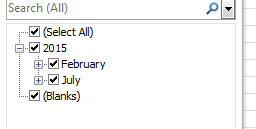
the date format in Excel sheet shold be displayed like above format.But it is working for filter on Date1 but not on Date2.
could you pls help me to get the same format to date2 as well in Excel.
- Tags:
- development_hub
- qlik developers
- qlik india
- qlik uk
- qlik-desktop
- qlik-tour
- qlikview deve
- qlikview_deployment
- qlikview_scripting

 sunny_talwar
- Mark as New
- Bookmark
- Subscribe
- Mute
- Subscribe to RSS Feed
- Permalink
- Report Inappropriate Content
Try this:
LOAD ID,
Name,
Date(Floor(TimeStamp#(Date1, 'MM/DD/YYYY hh:mm')),'DD/MM/YYYY') as Date1,
Date(Floor(TimeStamp#(Date2, 'MM/DD/YYYY hh:mm')),'DD/MM/YYYY') as Date2
FROM
C:\Users\43685481\Desktop\Table1.xlsx
(ooxml, embedded labels, table is Sheet1);

 Clever_Anjos
- Mark as New
- Bookmark
- Subscribe
- Mute
- Subscribe to RSS Feed
- Permalink
- Report Inappropriate Content
You format seems to be (MM/DD/YYYY) 2/12/2015 7:00