Unlock a world of possibilities! Login now and discover the exclusive benefits awaiting you.

- Qlik Community
- :
- All Forums
- :
- QlikView
- :
- Date Format
- Subscribe to RSS Feed
- Mark Topic as New
- Mark Topic as Read
- Float this Topic for Current User
- Bookmark
- Subscribe
- Mute
- Printer Friendly Page

- Mark as New
- Bookmark
- Subscribe
- Mute
- Subscribe to RSS Feed
- Permalink
- Report Inappropriate Content
Date Format
Hi,
I have a date format as "Apr 2 2011 12:00 AM", how can I convert this into "YYYYMMDD"? The time is always12:00 AM.
Thanks.
- Tags:
- qlikview_scripting

 maxgro
- Mark as New
- Bookmark
- Subscribe
- Mute
- Subscribe to RSS Feed
- Permalink
- Report Inappropriate Content
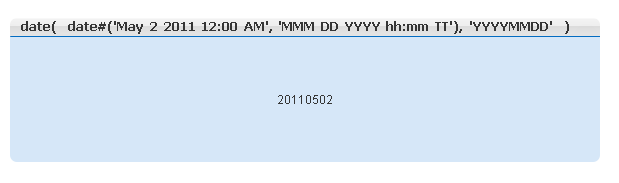
= date(
date#('Apr 2 2011 12:00 AM', 'MMM DD YYYY hh:mm TT'), 'YYYYMMDD'
)
look at this for date and date# functions
EDIT
see attachment

 vidyut
- Mark as New
- Bookmark
- Subscribe
- Mute
- Subscribe to RSS Feed
- Permalink
- Report Inappropriate Content
Makedate(Subfield(DateString,' ',3),Div(Index($(MonthNames),Subfield(DateString,' ',1)),4)+1,Subfield(DateString,' ',2)) as Date
Try this. $(MonthNames) refers to the variable MonthNames defined by default in your script.
Cheers,
Vidyut
- Mark as New
- Bookmark
- Subscribe
- Mute
- Subscribe to RSS Feed
- Permalink
- Report Inappropriate Content
You are close,
Can you please help identify the error in this code
(Subfield([Fiscal Week Ending Date],' ',3),Div(Index($(MonthNames),Subfield([Fiscal Week Ending Date],' ',1),4)+1,Subfield([Fiscal Week Ending Date],' ',2))) as Date
[Fiscal Week Ending Date], is my date variable and seems like ')' is missing.
- Mark as New
- Bookmark
- Subscribe
- Mute
- Subscribe to RSS Feed
- Permalink
- Report Inappropriate Content
I tried this. not working 