Unlock a world of possibilities! Login now and discover the exclusive benefits awaiting you.

- Qlik Community
- :
- All Forums
- :
- QlikView
- :
- Re: Date/month calculation
- Subscribe to RSS Feed
- Mark Topic as New
- Mark Topic as Read
- Float this Topic for Current User
- Bookmark
- Subscribe
- Mute
- Printer Friendly Page

 karan_kn
- Mark as New
- Bookmark
- Subscribe
- Mute
- Subscribe to RSS Feed
- Permalink
- Report Inappropriate Content
Date/month calculation
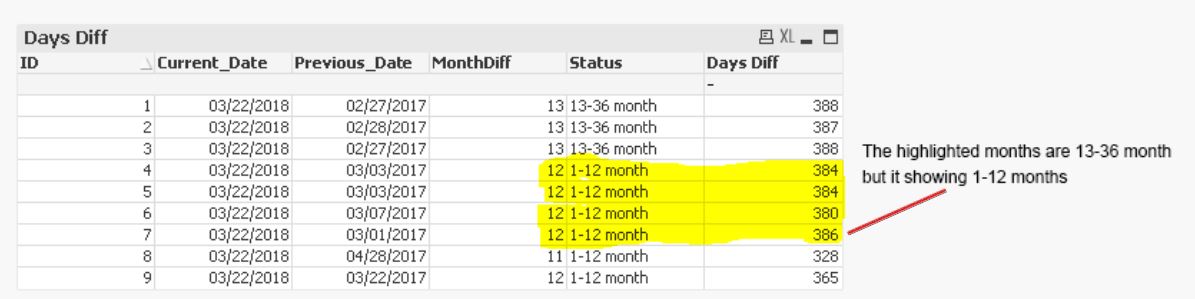
The highlighted months are showing 13-36 month, can someone help me to fix this.
Accepted Solutions

 sunny_talwar
- Mark as New
- Bookmark
- Subscribe
- Mute
- Subscribe to RSS Feed
- Permalink
- Report Inappropriate Content
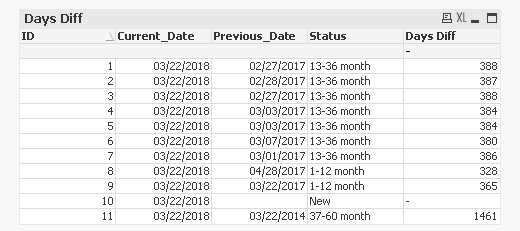
Modified the script to see the other two options
T1:
LOAD *,
If(Len(Trim(Previous_Date)) = 0, 'New',
If(AddYears(Previous_Date, 1) >= Current_Date, '1-12 month',
If(AddYears(Previous_Date, 3) >= Current_Date, '13-36 month',
If(AddYears(Previous_Date, 5) >= Current_Date, '37-60 month')))) as Status;
LOAD * INLINE [
ID, Current_Date, Previous_Date
1, 03/22/2018, 02/27/2017
2, 03/22/2018, 02/28/2017
3, 03/22/2018, 02/27/2017
4, 03/22/2018, 03/03/2017
5, 03/22/2018, 03/03/2017
6, 03/22/2018, 03/07/2017
7, 03/22/2018, 03/01/2017
8, 03/22/2018, 04/28/2017
9, 03/22/2018, 03/22/2017
10, 03/22/2018,
11, 03/22/2018, 03/22/2014
];
sunny_talwar
- Mark as New
- Bookmark
- Subscribe
- Mute
- Subscribe to RSS Feed
- Permalink
- Report Inappropriate Content
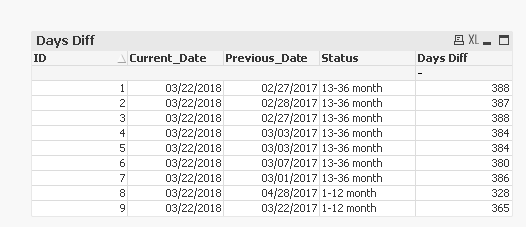
I think you were doing Month comparison in the script.... try this
T1:
LOAD *,
If(Len(Trim(Previous_Date)) = 0, 'New',
If(AddYears(Previous_Date, 1) >= Current_Date, '1-12 month',
If(AddYears(Previous_Date, 3) >= Current_Date, '13-36 month',
If(AddYears(Previous_Date, 5) >= Current_Date, '37-60 month')))) as Status;
LOAD * INLINE [
ID, Current_Date, Previous_Date
1, 03/22/2018, 02/27/2017
2, 03/22/2018, 02/28/2017
3, 03/22/2018, 02/27/2017
4, 03/22/2018, 03/03/2017
5, 03/22/2018, 03/03/2017
6, 03/22/2018, 03/07/2017
7, 03/22/2018, 03/01/2017
8, 03/22/2018, 04/28/2017
9, 03/22/2018, 03/22/2017
];
sunny_talwar
- Mark as New
- Bookmark
- Subscribe
- Mute
- Subscribe to RSS Feed
- Permalink
- Report Inappropriate Content
Modified the script to see the other two options
T1:
LOAD *,
If(Len(Trim(Previous_Date)) = 0, 'New',
If(AddYears(Previous_Date, 1) >= Current_Date, '1-12 month',
If(AddYears(Previous_Date, 3) >= Current_Date, '13-36 month',
If(AddYears(Previous_Date, 5) >= Current_Date, '37-60 month')))) as Status;
LOAD * INLINE [
ID, Current_Date, Previous_Date
1, 03/22/2018, 02/27/2017
2, 03/22/2018, 02/28/2017
3, 03/22/2018, 02/27/2017
4, 03/22/2018, 03/03/2017
5, 03/22/2018, 03/03/2017
6, 03/22/2018, 03/07/2017
7, 03/22/2018, 03/01/2017
8, 03/22/2018, 04/28/2017
9, 03/22/2018, 03/22/2017
10, 03/22/2018,
11, 03/22/2018, 03/22/2014
];

 swuehl
- Mark as New
- Bookmark
- Subscribe
- Mute
- Subscribe to RSS Feed
- Permalink
- Report Inappropriate Content
And maybe catch also the older values:
If(Len(Trim(Previous_Date)) = 0, 'New',
If(AddYears(Previous_Date, 1) >= Current_Date, '1-12 month',
If(AddYears(Previous_Date, 3) >= Current_Date, '13-36 month',
If(AddYears(Previous_Date, 5) >= Current_Date, '37-60 month', 'even older than 60 months'))))
sunny_talwar
- Mark as New
- Bookmark
- Subscribe
- Mute
- Subscribe to RSS Feed
- Permalink
- Report Inappropriate Content
Good catch  ... Always good to have a fall back statement to avoid nulls. Thanks Stefan!!
karan_kn
- Mark as New
- Bookmark
- Subscribe
- Mute
- Subscribe to RSS Feed
- Permalink
- Report Inappropriate Content
Thanks Sunny and Stefan

 rajaxavier
- Mark as New
- Bookmark
- Subscribe
- Mute
- Subscribe to RSS Feed
- Permalink
- Report Inappropriate Content
Tab:
load *,
if(interval(Current_Date-Previous_Date,'DD')<=365,'1-12 Month',
if(interval(Current_Date-Previous_Date,'DD')<=1095,'13-36 Month',
if(interval(Current_Date-Previous_Date,'DD')<=1825,'37-60 Month',
if(isnull(interval(Current_Date-Previous_Date,'DD')),'New'))))as Status,
if(isnull(interval(Current_Date-Previous_Date,'DD')),0,interval(Current_Date-Previous_Date,'DD')) as DaysDiff;
LOAD * INLINE [
ID, Current_Date, Previous_Date
1, 03/22/2018, 02/27/2017
2, 03/22/2018, 02/28/2017
3, 03/22/2018, 02/27/2017
4, 03/22/2018, 03/03/2017
5, 03/22/2018, 03/03/2017
6, 03/22/2018, 03/07/2017
7, 03/22/2018, 03/01/2017
8, 03/22/2018, 04/28/2017
9, 03/22/2018, 03/22/2017
10, 03/22/2018,
11, 03/22/2018, 03/22/2014
];
