Unlock a world of possibilities! Login now and discover the exclusive benefits awaiting you.

- Qlik Community
- :
- All Forums
- :
- QlikView
- :
- Date nightmare
- Subscribe to RSS Feed
- Mark Topic as New
- Mark Topic as Read
- Float this Topic for Current User
- Bookmark
- Subscribe
- Mute
- Printer Friendly Page

- Mark as New
- Bookmark
- Subscribe
- Mute
- Subscribe to RSS Feed
- Permalink
- Report Inappropriate Content
Date nightmare
So I want to do something super easy, but it won't do what I want .
.
I just want to substract n days from a date.
First try :
SET vMaxDate = date(max({1} PivotDate ), 'DD/MM/YYYY');
SET vMinDate = $(vMaxDate) - 180;
Result :
$(vMaxDate)=28/07/2015
$(vMinDate)=42033
The substraction has occured, but why is vMinDate no longer a date but a date#?
Second try:
SET vMaxDate = date#(max({1} PivotDate ), 'DD/MM/YYYY');
SET vMinDate = $(vMaxDate) - 180;
Result :
$(vMaxDate)=42213
$(vMinDate)= -
The substraction does not occur
What I would like as a result is
$(vMaxDate)=42213
$(vMinDate)=42033
What is the right way to do this?
(NB : PivotDate is a date#)
Accepted Solutions
- Mark as New
- Bookmark
- Subscribe
- Mute
- Subscribe to RSS Feed
- Permalink
- Report Inappropriate Content
Yes, works like this.

 maxgro
- Mark as New
- Bookmark
- Subscribe
- Mute
- Subscribe to RSS Feed
- Permalink
- Report Inappropriate Content
- Mark as New
- Bookmark
- Subscribe
- Mute
- Subscribe to RSS Feed
- Permalink
- Report Inappropriate Content
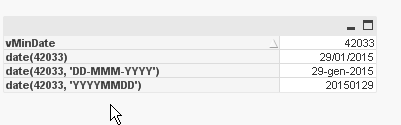
Thanks, I know how to transform 42033 into 29/01/2015, but my questions are:
1)Why, vMaxDate being a date (and not a date#), does substracting a number of days transform it into a date#? The answer can be, "it's the way it is" but then it seems to me the whole point of having date and date# falls apart if one can change into the other like this.
2) And also, why if I work with vMaxDate = date#(max({1} PivotDate ), 'DD/MM/YYYY'), does substracting a value not work? date# being a number, it would be logical that it worked.
 sunny_talwar
- Mark as New
- Bookmark
- Subscribe
- Mute
- Subscribe to RSS Feed
- Permalink
- Report Inappropriate Content
I think you are thinking about this incorrectly. Date# is not a number format, it is a function which is used to tell QlikView that your data is in this format. For instance you have a Excel file where date is like this 2015-01-31 and QlikView reads it as a text field. At that time you can use Date#() function to help QV understand that this is actually a date like this Date#('2015-01-31', 'YYYY-MM-DD'). and now if you wish to take this an convert it into a format of your liking, you can rap it around with Date() function with the format you want. Something like this: Date(Date#('2015-01-31', 'YYYY-MM-DD'), 'MM/DD/YYYY').
First Try:
SET vMaxDate = date(max({1} PivotDate ), 'DD/MM/YYYY');
SET vMinDate = $(vMaxDate) - 180;
Result :
$(vMaxDate)=28/07/2015
$(vMinDate)=42033
You see Date format for vMaxDate because it was rapped around with a date() function, but vMinDate isn't. If you did it this way:
First try :
SET vMaxDate = max({1} PivotDate), ;
SET vMinDate = $(vMaxDate) - 180;
You would see both of them as numbers.
Second Try:
SET vMaxDate = date#(max({1} PivotDate ), 'DD/MM/YYYY');
SET vMinDate = $(vMaxDate) - 180;
Result :
$(vMaxDate)=42213
$(vMinDate)= -
You are trying to tell QlikView to read a number as date in the format DD/MM/YYYY which it isn't able to do and making it a text formatted variable and when you subtract something from a text you get null.
I hope all of the above would make sense.
Best,
Sunny
 Kushal_Chawda
- Mark as New
- Bookmark
- Subscribe
- Mute
- Subscribe to RSS Feed
- Permalink
- Report Inappropriate Content
Try
SET vMaxDate = max({1} PivotDate );
SET vMinDate = $(vMaxDate) - 180;
maxgro
- Mark as New
- Bookmark
- Subscribe
- Mute
- Subscribe to RSS Feed
- Permalink
- Report Inappropriate Content
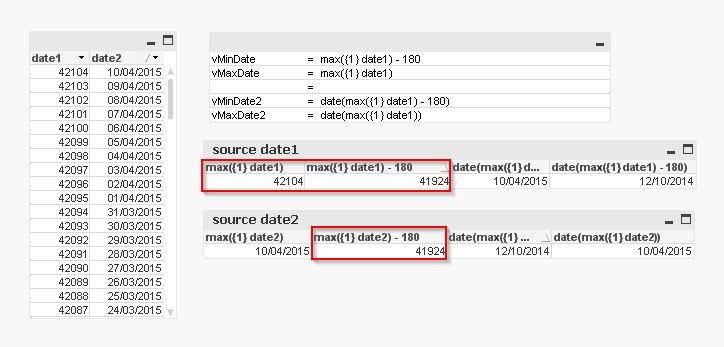
from what I understand if you use some math ( subtracting -180) or the source field is a number Qlik will return the number as in vMinDate, vMaxDate
in your case (the source is a 42xxx) I think you can use
SET vMaxDate = max({1} PivotDate ); // number
SET vMinDate = $(vMaxDate) - 180; // number
2)
Second try:
SET vMaxDate = date#(max({1} PivotDate ), 'DD/MM/YYYY');
SET vMinDate = $(vMaxDate) - 180;
I think this is an error because
SET vMaxDate = date#(max({1} PivotDate), 'DD/MM/YYYY');
if PivotDate is a number, max is a number, and you can't interpret as DD/MM/YYYY
so you get a '-' in vMinDate
- Mark as New
- Bookmark
- Subscribe
- Mute
- Subscribe to RSS Feed
- Permalink
- Report Inappropriate Content
Yes, works like this.
- Mark as New
- Bookmark
- Subscribe
- Mute
- Subscribe to RSS Feed
- Permalink
- Report Inappropriate Content
Yes works.