Unlock a world of possibilities! Login now and discover the exclusive benefits awaiting you.

- Qlik Community
- :
- All Forums
- :
- QlikView
- :
- Re: Different Text Boxes to reflect different sele...
- Subscribe to RSS Feed
- Mark Topic as New
- Mark Topic as Read
- Float this Topic for Current User
- Bookmark
- Subscribe
- Mute
- Printer Friendly Page

- Mark as New
- Bookmark
- Subscribe
- Mute
- Subscribe to RSS Feed
- Permalink
- Report Inappropriate Content
Different Text Boxes to reflect different selections
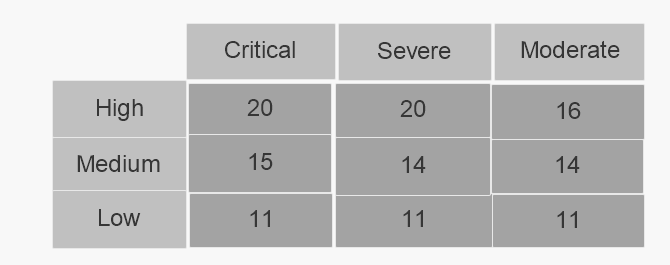
I have 6 text boxes, and each have a different expression in them, i want it so that that expression is displayed constantly and does not change in all the boxes.
Here is an example of the 6 boxes which I would like 6 different numbers to display,

Here is an example of the expressions:
=count(if([Severity] = 'Severe' and [Urgency] = 'High', ([Age] >= '7 Days'),'0'))
=count(if([Severity] = 'Moderate' and [Urgency] = 'Medium', ([Age] >= '60 Days'),'0'))
I believe i need to use something along the lines of:
count(aggr(only(if([Severity] = 'Severe' and [Urgency] = 'High', ([Age] >= '7 Days')),'0')))
- « Previous Replies
-
- 1
- 2
- Next Replies »
- Mark as New
- Bookmark
- Subscribe
- Mute
- Subscribe to RSS Feed
- Permalink
- Report Inappropriate Content
Hi Mark,
This still did not seem to fix the issue, I am still getting an output of 1 for all boxes.
NUM(SUBFIELD([Age],' ' ,1)) AS AgeNo is what i placed in my script.

 sasiparupudi1
- Mark as New
- Bookmark
- Subscribe
- Mute
- Subscribe to RSS Feed
- Permalink
- Report Inappropriate Content
May be try like this?
count(if([Severity] = 'Severe' and [Urgency] = 'High', (KeepChar([Age],'0123456789') >= 7),'0'))

 sunny_talwar
- Mark as New
- Bookmark
- Subscribe
- Mute
- Subscribe to RSS Feed
- Permalink
- Report Inappropriate Content
Would you be able to share a sample to check this out?
- Mark as New
- Bookmark
- Subscribe
- Mute
- Subscribe to RSS Feed
- Permalink
- Report Inappropriate Content
Sample Data attached
sunny_talwar
- Mark as New
- Bookmark
- Subscribe
- Mute
- Subscribe to RSS Feed
- Permalink
- Report Inappropriate Content
Is this what you want?

 chinnuchinni
- Mark as New
- Bookmark
- Subscribe
- Mute
- Subscribe to RSS Feed
- Permalink
- Report Inappropriate Content
try this:
LOAD Age,
Severity,
Urgency,
num( SubField(Age,' ',1)) as Age1
FROM
(biff, embedded labels, table is Sheet1$);
and
expression:
=Count({<Age1 = {">=60"},[Severity] = {'Severe'},[Urgency] = {'High'}>}Age)
- Mark as New
- Bookmark
- Subscribe
- Mute
- Subscribe to RSS Feed
- Permalink
- Report Inappropriate Content
Thank you!! Perfect solution!
- « Previous Replies
-
- 1
- 2
- Next Replies »