Unlock a world of possibilities! Login now and discover the exclusive benefits awaiting you.

- Qlik Community
- :
- All Forums
- :
- QlikView
- :
- Dimension Related
- Subscribe to RSS Feed
- Mark Topic as New
- Mark Topic as Read
- Float this Topic for Current User
- Bookmark
- Subscribe
- Mute
- Printer Friendly Page

 sarfaraz_sheikh
- Mark as New
- Bookmark
- Subscribe
- Mute
- Subscribe to RSS Feed
- Permalink
- Report Inappropriate Content
Dimension Related
Dear ALL ,
I am using simple Wildmatch function......... below is calculated dimension code..
=if(Wildmatch(D_NO,1),'Exellent',
if(Wildmatch(D_NO,2),'Very_Good',
if(Wildmatch(D_NO,3),'Good',
if(Wildmatch(D_NO,4),'Average',
if(Wildmatch(D_NO,5),'Need_Improvement',
if(Wildmatch(D_NO,1,2,3),'Fabulous'))))))
i am not getting Fabulous as dimension content.....kindly help if any tricks...
My QVW is also attached here for your reference.........
- « Previous Replies
-
- 1
- 2
- Next Replies »

 rubenmarin
- Mark as New
- Bookmark
- Subscribe
- Mute
- Subscribe to RSS Feed
- Permalink
- Report Inappropriate Content
Hi Sarfaraz, it will not get to fabolous because if D_NO =1 or 2 or 3, it will go to 'Excellent', Very good' or 'Good'
If you want to concatente that string to the first 3 results you can set that condition id different 'if' sentence:
=if(Wildmatch(D_NO,1),'Exellent',
if(Wildmatch(D_NO,2),'Very_Good',
if(Wildmatch(D_NO,3),'Good',
if(Wildmatch(D_NO,4),'Average',
if(Wildmatch(D_NO,5),'Need_Improvement'))))) &
if(Wildmatch(D_NO,1,2,3),' Fabulous')

 datanibbler
- Mark as New
- Bookmark
- Subscribe
- Mute
- Subscribe to RSS Feed
- Permalink
- Report Inappropriate Content
Hi,
the WildMatch function is for matching with wildcards - so you need (or rather, you can) use the *.
Judging from that code, the values 1, 2 and 3 are already populated with "Excellent", "Very good" and "Good" - they cannot be matched against any other value, at least not in the same expression.
What is it you want to achieve with this? Knowing what you want this code to tell you would make it easier to tell you why it doesn't do that or how you could do it.
Best regards,
DataNibbler
 maxgro
- Mark as New
- Bookmark
- Subscribe
- Mute
- Subscribe to RSS Feed
- Permalink
- Report Inappropriate Content
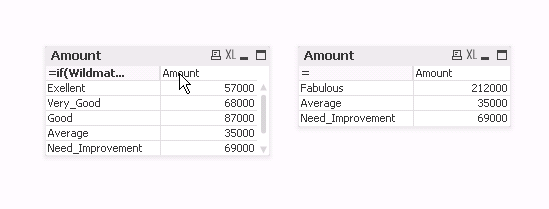
if you want the result on the right
=
if(Wildmatch(D_NO,4),'Average',
if(Wildmatch(D_NO,5),'Need_Improvement',
if(Wildmatch(D_NO,1,2,3),'Fabulous')))
rubenmarin
- Mark as New
- Bookmark
- Subscribe
- Mute
- Subscribe to RSS Feed
- Permalink
- Report Inappropriate Content
Or you can try adding this table to tour script:
Dimension:
LOAD * Inline [
D_NO, Dimension
1, Excellent
2, Very Good
3, Good
4, Average
5, Need Improvement
1, Fabulous
2, Fabulous
3, Fabulous
];
Then use Dimension field as dimension.
As DataNibbler saids, it's better if we know what you want to achieve.
sarfaraz_sheikh
- Mark as New
- Bookmark
- Subscribe
- Mute
- Subscribe to RSS Feed
- Permalink
- Report Inappropriate Content
Dear DataNibbler,
There is requirement from business user to achive like below .... Thast why i have highlighted small version of this above...
actually i have to this in my high level application ...somewhat like below
if(Wildmatch(STATUS_ID,80),'Insurer_reject',
if(Wildmatch(STATUS_ID,75),'Follow_Up',
if(wildmatch(STATUS_ID,77),'Lead Lost',
if(wildmatch(STATUS_ID,82),'Lead Pending U/W',
if(wildmatch(STATUS_ID,79),'Non Contactable',
if(wildmatch(STATUS_ID,78),'Not Interested',
if(wildmatch(STATUS_ID,99),'Pending for PPC',
if(wildmatch(STATUS_ID,74),'Sales Open Default',
if(wildmatch(STATUS_ID,87,92,94,97,91,93,90,103,121,123),'Sales closed final',
if( wildmatch(STATUS_ID,'74','75','77','78','79','80','82','87','89','92','94','97','91','93','90','99','103','114','121','123'),'Total Leads Login',
))))))))))
Sarfaraz
sarfaraz_sheikh
- Mark as New
- Bookmark
- Subscribe
- Mute
- Subscribe to RSS Feed
- Permalink
- Report Inappropriate Content
There is requirement from achive like this in application...
Is it possible in on chart level ..........if yes then how i can achive the same .
Sarfaraz
sarfaraz_sheikh
- Mark as New
- Bookmark
- Subscribe
- Mute
- Subscribe to RSS Feed
- Permalink
- Report Inappropriate Content
Actually i have to like below in my app...
if(Wildmatch(STATUS_ID,80),'Insurer_reject',
if(Wildmatch(STATUS_ID,75),'Follow_Up',
if(wildmatch(STATUS_ID,77),'Lead Lost',
if(wildmatch(STATUS_ID,82),'Lead Pending U/W',
if(wildmatch(STATUS_ID,79),'Non Contactable',
if(wildmatch(STATUS_ID,78),'Not Interested',
if(wildmatch(STATUS_ID,99),'Pending for PPC',
if(wildmatch(STATUS_ID,74),'Sales Open Default',
if(wildmatch(STATUS_ID,80,75,77,82,79,78,99,74),'Total Leads Login' ))))))))
Sarfaraz
sarfaraz_sheikh
- Mark as New
- Bookmark
- Subscribe
- Mute
- Subscribe to RSS Feed
- Permalink
- Report Inappropriate Content
No, I want to implement in single chart itself.......is it possible ???????????
Sarfaraz
sarfaraz_sheikh
- Mark as New
- Bookmark
- Subscribe
- Mute
- Subscribe to RSS Feed
- Permalink
- Report Inappropriate Content
Dear Nibbler,
Any update regarding the solution ??????
Sarfaraz

- « Previous Replies
-
- 1
- 2
- Next Replies »