Unlock a world of possibilities! Login now and discover the exclusive benefits awaiting you.

- Qlik Community
- :
- All Forums
- :
- QlikView
- :
- Dimension should not be filtered based on selectio...
- Subscribe to RSS Feed
- Mark Topic as New
- Mark Topic as Read
- Float this Topic for Current User
- Bookmark
- Subscribe
- Mute
- Printer Friendly Page

 nithin_miryala
- Mark as New
- Bookmark
- Subscribe
- Mute
- Subscribe to RSS Feed
- Permalink
- Report Inappropriate Content
Dimension should not be filtered based on selection
Hi Everyone,
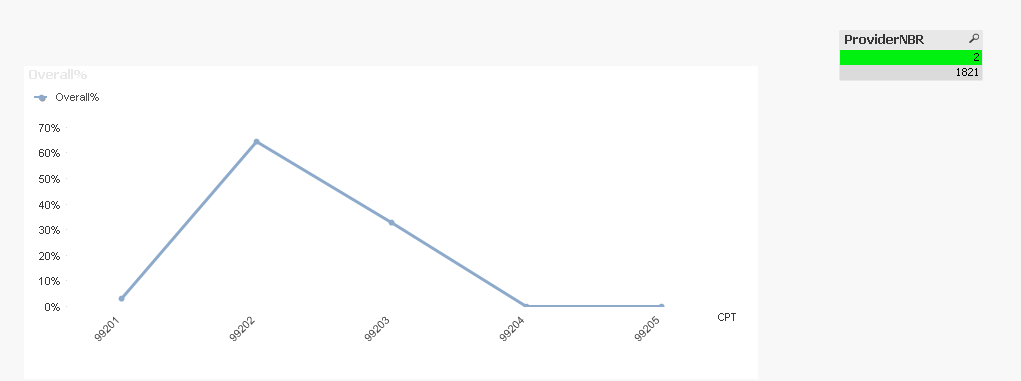
I have a chart which has 5 Cpt's it when i do not select nothing, but when i select a provider it narows down to 3 of them,
I want the Dimension to have 5 even if select the any provider
Here is the expression: = aggr(Only({<EMVisitTypeDSC={'NPV'},Provider=>}CPT),CPT)
Let me know your thoughts
- « Previous Replies
-
- 1
- 2
- Next Replies »
Accepted Solutions

 sunny_talwar
- Mark as New
- Bookmark
- Subscribe
- Mute
- Subscribe to RSS Feed
- Permalink
- Report Inappropriate Content
 sunny_talwar
- Mark as New
- Bookmark
- Subscribe
- Mute
- Subscribe to RSS Feed
- Permalink
- Report Inappropriate Content
What if you try this
Aggr(Only({1<EMVisitTypeDSC={'NPV'}>} CPT), CPT)
nithin_miryala
- Mark as New
- Bookmark
- Subscribe
- Mute
- Subscribe to RSS Feed
- Permalink
- Report Inappropriate Content
Tried it. it still filters the CPT
sunny_talwar
- Mark as New
- Bookmark
- Subscribe
- Mute
- Subscribe to RSS Feed
- Permalink
- Report Inappropriate Content
This is used a dimension, right?
nithin_miryala
- Mark as New
- Bookmark
- Subscribe
- Mute
- Subscribe to RSS Feed
- Permalink
- Report Inappropriate Content
Yes
sunny_talwar
- Mark as New
- Bookmark
- Subscribe
- Mute
- Subscribe to RSS Feed
- Permalink
- Report Inappropriate Content
Would you be able to share a sample to show where this isn't working? I don't see anything wrong with the syntax

 Qrishna
- Mark as New
- Bookmark
- Subscribe
- Mute
- Subscribe to RSS Feed
- Permalink
- Report Inappropriate Content
Aggr(Only({1<EMVisitTypeDSC={'NPV'},Provider=>} CPT), CPT)
nithin_miryala
- Mark as New
- Bookmark
- Subscribe
- Mute
- Subscribe to RSS Feed
- Permalink
- Report Inappropriate Content
Please find the attached sample.
Please look at it
sunny_talwar
- Mark as New
- Bookmark
- Subscribe
- Mute
- Subscribe to RSS Feed
- Permalink
- Report Inappropriate Content
I think you forgot to ignore selection in the expression 
=sum({<EMVisitTypeDSC={'NPV'}, ProviderNBR>}EMVisitCNT)/
sum({<EMVisitTypeDSC={'NPV'}, ProviderNBR>}TOTAL EMVisitCNT)
nithin_miryala
- Mark as New
- Bookmark
- Subscribe
- Mute
- Subscribe to RSS Feed
- Permalink
- Report Inappropriate Content
I did it intentionally as i want to show zero on the that particular CPT.
and i should be able filter graph but not the number CPTs in the dimension.
is that possible?

- « Previous Replies
-
- 1
- 2
- Next Replies »