Unlock a world of possibilities! Login now and discover the exclusive benefits awaiting you.

- Qlik Community
- :
- All Forums
- :
- QlikView
- :
- Dimensionality problem in Expression label
- Subscribe to RSS Feed
- Mark Topic as New
- Mark Topic as Read
- Float this Topic for Current User
- Bookmark
- Subscribe
- Mute
- Printer Friendly Page

 sarfaraz_sheikh
- Mark as New
- Bookmark
- Subscribe
- Mute
- Subscribe to RSS Feed
- Permalink
- Report Inappropriate Content
Dimensionality problem in Expression label
Dear Folks,
Dimensionality() is not giving me expected output in Qlikview version 11 SR12....However i was getting expected output in Qlikview version 11 SR1..
Attached is snapshot of my problem..
In Qlikview Version 11 SR12 ..Unexpected output i am getting below
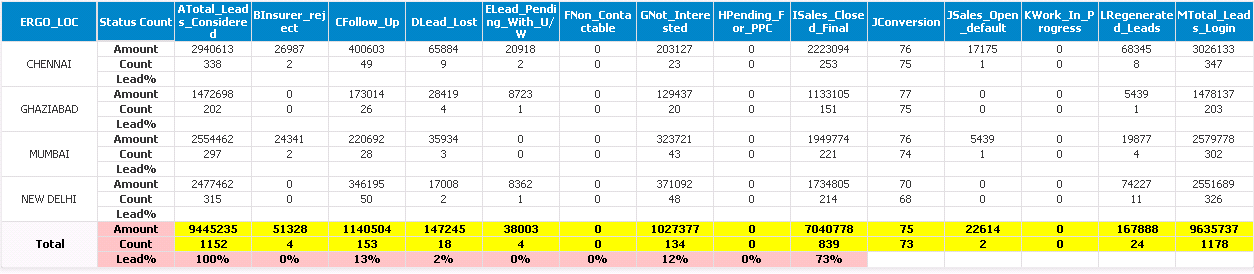
Expected output should be like below and as it was showing in Ver 11 SR1
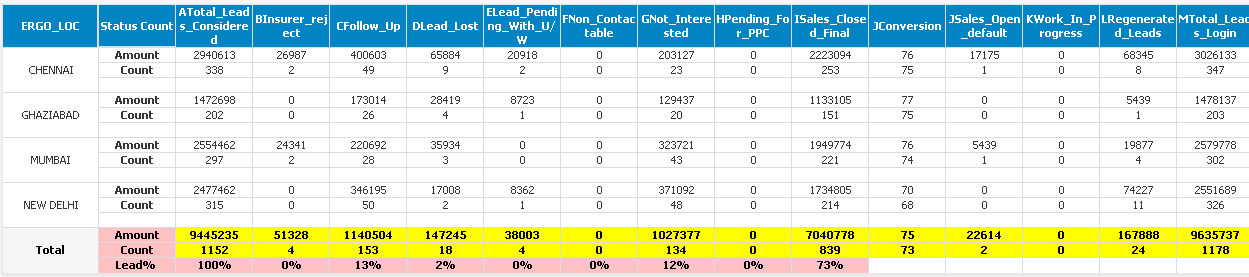
If you look at both charts see Expression Lead% ...in version 11 SR12 label is not getting white but in version 11 SR1 lable to getting white after inputing below code in Lead% expression Text color and Background color
if(Dimensionality()=2 or Dimensionality()=1,White(),
if(Dimensionality()=0 and
wildmatch([Status_Description-NB],'JSales_Open_default','KWork_In_Progress','LRegenerated_Leads','MTotal_Leads_Login'),'0',
if(Wildmatch([Status_Description-NB],'JConversion'),white()
)))
Can anyone tell me how i can acheived the expected result in Ver 11 SR12...help would be much appreciated if any..
jagan gwassenaar hic please comment
Thanks
Sarfaraz
- « Previous Replies
-
- 1
- 2
- Next Replies »
sarfaraz_sheikh
- Mark as New
- Bookmark
- Subscribe
- Mute
- Subscribe to RSS Feed
- Permalink
- Report Inappropriate Content
can anyone help me with the above problem ???

 tresB
tresB
- Mark as New
- Bookmark
- Subscribe
- Mute
- Subscribe to RSS Feed
- Permalink
- Report Inappropriate Content
To reproduce the issue and have a look into it, a representative sample qvw would be required. Try to share one.

 marcus_sommer
- Mark as New
- Bookmark
- Subscribe
- Mute
- Subscribe to RSS Feed
- Permalink
- Report Inappropriate Content
The expression isn't quite correct. Your then-part from the second conditions is '0' which might be ignored from the earlier version and which now caused an expression-error. There was changes between the releases how errors will be handled and there are options available within the easter egg, see also: http://qlikviewcookbook.com/2015/05/sr11-error-handling-changes/.
An alternatively to your white-coloring could be to set this to null() and use hiding of null as display-option.
- Marcus
sarfaraz_sheikh
- Mark as New
- Bookmark
- Subscribe
- Mute
- Subscribe to RSS Feed
- Permalink
- Report Inappropriate Content
Dear Marcus,
can you please share any sample example for my understanding........so that would be much better.
Sarfaraz
marcus_sommer
- Mark as New
- Bookmark
- Subscribe
- Mute
- Subscribe to RSS Feed
- Permalink
- Report Inappropriate Content
Before playing with some options try to adjust/correct your expression. Also the wildmatch-function looked odd because you didn't use a wildcard so that it worked like a match-function. Further a final else-part is missing (it's not a general problem but to set some default-value as else-part avoids potential problems). Check this and try for testing:
if(Dimensionality()=2 or Dimensionality()=1,White(),
if(Dimensionality()=0 and
wildmatch([Status_Description-NB],'JSales_Open_default','KWork_In_Progress','LRegenerated_Leads','MTotal_Leads_Login'),blue(),
if(Wildmatch([Status_Description-NB],'JConversion'),white(), green()
)))
- Marcus
sarfaraz_sheikh
- Mark as New
- Bookmark
- Subscribe
- Mute
- Subscribe to RSS Feed
- Permalink
- Report Inappropriate Content
I have tried your expression ...and getting below results as attached.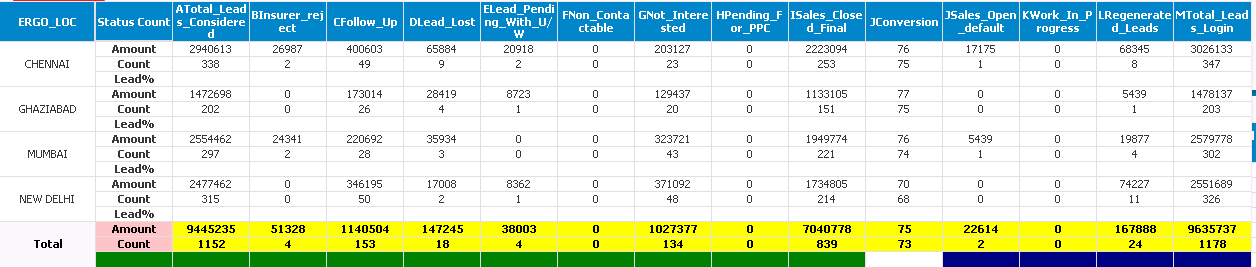
My question is why label of third expression lead % is not getting white ...is it bug ?? or do i need to change more in expression..
Kindly suggest me..
Sarfaraz
marcus_sommer
- Mark as New
- Bookmark
- Subscribe
- Mute
- Subscribe to RSS Feed
- Permalink
- Report Inappropriate Content
Try this to see a coloring for each result:
if(Dimensionality()=2 or Dimensionality()=1,red(),
if(Dimensionality()=0 and
wildmatch([Status_Description-NB],'JSales_Open_default','KWork_In_Progress','LRegenerated_Leads','MTotal_Leads_Login'),blue(),
if(Wildmatch([Status_Description-NB],'JConversion'),lightgrey(), green()
)))
- Marcus
sarfaraz_sheikh
- Mark as New
- Bookmark
- Subscribe
- Mute
- Subscribe to RSS Feed
- Permalink
- Report Inappropriate Content
as per your suggested expression see the result as attached..
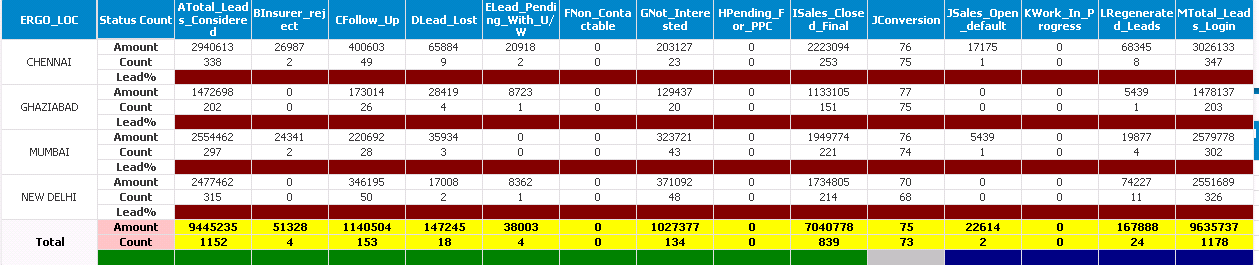
Label Lead% is not getting red at all in diminsionality 2....thats very surprising....
Please suggest what needs to be done..
Sarfaraz
marcus_sommer
- Mark as New
- Bookmark
- Subscribe
- Mute
- Subscribe to RSS Feed
- Permalink
- Report Inappropriate Content
Your condition is in both expression and dimensions? Are there other applied layout-options like styles in tab design or styles or any custom cell-format? Is the extended layout-mode enabled (tab general in document properties)?
Instead of white() and now red() try it with argb(0,0,0,0).
- Marcus

- « Previous Replies
-
- 1
- 2
- Next Replies »