Unlock a world of possibilities! Login now and discover the exclusive benefits awaiting you.

- Qlik Community
- :
- All Forums
- :
- QlikView
- :
- Disable certain selection
- Subscribe to RSS Feed
- Mark Topic as New
- Mark Topic as Read
- Float this Topic for Current User
- Bookmark
- Subscribe
- Mute
- Printer Friendly Page

 spcon2016
- Mark as New
- Bookmark
- Subscribe
- Mute
- Subscribe to RSS Feed
- Permalink
- Report Inappropriate Content
Disable certain selection
Hello Community,
I'm trying to create a pie-chart, which disregards a certain selection. I have two list-boxes (customers and products) and in the middle of all a pie-chart. This one should only be modified by the customers-selection, not by the products-selection.
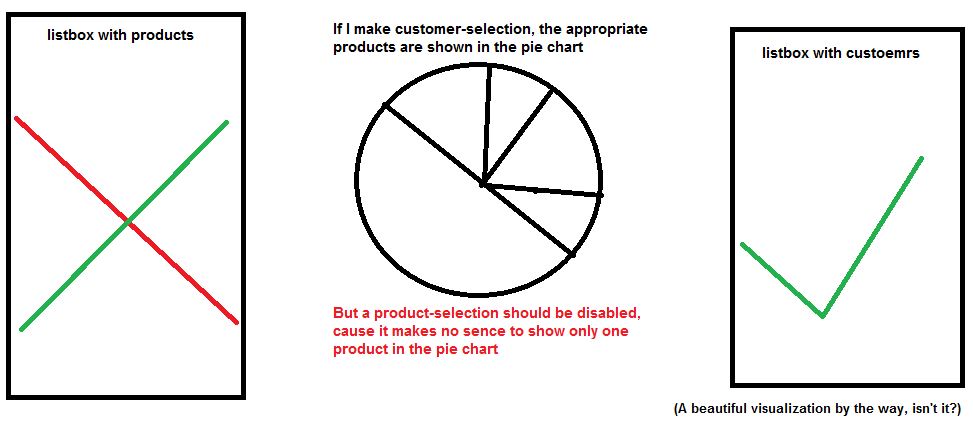
How I'm able to do that?
Here is the expression of pie-chart:
FABS(SUM (SALES)) / FABS(SUM(TOTAL SALES))
I thought abou Set Analysis, but how I could achieve what I need? Where to implement? Many questions and many gaps in my mind.
Best regards
K.K
Accepted Solutions

 prat1507
- Mark as New
- Bookmark
- Subscribe
- Mute
- Subscribe to RSS Feed
- Permalink
- Report Inappropriate Content
Use
FABS(SUM ({<PRODUCT=>}SALES)) / FABS(SUM({<PRODUCT=>}TOTAL SALES))
 felipedl
- Mark as New
- Bookmark
- Subscribe
- Mute
- Subscribe to RSS Feed
- Permalink
- Report Inappropriate Content
Hi Kerim,
Use set analysis for this,
something like:
FABS(SUM ({<Products>}SALES)) / FABS(SUM({<Products>}TOTAL SALES))
This will not consider the selections made on the Products listbox, if I understood correctly, that's what you want to disconsider.
Felipe.
prat1507
- Mark as New
- Bookmark
- Subscribe
- Mute
- Subscribe to RSS Feed
- Permalink
- Report Inappropriate Content
Use
FABS(SUM ({<PRODUCT=>}SALES)) / FABS(SUM({<PRODUCT=>}TOTAL SALES))
 krishnacbe
- Mark as New
- Bookmark
- Subscribe
- Mute
- Subscribe to RSS Feed
- Permalink
- Report Inappropriate Content
Try below expression to exclude Products selection FABS(SUM ({}SALES)) / FABS(SUM({}TOTAL SALES))
krishnacbe
- Mark as New
- Bookmark
- Subscribe
- Mute
- Subscribe to RSS Feed
- Permalink
- Report Inappropriate Content
Sorry Typo FABS(SUM ({}SALES)) / FABS(SUM({}TOTAL SALES))
krishnacbe
- Mark as New
- Bookmark
- Subscribe
- Mute
- Subscribe to RSS Feed
- Permalink
- Report Inappropriate Content
FABS(SUM ({ PRODUCT= }SALES)) / FABS(SUM({PRODUCT= }TOTAL SALES))
