Unlock a world of possibilities! Login now and discover the exclusive benefits awaiting you.

- Qlik Community
- :
- All Forums
- :
- QlikView
- :
- Display in Barchart
- Subscribe to RSS Feed
- Mark Topic as New
- Mark Topic as Read
- Float this Topic for Current User
- Bookmark
- Subscribe
- Mute
- Printer Friendly Page

- Mark as New
- Bookmark
- Subscribe
- Mute
- Subscribe to RSS Feed
- Permalink
- Report Inappropriate Content
Display in Barchart
Hi All,
I have a bar chart for which Month as the Dimension, for that the Expression is having Numerator and Denominator. in some cases the denominator can be 'Null' or '0'. so in this cases i need to display 'NA' for that particular month. Is it possible to do the same.
Thanks in Advance
- « Previous Replies
-
- 1
- 2
- Next Replies »

 VishalWaghole
- Mark as New
- Bookmark
- Subscribe
- Mute
- Subscribe to RSS Feed
- Permalink
- Report Inappropriate Content
Hi Reena,
You can try with this logic,
if((YourExpression > 0 and not isNull(YourExpression)),YourExpression,'NA')
- Regards,
Vishal Waghole
- Mark as New
- Bookmark
- Subscribe
- Mute
- Subscribe to RSS Feed
- Permalink
- Report Inappropriate Content
you can write it as follows:
=if(yourexpression=0,NA,yourexpression)
Hope it work.
- Mark as New
- Bookmark
- Subscribe
- Mute
- Subscribe to RSS Feed
- Permalink
- Report Inappropriate Content
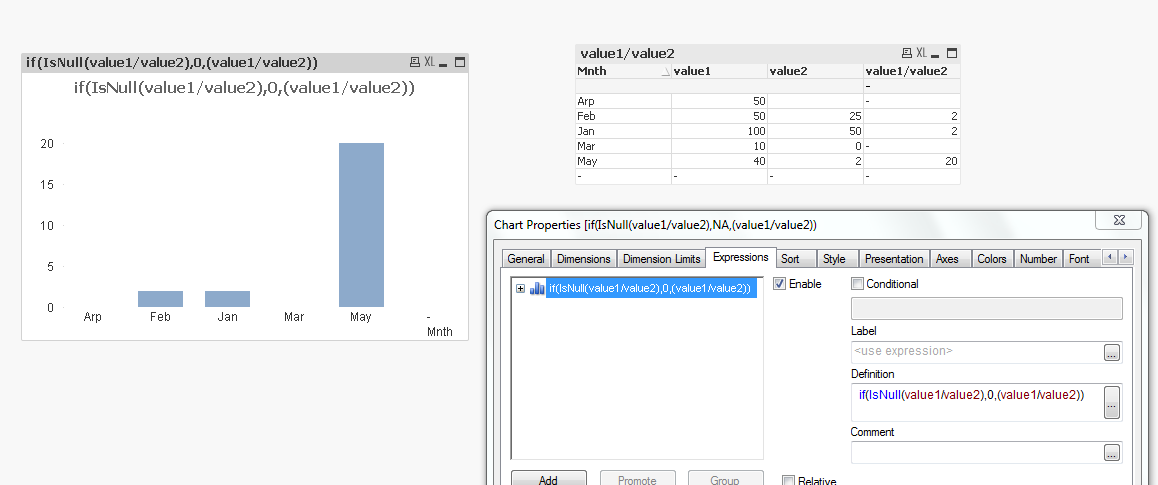
Hi,
I Think to display NA is not possible in Chart but you can do something below..
* inline
[
Mnth,value1,value2
Jan, 100,50
Feb,50,25
Mar,10,0
Arp,50,
May,40,2
];

 manojkulkarni
- Mark as New
- Bookmark
- Subscribe
- Mute
- Subscribe to RSS Feed
- Permalink
- Report Inappropriate Content
I don't think you can display 'NA' as value for the particular month where its value is 0 or null. Since the chart represents numeric value. You can display 0 as it is by checking the option 'Zero on Bars'
 DavidFoster1
- Mark as New
- Bookmark
- Subscribe
- Mute
- Subscribe to RSS Feed
- Permalink
- Report Inappropriate Content
Hi Reena
You can use the trick that Stephen Redmond put in his cookbook.
Use a DUAL function for the values and make sure the number format is 'default' and you can show text in the datapoint values.
- Mark as New
- Bookmark
- Subscribe
- Mute
- Subscribe to RSS Feed
- Permalink
- Report Inappropriate Content
Hi,
it would be helpful, if you can provide me a sample expression .
DavidFoster1
- Mark as New
- Bookmark
- Subscribe
- Mute
- Subscribe to RSS Feed
- Permalink
- Report Inappropriate Content
Hmmmm something liike:
DUAL(
//Text Element
IF(ISNULL(<YourField>),'N/A',Num(Sum(<YourField),'#,##0'),
//Numeric Element
ALT(<YourField>,0)
)
And remember to leave the number formatting in the chart properties tab set to 'default' or the chart disregards the Text element of DUALs and just uses the Numeric element
- « Previous Replies
-
- 1
- 2
- Next Replies »