Unlock a world of possibilities! Login now and discover the exclusive benefits awaiting you.

- Qlik Community
- :
- All Forums
- :
- QlikView
- :
- Display value and % on chart
- Subscribe to RSS Feed
- Mark Topic as New
- Mark Topic as Read
- Float this Topic for Current User
- Bookmark
- Subscribe
- Mute
- Printer Friendly Page

 vijaysahu2
- Mark as New
- Bookmark
- Subscribe
- Mute
- Subscribe to RSS Feed
- Permalink
- Report Inappropriate Content
Display value and % on chart
Hi All
How can I display count and % together from total count on the chart. I can easily display the count below but also would like to display
the % of each priority against what total we have in that year.. for example below
35/55*100 = 70%
10/55*100 = 18.18%
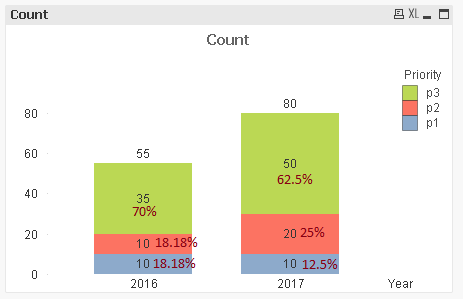
I have attached the Qvw file here..

 sunny_talwar
- Mark as New
- Bookmark
- Subscribe
- Mute
- Subscribe to RSS Feed
- Permalink
- Report Inappropriate Content
May be this
Dual(Count & Chr(10) & Num(Count/Sum(TOTAL <Year> Count), '##.00%'), Count)
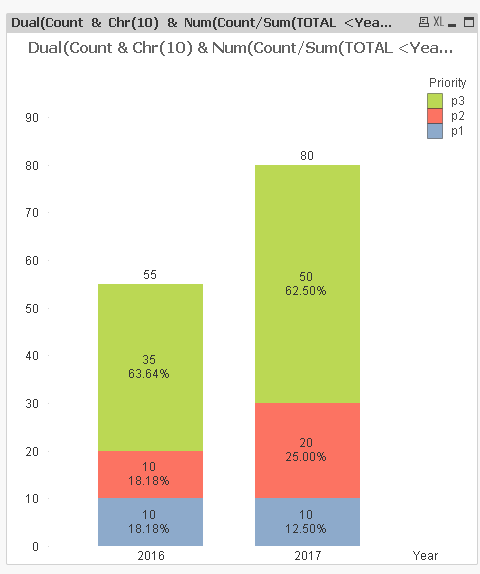
vijaysahu2
- Mark as New
- Bookmark
- Subscribe
- Mute
- Subscribe to RSS Feed
- Permalink
- Report Inappropriate Content
Hi Sunny
Your given file does work as expected though I had provided just a sample of what my original issue is. I tried to mapped values in my expression from yours but this is not working at all. Below is my original chart Where I want to
display count and % together. There are two dimensions created one is Priority Severity and DateDrillDown (year, Month,week) and only one expression
count({<DisplayFlag = {1}, [Date Type] = {'CloseResolveDate'}>} [Reference Number (All)])
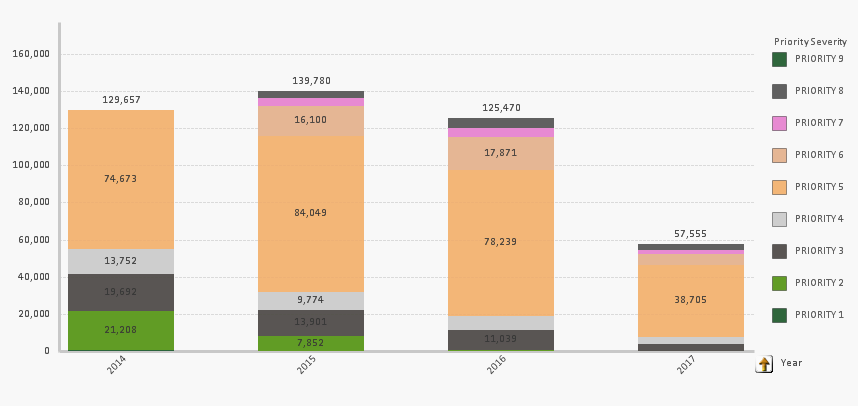
I used your expression to replace mine
Dual(Count & Chr(10) & Num(Count/Sum(TOTAL <Year> Count), '##.00%'), Count)
Mine - I have replaced count to my expression.. and Year has been Replaced by My Dimension DatedrillDown
Dual(count({<DisplayFlag = {1}, [Date Type] = {'CloseResolveDate'}>} [Reference Number (All)]) & Chr(10) & Num(count({<DisplayFlag = {1}, [Date Type] = {'CloseResolveDate'}>} [Reference Number (All)]) /Sum(TOTAL <DatedrillDown> count({<DisplayFlag = {1}, [Date Type] = {'CloseResolveDate'}>} [Reference Number (All)]) ), '##.00%'), count({<DisplayFlag = {1}, [Date Type] = {'CloseResolveDate'}>} [Reference Number (All)]) )
Please advise me how to solve this problem.
sunny_talwar
- Mark as New
- Bookmark
- Subscribe
- Mute
- Subscribe to RSS Feed
- Permalink
- Report Inappropriate Content
You need to use an aggr() function between Sum and Count function.... May be like this
Dual(Count({<DisplayFlag = {1}, [Date Type] = {'CloseResolveDate'}>} [Reference Number (All)]) & Chr(10) & Num(Count({<DisplayFlag = {1}, [Date Type] = {'CloseResolveDate'}>} [Reference Number (All)]) /Sum(TOTAL <[$(=GetCurrentField(DatedrillDown))]> Aggr(Count({<DisplayFlag = {1}, [Date Type] = {'CloseResolveDate'}>} [Reference Number (All)]), [Priority Severity], [$(=GetCurrentField(DatedrillDown))]), '##.00%'), Count({<DisplayFlag = {1}, [Date Type] = {'CloseResolveDate'}>} [Reference Number (All)]) )
