Unlock a world of possibilities! Login now and discover the exclusive benefits awaiting you.

- Qlik Community
- :
- All Forums
- :
- QlikView
- :
- Display value in K's or Mil's
- Subscribe to RSS Feed
- Mark Topic as New
- Mark Topic as Read
- Float this Topic for Current User
- Bookmark
- Subscribe
- Mute
- Printer Friendly Page

- Mark as New
- Bookmark
- Subscribe
- Mute
- Subscribe to RSS Feed
- Permalink
- Report Inappropriate Content
Display value in K's or Mil's
Good morning,
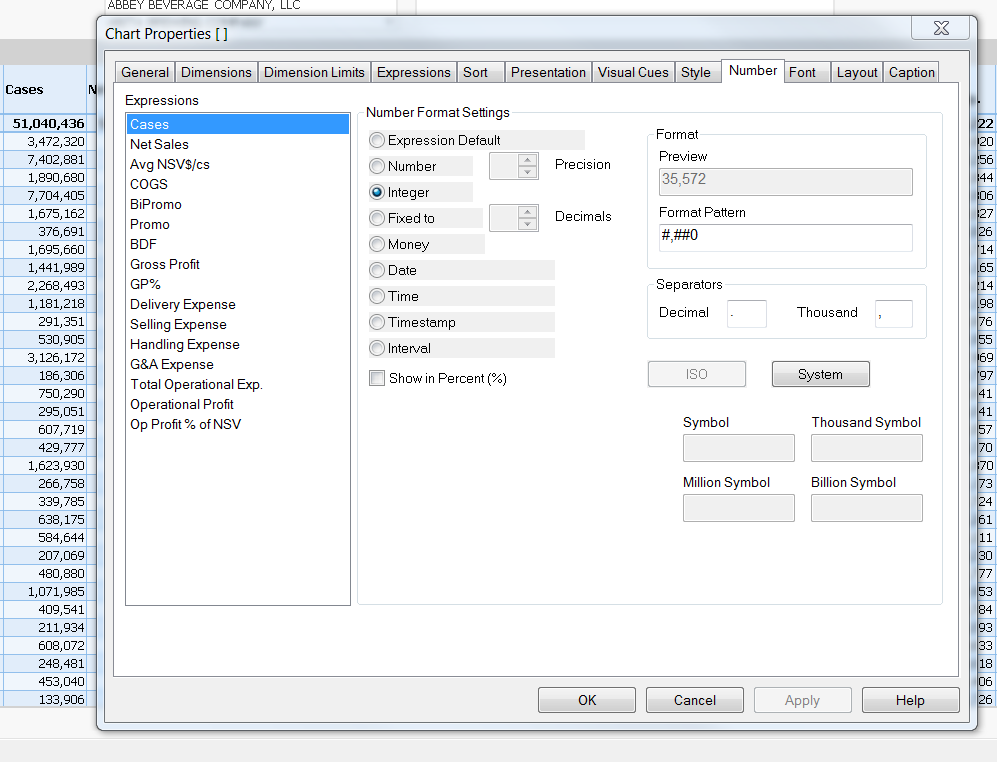
I am having some difficulty displaying my values in thousands, millions, etc.
I have attached a picture...
All i'm trying to do, for my cases column, is display it in millions or thousands, but the boxes are greyed out. I am surprised i couldn't find this answer in the forums or the QV manual.
Thank you in advance,
-David
- Tags:
- formatting
.png "bbi_mba_76")
 bbi_mba_76
- Mark as New
- Bookmark
- Subscribe
- Mute
- Subscribe to RSS Feed
- Permalink
- Report Inappropriate Content
Hi,
they are greyed, but you could change the format and set the format pattern or the separators?
- Mark as New
- Bookmark
- Subscribe
- Mute
- Subscribe to RSS Feed
- Permalink
- Report Inappropriate Content
Hi,
You may arrange the million or thousand issue by dividing your field for example sum(cases)/1000 or sum(cases)/1000000. The actual formatting (comma. or decimal point as separator) can be done in the format pattern as showed by BBI_MBA_76.
Hope this helps.
Regards,
Gerrit

 stevedark
- Mark as New
- Bookmark
- Subscribe
- Mute
- Subscribe to RSS Feed
- Permalink
- Report Inappropriate Content
Hi David,
Those options are available to you when your chart is set to be a visual chart, but not when it is a straight table. Given the number of expressions I presume this is a table?
The Symbol fields are only really for the axis on charts, not for the display of values. Typically you would not want to have different granularity on different rows on a table.
If you know you always want to show millions (for example) you will want to divide your expression, for example:
sum(Amount) / 1000000
Typically when I am doing this I will declare a variable (to ensure I don't stuff up the number of zeros somewhere!):
sum(Amount) / v1M
To denote that the column is all shown in millions I would then add a 'M' to the Label of the expression.
If you needed to chop and change granularity on different rows you would need to build an if statement, to divide by the right amount and put the suffix on, but I would advise against that if you have the option.
Hope this helps.
Steve
 rbecher
- Mark as New
- Bookmark
- Subscribe
- Mute
- Subscribe to RSS Feed
- Permalink
- Report Inappropriate Content
Someone should create an idea about that. This should be a common format..
- Ralf