Unlock a world of possibilities! Login now and discover the exclusive benefits awaiting you.

- Qlik Community
- :
- All Forums
- :
- QlikView
- :
- Distinct Column Totals for a Straight Table?
- Subscribe to RSS Feed
- Mark Topic as New
- Mark Topic as Read
- Float this Topic for Current User
- Bookmark
- Subscribe
- Mute
- Printer Friendly Page

 jrdunson
- Mark as New
- Bookmark
- Subscribe
- Mute
- Subscribe to RSS Feed
- Permalink
- Report Inappropriate Content
Distinct Column Totals for a Straight Table?
Hey, I'm just wanting to show straight tables, yet for distinct values, per user selections:
| ID | Key | Amount |
| 0000093529 | 2092404 | 25 |
| 0000093529 | 2192572 | 25 |
| 0000758673 | 2164158 | 20 |
| 0000549740 | 2192638 | 0 |
| 0000549740 | 2193199 | 50 |
| 0000740998 | 2164156 | 25 |
| 0900300113 | 2107702 | 50 |
| ??? | 7 | 195 |
| Unique ID Count? | Key count | Total Amount |
How do I calculate a 'Unique ID Count' ? [i.e. should be 5] ...???
I've Google'd, tried to use Aggr(), Count DISTINCT, but haven't yet found a solution... Should this be simple?
Jarrell
Accepted Solutions
jrdunson
- Mark as New
- Bookmark
- Subscribe
- Mute
- Subscribe to RSS Feed
- Permalink
- Report Inappropriate Content
Hey everyone,
I figure this out...
- I replaced this: count(DISTINCT [ID])
- With this: num(count(DISTINCT [ID]), '#,##0')
.. adding the num() make it work.

 manideep78
- Mark as New
- Bookmark
- Subscribe
- Mute
- Subscribe to RSS Feed
- Permalink
- Report Inappropriate Content
Hi,
Where do you want to use this ID Count. Is it in a text object or straight table.
If you want to show in a text object Count(Distinct ID) gives 5.
But if you want to show in a straight table you should remove Key. Since Key is unique and same ID is have 2 unique keys. you should see Id twice. if you remove Key then you can see sUnique Id in a table.

 maxgro
- Mark as New
- Bookmark
- Subscribe
- Mute
- Subscribe to RSS Feed
- Permalink
- Report Inappropriate Content
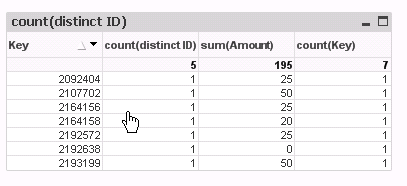
create a chart (straight table)
dimension Key
expression see below lables
jrdunson
- Mark as New
- Bookmark
- Subscribe
- Mute
- Subscribe to RSS Feed
- Permalink
- Report Inappropriate Content
I tried this... and didn't work... my column results in zeros...and there is nothing in the total field.
My column is an expression: Count (Distinct [ID])
Here are my results (PS. my table has 943,000 rows in it...so, I didn't highlight the exact same rows as I did above, but here is another few rows as another example):

manideep78
- Mark as New
- Bookmark
- Subscribe
- Mute
- Subscribe to RSS Feed
- Permalink
- Report Inappropriate Content
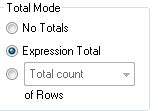
make sure in the expressions tab, total mode is set to expression total.
jrdunson
- Mark as New
- Bookmark
- Subscribe
- Mute
- Subscribe to RSS Feed
- Permalink
- Report Inappropriate Content
It is... already...
jrdunson
- Mark as New
- Bookmark
- Subscribe
- Mute
- Subscribe to RSS Feed
- Permalink
- Report Inappropriate Content
Sorry, I can't remove the 'Key' field
manideep78
- Mark as New
- Bookmark
- Subscribe
- Mute
- Subscribe to RSS Feed
- Permalink
- Report Inappropriate Content
Can you please upload your app with some sample data.
jrdunson
- Mark as New
- Bookmark
- Subscribe
- Mute
- Subscribe to RSS Feed
- Permalink
- Report Inappropriate Content
Hey everyone,
I figure this out...
- I replaced this: count(DISTINCT [ID])
- With this: num(count(DISTINCT [ID]), '#,##0')
.. adding the num() make it work.
