Unlock a world of possibilities! Login now and discover the exclusive benefits awaiting you.

- Qlik Community
- :
- All Forums
- :
- QlikView
- :
- Distinct Count Issue
- Subscribe to RSS Feed
- Mark Topic as New
- Mark Topic as Read
- Float this Topic for Current User
- Bookmark
- Subscribe
- Mute
- Printer Friendly Page

 mhmmd_srf
- Mark as New
- Bookmark
- Subscribe
- Mute
- Subscribe to RSS Feed
- Permalink
- Report Inappropriate Content
Distinct Count Issue
Hi All,
In one line my requirement is I want to get something like this:
Count (*)
from
(select distinct OrderNumber,OrderLine
from Table);
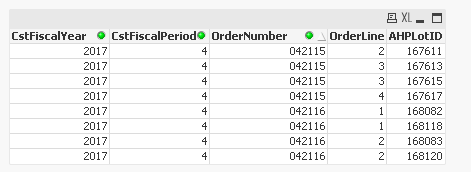
If you check above pic. I have Two Order no : 042115 and 042116.
For 042115, the distinct count OrderLine = 3 and
for 042116, the distinct count OrderLine = 2.
So in count I need 3+2. and I want plot only this count in Separate Bar Chart.
Could anyone please help me to get this.
Thanks,
Sarif
- « Previous Replies
-
- 1
- 2
- Next Replies »
mhmmd_srf
- Mark as New
- Bookmark
- Subscribe
- Mute
- Subscribe to RSS Feed
- Permalink
- Report Inappropriate Content
Hello Anil,
Thanks a lot.. it is working fine.
Now If I want this expression with a where clause, like Where Count(AHPLot ID) >0.
How can I make the Set Expression.
Please help.
Thanks,
Sarif

 santiago_respan
- Mark as New
- Bookmark
- Subscribe
- Mute
- Subscribe to RSS Feed
- Permalink
- Report Inappropriate Content
I was going to suggest the same until i saw this post. Vishwarath suggestion should do the trick.
Regards,

- Mark as New
- Bookmark
- Subscribe
- Mute
- Subscribe to RSS Feed
- Permalink
- Report Inappropriate Content
How can I make the Set Expression.
May be this
Sum(Aggr(Count({<AHPLotID = {"=Count(AHPLotID) > 0"}>} Distinct OrderLine), OrderNumber))
Note: I request you to mark as helpful and close this thread by flag of Vishwarath Answer.

 Digvijay_Singh
- Mark as New
- Bookmark
- Subscribe
- Mute
- Subscribe to RSS Feed
- Permalink
- Report Inappropriate Content
Bit confusing now, are you sure its Count(AHPLot ID) >0 ? or AHPLot ID >0
Its easy to add AHPLot ID) >0 as set expression inside count function in the suggested expression -
Sum(Aggr(Count(Distinct OrderLine), OrderNumber))

- « Previous Replies
-
- 1
- 2
- Next Replies »