Unlock a world of possibilities! Login now and discover the exclusive benefits awaiting you.

- Qlik Community
- :
- All Forums
- :
- QlikView
- :
- Distinct count with 2 conditions
- Subscribe to RSS Feed
- Mark Topic as New
- Mark Topic as Read
- Float this Topic for Current User
- Bookmark
- Subscribe
- Mute
- Printer Friendly Page

- Mark as New
- Bookmark
- Subscribe
- Mute
- Subscribe to RSS Feed
- Permalink
- Report Inappropriate Content
Distinct count with 2 conditions
Hello,
I need to count the number of failures with 2 conditions:
If the machine is the same, and also the start day/time is equal the final end/time of the previous order, should not count as a failure.
Follow the files and example.
I need to bring the correct failure count as you guys can see in the last column.
wo_no = work order number
Thanks a lot
| MACHINE | WO_NO | REAL_S_DATE | REAL_F_DATE | Count(WO_NO) | Correct failure count |
| 12 | 10 | ||||
| FW47 | 125678 | 02/10/2017 07:30 | 02/10/2017 07:48 | 1 | 1 |
| FW47 | 125752 | 03/10/2017 07:30 | 03/10/2017 09:00 | 1 | 1 |
| FW47 | 125757 | 03/10/2017 09:00 | 03/10/2017 12:50 | 1 | 1 |
| FW47 | 125714 | 03/10/2017 14:30 | 03/10/2017 15:00 | 1 | 1 |
| FW47 | 125711 | 03/10/2017 15:00 | 03/10/2017 16:00 | 1 | 0 |
| FW47 | 126420 | 05/10/2017 13:42 | 05/10/2017 14:06 | 1 | 1 |
| FW47 | 127639 | 06/10/2017 14:30 | 06/10/2017 15:00 | 1 | 1 |
| FW47 | 127638 | 06/10/2017 15:00 | 06/10/2017 16:00 | 1 | 0 |
| FW47 | 127172 | 08/10/2017 15:06 | 08/10/2017 16:54 | 1 | 1 |
| FW47 | 602027 | 09/10/2017 07:24 | 09/10/2017 11:00 | 1 | 1 |
- « Previous Replies
-
- 1
- 2
- Next Replies »
Accepted Solutions

 its_anandrjs
- Mark as New
- Bookmark
- Subscribe
- Mute
- Subscribe to RSS Feed
- Permalink
- Report Inappropriate Content
On script part do calculation and UI do count of expression.
LOAD *,IF(REAL_S_DATE = Previous(REAL_F_DATE),1,0) as [Correct Failure];
LOAD MACHINE, WO_NO,
(Timestamp( Timestamp#( REAL_S_DATE,'DD/MM/YYYY hh:mm'),'DD/MM/YYYY hh:mm')) as REAL_S_DATE,
(Timestamp( Timestamp#( REAL_F_DATE,'DD/MM/YYYY hh:mm'),'DD/MM/YYYY hh:mm')) as REAL_F_DATE, CWO_NO, [Correct failure count];
LOAD * Inline
[
MACHINE, WO_NO, REAL_S_DATE, REAL_F_DATE, CWO_NO, Correct failure count
FW47, 125678, 02/10/2017 07:30, 02/10/2017 07:48, 1, 1
FW47, 125752, 03/10/2017 07:30, 03/10/2017 09:00, 1, 1
FW47, 125757, 03/10/2017 09:00, 03/10/2017 12:50, 1, 1
FW47, 125714, 03/10/2017 14:30, 03/10/2017 15:00, 1, 1
FW47, 125711, 03/10/2017 15:00, 03/10/2017 16:00, 1, 0
FW47, 126420, 05/10/2017 13:42, 05/10/2017 14:06, 1, 1
FW47, 127639, 06/10/2017 14:30, 06/10/2017 15:00, 1, 1
FW47, 127638, 06/10/2017 15:00, 06/10/2017 16:00, 1, 0
FW47, 127172, 08/10/2017 15:06, 08/10/2017 16:54, 1, 1
FW47, 602027, 09/10/2017 07:24, 09/10/2017 11:00, 1, 1
];

 sunny_talwar
- Mark as New
- Bookmark
- Subscribe
- Mute
- Subscribe to RSS Feed
- Permalink
- Report Inappropriate Content
May be like this
Count(If(REAL_S_DATE) <> Above(REAL_F_DATE), WO_NO)
- Mark as New
- Bookmark
- Subscribe
- Mute
- Subscribe to RSS Feed
- Permalink
- Report Inappropriate Content
didn't work:


- Mark as New
- Bookmark
- Subscribe
- Mute
- Subscribe to RSS Feed
- Permalink
- Report Inappropriate Content
May be typo error?
Count(If(REAL_S_DATE <> Above(REAL_F_DATE), WO_NO))
- Mark as New
- Bookmark
- Subscribe
- Mute
- Subscribe to RSS Feed
- Permalink
- Report Inappropriate Content
Got error
its_anandrjs
- Mark as New
- Bookmark
- Subscribe
- Mute
- Subscribe to RSS Feed
- Permalink
- Report Inappropriate Content
Checking Machine also
Count(If(REAL_S_DATE) <> Above(REAL_F_DATE) and MACHINE <> Above(MACHINE), WO_NO)
This is correct
Count(If(REAL_S_DATE) <> Above(REAL_F_DATE) and MACHINE <> Above(MACHINE), WO_NO))
- Mark as New
- Bookmark
- Subscribe
- Mute
- Subscribe to RSS Feed
- Permalink
- Report Inappropriate Content
also getting error with this expression...

its_anandrjs
- Mark as New
- Bookmark
- Subscribe
- Mute
- Subscribe to RSS Feed
- Permalink
- Report Inappropriate Content
May be try with NUM dates though
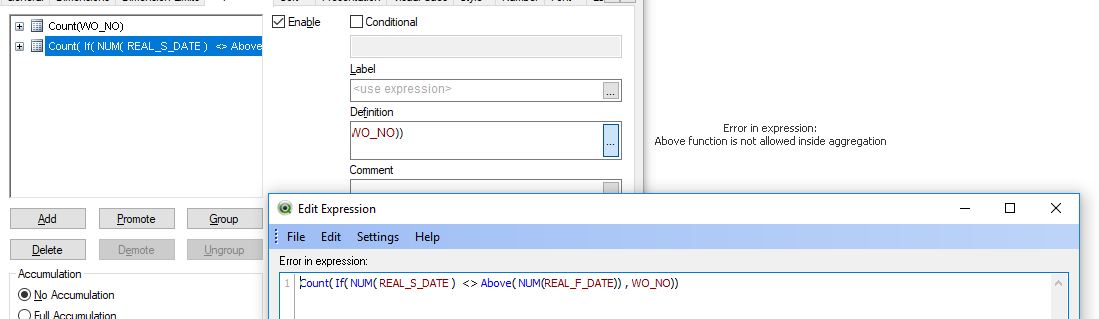
Count( If NUM( REAL_S_DATE ) <> Above( NUM(REAL_F_DATE)) and MACHINE <> Above(MACHINE), WO_NO))
Or
Count( If NUM( REAL_S_DATE ) <> Above( NUM(REAL_F_DATE)) , WO_NO))

 effinty2112
- Mark as New
- Bookmark
- Subscribe
- Mute
- Subscribe to RSS Feed
- Permalink
- Report Inappropriate Content
Hi Samuel,
Maybe:
| MACHINE | WO_NO | REAL_S_DATE | REAL_F_DATE | if(REAL_S_DATE= Above(TOTAL REAL_F_DATE),0,1) |
|---|---|---|---|---|
| FW47 | 125678 | 02/10/2017 07:30 | 02/10/2017 07:48 | 1 |
| FW47 | 125752 | 03/10/2017 07:30 | 03/10/2017 09:00 | 1 |
| FW47 | 125757 | 03/10/2017 09:00 | 03/10/2017 12:50 | 0 |
| FW47 | 125714 | 03/10/2017 14:30 | 03/10/2017 15:00 | 1 |
| FW47 | 125711 | 03/10/2017 15:00 | 03/10/2017 16:00 | 0 |
| FW47 | 126420 | 05/10/2017 13:42 | 05/10/2017 14:06 | 1 |
| FW47 | 127639 | 06/10/2017 14:30 | 06/10/2017 15:00 | 1 |
| FW47 | 127638 | 06/10/2017 15:00 | 06/10/2017 16:00 | 0 |
| FW47 | 127172 | 08/10/2017 15:06 | 08/10/2017 16:54 | 1 |
| FW47 | 602027 | 09/10/2017 07:24 | 09/10/2017 11:00 | 1 |
count of failures =Sum(Aggr(if(REAL_S_DATE= Above(TOTAL REAL_F_DATE),0,1),(REAL_S_DATE,(NUMERIC,ASCENDING))))
=7
Regards
Andrew
- Mark as New
- Bookmark
- Subscribe
- Mute
- Subscribe to RSS Feed
- Permalink
- Report Inappropriate Content
same error:
- « Previous Replies
-
- 1
- 2
- Next Replies »