Unlock a world of possibilities! Login now and discover the exclusive benefits awaiting you.

- Qlik Community
- :
- All Forums
- :
- QlikView
- :
- Don't Include Data unless selected
- Subscribe to RSS Feed
- Mark Topic as New
- Mark Topic as Read
- Float this Topic for Current User
- Bookmark
- Subscribe
- Mute
- Printer Friendly Page

 greend21
- Mark as New
- Bookmark
- Subscribe
- Mute
- Subscribe to RSS Feed
- Permalink
- Report Inappropriate Content
Don't Include Data unless selected
Hi,
I want my data to exclude a certain field unless the selection for it on the list box is selected. Is this possible? I was trying set analysis but cannot get it.
According to this page, the below set analysis excludes the year 2000 unless it is selected.
Set modifiers with set operators ‒ Qlik Sense
sum( {$<Year = Year + ({“20*”,1997} – {2000}) >} Sales )
My set analysis is as follows. FieldB has two options, Y and N. I want the data to exclude FieldB Y values unless I select it from a listbox.
Sum({$<FieldB = FeldB -({Y}) >}FieldA)

 vishsaggi
- Mark as New
- Bookmark
- Subscribe
- Mute
- Subscribe to RSS Feed
- Permalink
- Report Inappropriate Content
May be try this?
= Sum({$< FieldB = {"*"} - {'Y'} >} FieldA)

 sunny_talwar
- Mark as New
- Bookmark
- Subscribe
- Mute
- Subscribe to RSS Feed
- Permalink
- Report Inappropriate Content
May be this
=Sum({<FieldB -= {'Y'}>+<FieldB = {"$(=GetFieldSelections(FieldB))"}>}FieldA)
greend21
- Mark as New
- Bookmark
- Subscribe
- Mute
- Subscribe to RSS Feed
- Permalink
- Report Inappropriate Content
Closer, but this then ONLY shows field B when selected
sunny_talwar
- Mark as New
- Bookmark
- Subscribe
- Mute
- Subscribe to RSS Feed
- Permalink
- Report Inappropriate Content
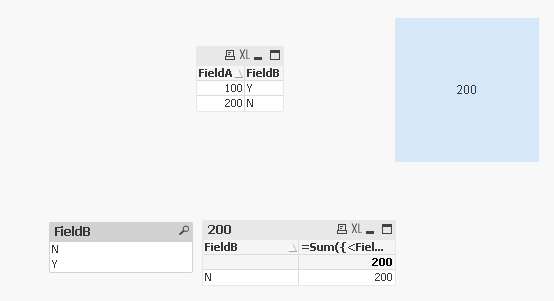
It is showing me N without selection, what is the problem?

 trdandamudi
- Mark as New
- Bookmark
- Subscribe
- Mute
- Subscribe to RSS Feed
- Permalink
- Report Inappropriate Content
I modified Sunny expression, Is this what you are looking for?
If(GetFieldSelections(FieldB)>1,
Sum(FieldA),
Sum({<FieldB -= {'Y'}>+<FieldB = {"$(=GetFieldSelections(FieldB))"}>}FieldA))
