Unlock a world of possibilities! Login now and discover the exclusive benefits awaiting you.

- Qlik Community
- :
- All Forums
- :
- QlikView
- :
- Doubt in column chart
- Subscribe to RSS Feed
- Mark Topic as New
- Mark Topic as Read
- Float this Topic for Current User
- Bookmark
- Subscribe
- Mute
- Printer Friendly Page

- Mark as New
- Bookmark
- Subscribe
- Mute
- Subscribe to RSS Feed
- Permalink
- Report Inappropriate Content
Doubt in column chart
hello,
I want to show the data for the unavailable months in bar chart which should be sum(Quantity for available months)/(No. of months),
Please see attached sheet.
Thanks,
swati
- Tags:
- new_to_qlikview

 vvvvvvizard
- Mark as New
- Bookmark
- Subscribe
- Mute
- Subscribe to RSS Feed
- Permalink
- Report Inappropriate Content
ctr + e , select "table files " on bottom screen , choose the excel sheet , click next , next , next .
ctr+r , to load the data in
right click , new chart , choose bar graph ,click next , in the dimension tab add month , click next , in the expression tab add Sum(Quantity)/Count(Month)
click next next next until the end .

 arulsettu
- Mark as New
- Bookmark
- Subscribe
- Mute
- Subscribe to RSS Feed
- Permalink
- Report Inappropriate Content
like this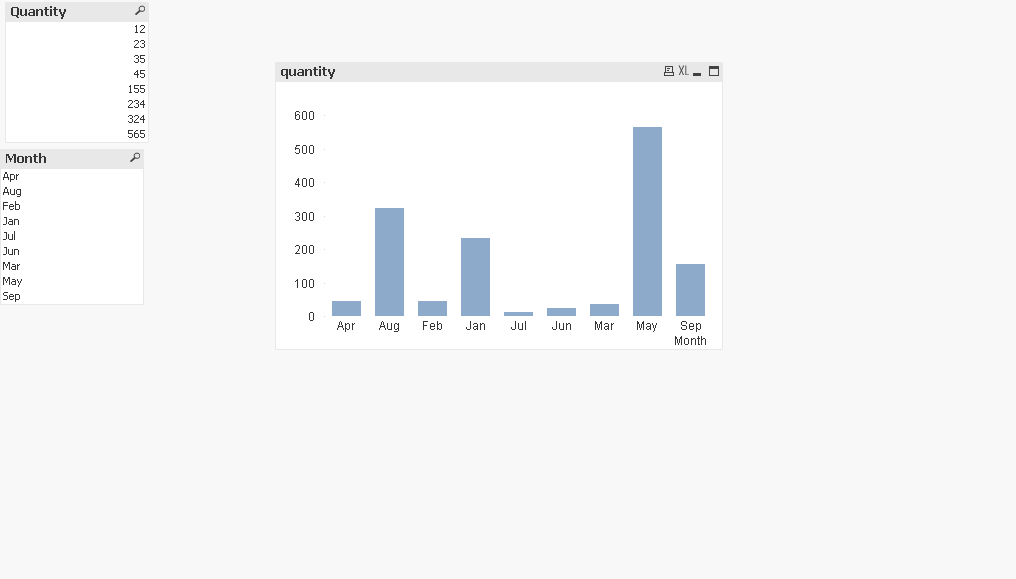
vvvvvvizard
- Mark as New
- Bookmark
- Subscribe
- Mute
- Subscribe to RSS Feed
- Permalink
- Report Inappropriate Content
Yes that is correct ,
You might just want to sort you months in order , if you right click on the bar chart , properties , sort tab , choose month check box , ascending order , unlclick other checkboxes
- Mark as New
- Bookmark
- Subscribe
- Mute
- Subscribe to RSS Feed
- Permalink
- Report Inappropriate Content
I want to show the Quantity
for Oct,Nov and Dec in the same chart after Sep and values for all three (Oct,Nov,Dec) should be sum(Quantity(Jan+Feb+...+Sep)/9) in this case. so, quantity for last 3 months will be avg of first 9 months.
- Mark as New
- Bookmark
- Subscribe
- Mute
- Subscribe to RSS Feed
- Permalink
- Report Inappropriate Content
Hi,
load below table:
Load * inline [
| Month, | Quantity |
| Jan, | 234 |
| Feb, | 45 |
| Mar, | 35 |
| Apr, | 45 |
| May, | 565 |
| Jun, | 23 |
| Jul, | 12 |
| Aug, | 324 |
| Sep, | 155 |
Oct
Nov
Dec
];
try the below expression in your chart.
if(sum(Quantity)=0,sum(TOTAL Quantity)/Count({<Quantity = {'>0'}>} Month),sum(Quantity))
- Mark as New
- Bookmark
- Subscribe
- Mute
- Subscribe to RSS Feed
- Permalink
- Report Inappropriate Content
I am still not getting values for last 3 months.
vvvvvvizard
- Mark as New
- Bookmark
- Subscribe
- Mute
- Subscribe to RSS Feed
- Permalink
- Report Inappropriate Content
Try if(sum(Quantity)=0,Sum(TOTAL Quantity)/9,sum(Quantity))
- Mark as New
- Bookmark
- Subscribe
- Mute
- Subscribe to RSS Feed
- Permalink
- Report Inappropriate Content
By this wat I will get the value but its hard coding which we cannot do, data may change later.
vvvvvvizard
- Mark as New
- Bookmark
- Subscribe
- Mute
- Subscribe to RSS Feed
- Permalink
- Report Inappropriate Content
Try
A:
Load * inline [
Month, Quantity
Jan, 234
Feb, 45
Mar, 35
Apr, 45
May, 565
Jun, 23
Jul, 12
Aug, 324
Sep, 155
Oct,
Nov,
Dec,
];
B:
Load *,
if(len(Quantity)>0,Quantity,0) as Counterr
resident A;
drop table A;
Now press CTR+ALT +V and add a variable named
counter2 with expression
=count(if(Counterr>0,Month))
Now add an expression
if(sum(Quantity)=0,Sum(TOTAL Quantity)/$(counter2),sum(Quantity))