Unlock a world of possibilities! Login now and discover the exclusive benefits awaiting you.

- Qlik Community
- :
- All Forums
- :
- QlikView
- :
- Re: Dropping FieldName with no data
- Subscribe to RSS Feed
- Mark Topic as New
- Mark Topic as Read
- Float this Topic for Current User
- Bookmark
- Subscribe
- Mute
- Printer Friendly Page

 sunny_talwar
- Mark as New
- Bookmark
- Subscribe
- Mute
- Subscribe to RSS Feed
- Permalink
- Report Inappropriate Content
Dropping FieldName with no data
Hi Experts -
Here is my scenario. I am concatenating different databases (with mostly different field names) and then looping through them to create different qvds for each of them by using a flag. Now the problem is that I am getting the field names from all the data bases, although with 0 values and I was wondering if there was a way to remove the extra fields before I store it in the qvd.
Here is a sample script:
Table1:
LOAD *,
1 as Flag
Inline [
Dim, Value1
A, 1
];
Concatenate (Table1)
LOAD *,
2 as Flag
Inline [
Dim, Value2
A, 10
];
FOR i = 1 to 2
TEMP:
NoConcatenate
LOAD *
Resident Table1
Where Flag = $(i);
STORE TEMP into Table_$(i).qvd (qvd);
DROP Table TEMP;
NEXT
DROP Table Table1;
The 1st qvd will include Value2 and 2nd qvd includes Value1 (completely blank) is there anyway I can drop them from the qvd?
Thanks for any ideas and suggestions.
Best,
Sunny
- « Previous Replies
- Next Replies »

 swuehl
- Mark as New
- Bookmark
- Subscribe
- Mute
- Subscribe to RSS Feed
- Permalink
- Report Inappropriate Content
I was thinking about something like this (just an outline of combining single table filtering with a persistent CAT filter table):
// Create data sources, just as samples
Table1:
LOAD *
Inline [
Dim, Value1
A, 1
D, 7
];Table2:
LOAD *
Inline [
Dim, Value2
A, 10
B, 3
C, 5
];
CAT:
LOAD NULL() as Test
AutoGenerate 0;FOR i = 1 to 2
TEMP:
NoConcatenate
LOAD *
Resident Table$(i)
Where NOT Exists(Test, Dim); //demo for exclusion filterCONCATENATE (CAT)
LOAD *, Dim as Test
Resident TEMP;
DROP FIELD Test FROM TEMP;STORE TEMP into Table_$(i).qvd (qvd);
DROP TABLE TEMP;
NEXT
DROP Table Table1, Table2;

 amayuresh
- Mark as New
- Bookmark
- Subscribe
- Mute
- Subscribe to RSS Feed
- Permalink
- Report Inappropriate Content
Sunny,
Please correct me if I am missing somewhere.
One suggestion: we have flag to identify two different tables, so we can rename the Value1,Value2 column as Value in both table.
Table1:
LOAD *,
1 as Flag
Inline [
Dim, Value1
A, 1
];
NoConcatenate
Table2:
LOAD *,
2 as Flag
Inline [
Dim, Value2
A, 10
];
NoConcatenate
t1:
Load Dim, Flag, Value1 as Value Resident Table1;
Concatenate
Load Dim, Flag, Value2 as Value Resident Table2;
FOR i = 1 to 2
TEMP:
NoConcatenate
LOAD *
Resident t1
Where Flag = $(i);
STORE TEMP into Table_$(i).qvd (qvd);
DROP Table TEMP;
NEXT
DROP Table Table1, Table2;
Output like,
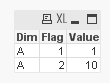
Both QVD contains column as Dim, Flag, Value.

- Mark as New
- Bookmark
- Subscribe
- Mute
- Subscribe to RSS Feed
- Permalink
- Report Inappropriate Content
Hi Sunny,
Check this out :
Remove Empty columns (All Null values) in script dynamically
Regards,
Anjali Gupta
sunny_talwar
- Mark as New
- Bookmark
- Subscribe
- Mute
- Subscribe to RSS Feed
- Permalink
- Report Inappropriate Content
Thanks for the link Anjali. I actually did something similar for a prototype, but it seems that my colleagues don't find this as a priority.
I will try to post what I did for someone who might be interested in knowing what I did.
sunny_talwar
- Mark as New
- Bookmark
- Subscribe
- Mute
- Subscribe to RSS Feed
- Permalink
- Report Inappropriate Content
Thanks for the suggest Mayuresh, but this is not something which will work because sometimes I will have a a field in one database which isn't available in the others. Besides I don't want to rename them all to one name.
- « Previous Replies
- Next Replies »