Unlock a world of possibilities! Login now and discover the exclusive benefits awaiting you.

- Qlik Community
- :
- All Forums
- :
- QlikView
- :
- Dynamic update - add one table to another
- Subscribe to RSS Feed
- Mark Topic as New
- Mark Topic as Read
- Float this Topic for Current User
- Bookmark
- Subscribe
- Mute
- Printer Friendly Page

- Mark as New
- Bookmark
- Subscribe
- Mute
- Subscribe to RSS Feed
- Permalink
- Report Inappropriate Content
Dynamic update - add one table to another
what Dynamic table statement (yes I really need Dynamic statement - not looking for another solution)
can I use to add the content on table 2 to table 1 so table 1 will look like
| Name | Score |
| A | 1 |
| B | 2 |
| C | 3 |
| D | 4 |
| E | 10 |
| F | 20 |
something like : Update table1 set ...
starting point:
table1:
LOAD * INLINE [
Name, Score
A, 1
B, 2
C, 3
D, 4
];
Qualify *;
table2:
LOAD * INLINE [
Name, Score
E, 10
F, 20
];
unQualify *;
Many thanks,
Raphael
- Tags:
- dynamic update
- « Previous Replies
-
- 1
- 2
- Next Replies »
Accepted Solutions

 t_chetirbok
- Mark as New
- Bookmark
- Subscribe
- Mute
- Subscribe to RSS Feed
- Permalink
- Report Inappropriate Content
Is your "enable dynamic update" checkbox is checked? The table will be changed only in your visualization

 sunny_talwar
- Mark as New
- Bookmark
- Subscribe
- Mute
- Subscribe to RSS Feed
- Permalink
- Report Inappropriate Content
When you say dynamic, do you mean while reloading or is this something you expect to happen from the front end?
t_chetirbok
- Mark as New
- Bookmark
- Subscribe
- Mute
- Subscribe to RSS Feed
- Permalink
- Report Inappropriate Content
do you want by clicking on a button update your table1? (as dynamic update is an action for trigger)

 stabben23
- Mark as New
- Bookmark
- Subscribe
- Mute
- Subscribe to RSS Feed
- Permalink
- Report Inappropriate Content
use join or concatenate instead of qualify maybe.
table1:
LOAD * INLINE [
Name, Score
A, 1
B, 2
C, 3
D, 4
];
join/concatenate //here
table2:
LOAD * INLINE [
Name, Score
E, 10
F, 20
];
- Mark as New
- Bookmark
- Subscribe
- Mute
- Subscribe to RSS Feed
- Permalink
- Report Inappropriate Content
yes clicking a button then Action: Dynamic Update, thanks
- Mark as New
- Bookmark
- Subscribe
- Mute
- Subscribe to RSS Feed
- Permalink
- Report Inappropriate Content
yes, this is what I am trying to do, but so far I used Dynamic update to update one line at a time, now I want to do bulk update, thanks
- Mark as New
- Bookmark
- Subscribe
- Mute
- Subscribe to RSS Feed
- Permalink
- Report Inappropriate Content
Cannot in the given situation but thanks
t_chetirbok
- Mark as New
- Bookmark
- Subscribe
- Mute
- Subscribe to RSS Feed
- Permalink
- Report Inappropriate Content
try this
='INSERT INTO table1 (Name, Score)
values '&
'('&chr(39)&Concat(table2.Name&chr(39)&','&table2.Score, '),('&chr(39))&')'
&';'
- Mark as New
- Bookmark
- Subscribe
- Mute
- Subscribe to RSS Feed
- Permalink
- Report Inappropriate Content
Clicking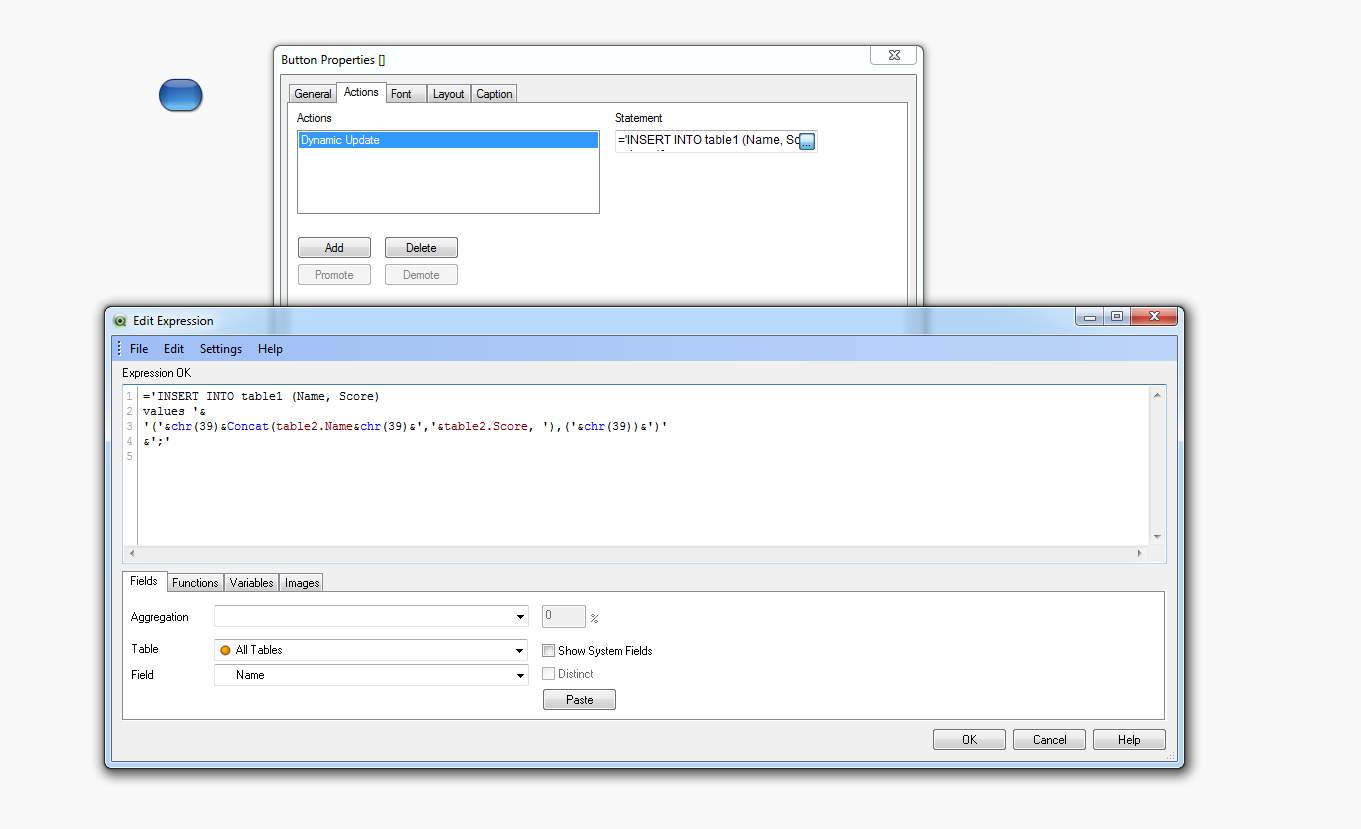 on button but no change to table1
t_chetirbok
- Mark as New
- Bookmark
- Subscribe
- Mute
- Subscribe to RSS Feed
- Permalink
- Report Inappropriate Content
Is your "enable dynamic update" checkbox is checked? The table will be changed only in your visualization
- « Previous Replies
-
- 1
- 2
- Next Replies »