Unlock a world of possibilities! Login now and discover the exclusive benefits awaiting you.

- Qlik Community
- :
- All Forums
- :
- QlikView
- :
- ELIMINATE NULL ROWS
- Subscribe to RSS Feed
- Mark Topic as New
- Mark Topic as Read
- Float this Topic for Current User
- Bookmark
- Subscribe
- Mute
- Printer Friendly Page

- Mark as New
- Bookmark
- Subscribe
- Mute
- Subscribe to RSS Feed
- Permalink
- Report Inappropriate Content
ELIMINATE NULL ROWS
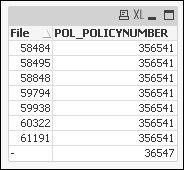
Attached please find the sample qvw, sample Excel . What I am trying to accomplish is as per the snapshot policy number 356541 has multiple file numbers assigned to it and also there is a null value assigned to the same policy number. In a case like this where there is even 1 File number exist for a policy number I want to eliminate the rows for the same policy number with null values, but if Null Value is the only entry available for a policy then I want that Null value for example in this case I would like to see the row for policy number 36547.


- Mark as New
- Bookmark
- Subscribe
- Mute
- Subscribe to RSS Feed
- Permalink
- Report Inappropriate Content
I am sorry, If i misunderstand over here
Load * From <Data Source> Where File <> Peek('File', -1);
Or
Load * From <Data Source> Where Previous(File) <> File;
- Mark as New
- Bookmark
- Subscribe
- Mute
- Subscribe to RSS Feed
- Permalink
- Report Inappropriate Content
So in my sample policy number 356541 has File numbers and a null, in this case I want to eliminate the row with Null file number
- Mark as New
- Bookmark
- Subscribe
- Mute
- Subscribe to RSS Feed
- Permalink
- Report Inappropriate Content
Now your question makes confuse, Would you share expected result on wall
- Mark as New
- Bookmark
- Subscribe
- Mute
- Subscribe to RSS Feed
- Permalink
- Report Inappropriate Content
You mean to say, You want to exclude all File Null values
Load * From <Data Source> Where Len(File)>0;
- Mark as New
- Bookmark
- Subscribe
- Mute
- Subscribe to RSS Feed
- Permalink
- Report Inappropriate Content
Below is the expected result
| 58484 | 356541 |
| 58495 | 356541 |
| 58848 | 356541 |
| 59794 | 356541 |
| 59938 | 356541 |
| 60322 | 356541 |
| 61191 | 356541 36547 |
- Mark as New
- Bookmark
- Subscribe
- Mute
- Subscribe to RSS Feed
- Permalink
- Report Inappropriate Content
I really don't why you need this. For your question answer may be this
Load * From <Data Source> Where If(Previous(POL_POLICYNUMBER) = POL_POLICYNUMBER,Len(File)>0, POL_POLICYNUMBER)
Does that answer your question?

 tamilarasu
- Mark as New
- Bookmark
- Subscribe
- Mute
- Subscribe to RSS Feed
- Permalink
- Report Inappropriate Content
Hi Rehan,
Data:
LOAD File,
     POL_POLICYNUMBER
FROM
[Sample (2).xls]
(biff, embedded labels, table is Sheet1$);

Left Join
Load POL_POLICYNUMBER,
    Count(File) as FileCount
Resident Data Group by POL_POLICYNUMBER;

NoConcatenate
Result:
Load *
Resident Data
Where (FileCount > 0 And Len(Trim(File))>0) Or FileCount =0;

DROP Field FileCount;
DROP Table Data;
Output: